Allow read-only users to edit favorites
0 vote

It would be great if regular/read-only users who build a favorites list had permission to edit those favorites(i.e. move folders with their content, change folder colors, etc).
Devolutions support suggested I post a feature request here about this.
Thank you very much in advance for considering this request.
All Comments (6)
Hello,
Do you mean edit the entry and bypass the readonly state or edit the favorite folder color?
Regards
David Hervieux
For example, if you are a read-only user you cannot move a folder or subfolder to another folder or subfolder, the folder will move but its content will not follow.. and if you try to change your custom favorite folders colors(for example create a favorite folder called 'Test') it just won't change the color.
I also discovered that if I do change color of a folder as an administrator, then the parent folders in the database will change color too(e.g. if I change the 'Test' folder color, then the folder from the database which has the content of the favorite 'Test' folder will change color too(which I found weird).
Maybe my explanation isn't clear but if you do a couple of tests with a read-only user and compare with an admin user you will certainly realize what I am trying to describe.
Hello,
Just to clarify things, you can configure a folder to be in your favorites, but there are also "favorite folders". A read-only user (or one who doesn't have edit rights) will not be able to edit a folder that was configured to be in the favorites, as a favorite is simply a link to an existing entry in a vault. This is why editing the folder from the favorites actually edits the real entry, and why a read-only user is not able to achieve this.
In the following screenshot, the entry "Folder from shared vault" is a favorite from the shared vault, with a custom image. The "favorite folder" is a favorite folder, which even a read-only user can create. This "favorite folder" can be used to organise your favorites by dragging favorite entries into these folders to create your own structure.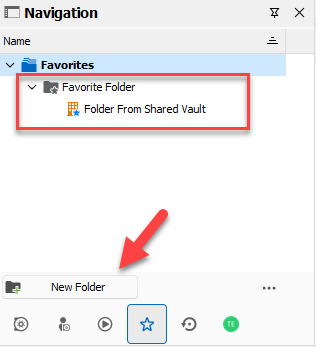
What we could allow is letting a user configure a color for their favorite folders.
Would this work for you?
Regards,
Hubert Mireault
d33d5a80-2a58-4c50-8d20-4c2efe610bdd.png
Hello Hubert,
Allowing read-only users to configure a color for their favorite folders would be great, this would work for us.
Also, is it normal that when a read-only user drag&drop a favorite folder, the folder moves but its content does not follow? I am seeing this with one of my users.
He also was unable to delete folders he created in his favorites.
Any idea?
Thank you very much for the response
Hello,
Perfect, I will open a ticket to allow configuring the favorite folder color.
For your question about moving the folder but its contents not following, this is currently the normal behavior, as each individual entry is considered its own favorite. We have had a request to include the folder's contents in the favorites recently here, but as David mentioned, there are currently technical limitations that makes it difficult for us to make this change. We are keeping it in mind for future improvements as soon as we find a solution to these limitations.
For the deletion of favorite folders, from my testing, they need to be empty before you're able to delete them: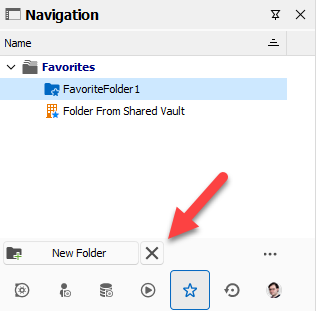
Regards,
Hubert Mireault
5e0154dd-5481-410e-a98e-43957bc5ff95.png
Thank you very much !