migrate rdm between active directories

hi
we have rdm connected to a specific active directory. permissions and all...
it it possible somehow to migrate the whole tree from one AD to another?
meaning :
user1 in domain1.local
will be migrated to
user1 in domain2.local
while preserving all folder permissions of course.
thank you
All Comments (13)
Hello,
What RDM version are you using?
What data source type are you connected to?
If you're connected to a Devolutions Server data source, then yes it's possible using the Authentication Migration tool.
Best regards,
Érica Poirier
no, i'm using sql data source
is that possible?
Hello,
Thank you for your feedback.
That could be possible to do in that scenario using a SQL statement.
What is the username format used for accounts in Administration - Users in RDM? Is it username@domain.loc or domain\username?
Best regards,
Érica Poirier
it's domain\username
Hello,
Thank you for your feedback.
I will send you a SQL query in a private message.
As this query will update the user accounts, ensure to do a full database backup prior running the query in case you need to revert back to the previous state.
Let us know how it goes once you will run the query.
Best regards,
Érica Poirier
Hello,
Once you'll migrate the domain users to the new domain with the query I sent you in a private message, you will have to fix these accounts using the Fix SQL Login button in Administration - Users. This will recreate the appropriate domain user accounts on the SQL Server.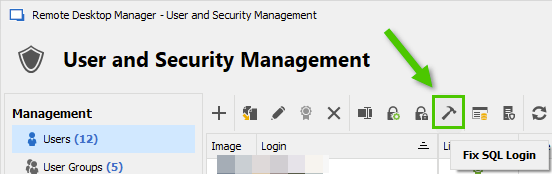
Let us know if you get any problems running the query.
Best regards,
Érica Poirier
fe77f246-97e8-4b51-b2d3-4d4e674ce44c.png
cool, thank you
hi
about this
is it possible to create users from another domain who i have trust relationship with?
i haven't seen this option, but maybe it exists somewhere?
for example if i want to give ntfs permissions to a file or folder, i have the other domain available for query
but in rdm, i don't see an option to lookup any other domain other than my own.
Hello,
Are you able to go in SQL Server Management Studio (SSMS) and add that account from the other domain?
If you can add the account from another domain on the SQL database and connect to the database directly using SSMS, then you should be able to manually create the account in RDM. If in SSMS you can't add that account and connect to the database, then it won't be possible from RDM.
Best regards,
Érica Poirier
i have used the sql query to change the logons
so they are changed, that's fine
i see the users inside sql with new domain
afterwards, i've changed the domain of the server to the new domain
i see the users inside rdm, i even tried to do "fix login", but when i goto the rdm folders, no user is listed in the permissions, the permissions did not transfer
Hello,
The following PowerShell script will export all current existing permisions in a CSV file.
https://github.com/Devolutions/RDMSamples-ps/blob/main/module/security/Export-RDMPermissions.ps1
Then, you can update it with the new usernames and import them back using this script.
https://github.com/Devolutions/RDMSamples-ps/blob/main/module/security/SetPermissionsonFoldersInVault.ps1
You will need to install our PowerShell module if it's not already installed.
https://docs.devolutions.net/kb/devolutions-powershell/remote-desktop-manager/rdm-powershell-core-module/
Let me know if you need further information about these scripts.
Best regards,
Érica Poirier
thank you :)
should i uncomment the # at the beginning?
Hello,
The commented text at the beginning of each script describes all parameters and CSV headers. This must not be uncomment as the scripts won't work.
Best regards,
Érica Poirier