MacOS RDM keyboard shortcuts issues

Greetings to Devolutions support and everyone in this forum.
Has anyone noticed issue with shortcuts in web browsers ? ( Chrome or Edge )
I use a lot of tabs on remote Windows session in web browser. Very often I need to open a lot of new tabs, search in them navigate between them and then close them.
The problem is, the shortcuts I am using the most (ctrl+t , ctrl+f, ctrl+w) very often lags or does not work at all. If I wait couple of secods they work for a while and then it cuts out again.
I noticed it is happening only in Web browsers. For example I can do the same in Notepad++ or other programs that support shortcuts and there I have no issues.
Worth noticing I was a long time Windows user so I remapped my system keys to match windows layout (you know, muscle memory) in MacOS settings and then I switched "Windows"/Command with Control in Remote Desktop Manager.
(see attached screenshots)
99% of my RDPs are (Windows server 2012, 2017, 2019, 2022).
I also tried to disable all RDP shortcuts just to see if something is clashing. That did not help.
I am running:
MacOS Ventura 13.5
Remote Desktop Manager version 2023.2.7.2
Is it a bug? am I doing something wrong here?
Any advice is highly appreciated as it is driving me nuts. Everything else is great though!
Thank you for your time !
br, Matej
MAC.png
RDP.png
All Comments (8)
Hi matejelias1,
I think I can reproduce the issue. In the sense that, if I uses the Ctrl+T and Ctrl+W shortcuts to open and close a lot of tabs, the responsiveness of those shortcuts does seem to drop. I don't know if this issue is on RDM sides, or RDP though. I tried comparing with Microsoft Remote Desktop, and it did also reproduce some lagging after opening multiple tab simultaneously.
Could you confirm if you reproduce or not the same issue with Microsoft Remote Desktop? Once you have MRDP installed, you can launch your RDM sessions through it by doing Open with Parameters -> Open (External).
In my case, it might simply be the remote hosts resources being strained by the amount of tabs, so I'm not sure I reproduce the same issue.
Best regards,
Xavier Fortin
Hi Xavier,
Thank you for you quick reply!
I installed Microsoft Remote Desktop from AppStore, connected to session and I can say that it works at it should!
I can press CTRL+T as many times as I want and every one of them will open without delay. Same with closing, no delay or drop.
Granted I have to use CMD+T instead of FN+T because of said mapping. But that should not be a problem I think?
Maybe I am using wrong RDP level? I am currently using RDP8 in my Devolutions RDPM.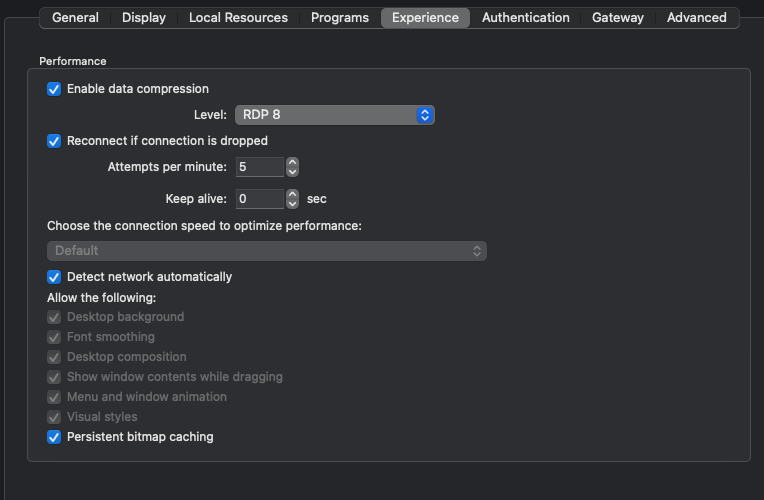
EDIT: I ried to open connection externally (it opened it thru MS RDM) and there it work.
f46603ad-1bf1-434d-8687-9f99bfc75725.png
I honestly doubt that the key modifiers should have any impact on this, but could you eliminate this possibility for us? If you configure both your system and entry settings to use the default shortcuts (temporarily for the test), does the behaviour stays the same?
I've tried to test this myself, but due to my own issue I described earlier, this was not entirely conclusive.
In the mean time, I will open a ticket.
Best regards,
Xavier Fortin
I tried to revert keybindings to default (both MacOS modifiers and RDM) and it works as it should.
- If I keep MacOS Modifiers but I keep RDM keys by default it works ! (Command = Windows , Control = Control )
- If I keep MacOS Modifiers AND my RDM keys as I need them, the issue comes back. (command switched to control) as in attached screenshot
- I logged off from remote session and restarted the application between each attempt
So maybe the issue is in RDM after all.
Happy to provide any other feedback
Alright, so the issue seems to be with RDM's RDP entries Key Modifier option.
Thanks for confirming this.
Best regards,
Xavier Fortin
Hi matejelias1,
RDM Mac 2023.2.9.1 is now available with a fix for the keyboard issue. Please, do tell us if the issue persists, or if you have any other issues.
Best regards,
Xavier Fortin
Hi Xavier,
I am happy to report that this update fixed my issue!
Thank you and devolutions dev team for this!
br, Matej
Glad to hear it! Do not hesitate if you have any other issues.
Best regards,
Xavier Fortin