open anydesk session from browser session

(btw, I am writing this a second time, as ESC closes this compose form without confirmation, this maybe should be changed 🙄)
we use the Atera RMM which can start AnyDesk sessions from within the web browser. This happens with a javascript button with this kind of code
<button class="button button-rounded filled-blue small" trackable="" trackable-id="4a668088-fe8d-4968-982d-69495824d4ea" ng-click="vmm.openAd()" ng-class="{'disabled': vmm.password == null}">
                <span translate-once="" ngclipboard="" data-clipboard-text="2oZ7Op2va***">Copy & Open AnyDesk</span>
            </button>
When using an embedded browser session RDM this doesn't work.
In Edge a tab with this strange URL opens: anydesk-f45e5***:1932040***
in chrome it asks to open the app but nothing happens when pessing YES
The strange thing is, that I think it worked once..
0344e0f5-e833-4c3e-a7c8-628f6e771ffd.png
All Comments (16)
Hello,
I did some investigation yesterday and I might have found the root cause of the issue. I think we need to handle in our code the external launch uri. I will take a look at it soon and see if this can be added for a next minor update.
Regards
David Hervieux
very nice, thank you!
@perler,
I had a quick look, since I don't have access to test AnyDesk I tested with both mailto: and rdm: protocol handlers. I performed the test in 3 embedded sessions (Edge, Chrome & IE) and they all work. (see video)
- Are you running Atera RMM & RDM on the same machine?
- If not, it could be that the protocol handler for AnyDesk hasn't been registered on the RDM machine?
- If you put the url directly in Run (Windows + R) what happens? Please test on both machines if that is the case.
Best regards,
Stéfane Lavergne
topics-39937.mp4
hi,
atera RMM is a web service, so it's just the website inside RDM. when I put the URL into Windows+R anydesk opens and starts the session, no problem there..
Pat
Interesting, I will continue my investigation.
Can you please send me a fake any desk url open/launch (change the keys/values with random characters) via private message.
Thanks,
Stéfane Lavergne
I can reproduce the issue with an AnyDesk url. Nothing happens in RDM (Edge, IE & Chrome) but when I use Run (Windows + R) I get the image below, which makes sense I guess since the protocol hander is not registered.
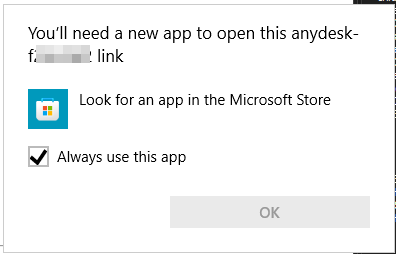
Stéfane Lavergne
0a342557-6275-465b-89a0-5992a8f7c037.png
Ok, some progress. Spoiler, we have a solution that should work.
Geeking out here, read last line for your answer.
I modified my test web to include 2 anydesk URLs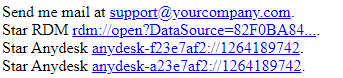
They both didn't work, nothing happened in Edge (embedded & external). I then created a "fake" protocol-handler to Open NotePad on the first URL (anydesk-f23e7af2). POW! it works for the first URL I would need to do the same with the second. Not a feasible solution, I can't create (modify the registry) for each possible anydesk URL.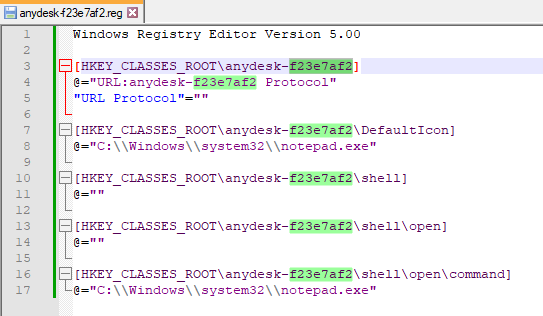
Why doesn't Edge launch without a protocol handler? No clue, but maybe I can catch the action on start navigate and handle it there?
Well, it does, so we hooked onto the NavigationStarting event of the control and we can now send the command to the OS much like doing Run (Windows + R).
I will finalize the code and it should be available in the 2023.2.21 release as they just build v2023.2.20 this morning. Note: solution will only solve for Edge embedded.
Best regards,
Stéfane Lavergne
1e18f21d-3b47-432c-8a1b-f6509efdd564.png
9125e146-5e9b-4549-b854-b802b6d81a43.png
very satisfying for a friday afternoon, isn't it? :D
thanks so much! edge is good for me, you might have a look at chrome, it behaved differently somehow..
Yes, yes it is.
As for chrome, once I checked "Remember my choice" it started to work as expected. Give it a try and see if you see the same behaviour.
Best regards,
Stéfane Lavergne
looks good, thanks!
I've fixed the issue with Chrome. In the next release .22* it will launch even if you don't check "Remember my choice".
* I just missed the .21 cutoff, the release will be out soon but won't have this last change.
Best regards,
Stéfane Lavergne
ok, I am on 2023.2.22.0 64-bit but anydesk sessions still don't open.. :(
What do you get here?
We based the code on this. We parse the URL on click and if it matches any of the defined AnyDesk handlers URL we launch the URL using Process.Start, an equivalent to doing Windows + R and executing the URL manually. If it works manually there is no reason that I can think of for this trick not to work.
Would it be possible for you to send use a sanitize version of the web page (HTML) for us to look at?
Best regards,
Stéfane Lavergne
377591bf-254c-45a9-a006-4ef8af0c4609.png
have a look at your PM. btw, you can create a trial version of atera here: https://www.atera.com/signup/
doh! my bad I completely missed that part of your original post. I will need the change the implementation.
Sorry for the delay that this has caused.
Best regards,
Stéfane Lavergne
Resolved in v2023.2.28 (out soon)
From the dashboard the url generated by Atera was a simple open and it worked. But if you clicked open via the device view, Atera launched the url via a new tab/window and that tripped up RDM and the WebView2 control.
Stéfane Lavergne