"Invalid Integration License" error after first start

Hello,
we installed 2023.2.18 on three systems today and on the first start with a configured default.cfg this error message appeared on each of them: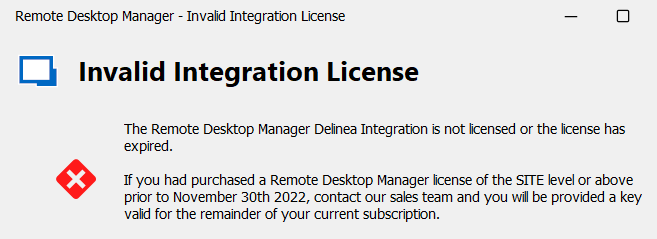
In the past with older versions this message did not came up on the first start of RDM. We have to restart RDM and then it is OK, but as it worked in the past - please fix it!
Brgds Andreas
1cfa9a50-427c-45c6-aafb-b9799fb5fb48.png
All Comments (15)
Hello Andreas,
Is it possible that the Delinea license is expired in Administration - Licenses?
I will send you a private message with a license key for the Delinea RDM module.
Best regards,
Érica Poirier
Hello Erica,
Sorry - no. And a restart of RDM would also not fix this problem.
Brgds Andreas
dc0a9438-90f2-4014-a2b9-40453a576913.png
Hello Andreas,
Is it working with the license I sent you or you get the same behaviour?
Best regards,
Érica Poirier
Hello Erica,
I didn´t tried it with your license as you can see on my screenshot that I have a valid license. We just renewed our license for another 3 years with Delinea integration. And as I said, after a RDM restart it is working normally. So the problem only exists on the first RDM start.
We install RDM and don´t start it, copy our default.cfg to the installation folder, start RDM and when we want to access Secret Server, this error message is shown. Then we close RDM and start it again and we are able to access Secret Server.
I really don´t think that it is related to the Delinea integration license as I installed a fresh 2023.2.14 about 2 weeks ago for a new colleague and he did not got this error message. Today another colleague got a new notebook and the first thing he got with 2023.2.18 was this error message.
Brgds Andreas
Hello Andreas,
It seems to be only when RDM starts following a fresh install. Maybe the issue is because the license isn't properly loaded at that moment.
We will investigate and get back to you.
Thank you for your patience.
Best regards,
Érica Poirier
Hello Andreas,
One more question about this problem your users are experiencing.
Are you getting this error while RDM is running on a Terminal Server or do they get this on their own machines?
Best regards,
Érica Poirier
Hello Erica,
it was on their own machines.
Brgds Andreas
Hello Andreas,
Thank you for your feedback.
What is the purpose of using the default.cfg file on user's machine in your environment?
If it's for the RDM local settings, have you think about using the Custom Installer Service?
Best regards,
Érica Poirier
Hello,
we discussed this about 1,5 years ago I think...
I use GPO to distribute all my settings, but the database configuration is not possible to be set by GPO. This is the only reason why I use a default.cfg.
If you manage to add all those settings needed to configure a SQL database to GPO, I can get rid of my default.cfg.
We also discussed the Custom Installer Service, but as far as I remember this also uses a default.cfg, but I need to build a new install package for our software distribution every time a new version comes out. As we use Patch My PC with SCCM to install/update RDM, this would add some additional overhead.
EDIT:
I investigated now my default.cfg and found a key named "SafeLocalLicenseToken" - could this be the problem?
Brgds Andreas
Hello Andreas,
Thank you for your feedback and to remind me the purpose of using the default.cfg to share the data source configuration with a GPO.
I will ask our engineering team about the "SafeLocalLicenseToken" parameter if that could be the reason. And if you have a chance to test it on a new machine without this parameter, please let us know if that help to solve the problem.
We will keep you posted.
Best regards,
Érica Poirier
Hello Andreas,
I forgot to ask, is it possible to send me this default.cfg file in a private message for us to investigate this problem?
Thank you for your collaboration.
Best regards,
Érica Poirier
Hello Andreas,
How have you created the default.cfg by renaming the RemoteDesktopManager.cfg file? If so, then I recommend you to recreate the deffault.cfg file using the Export options in the File menu. This will clean up the the keys like the "SafeLocalLicenseToken".
Let us know if that helps.
Best regards,
Érica Poirier
Hello Erica,
to be honest - I don‘t remember. But I think I exported it.
I will do an export next week and compare it to the one I use now.
Brgds Andreas
Hello Erica,
I did now a new export and now I am sure I exported it.
But I saw a new option which I think was not available when I did the export about 1.5 years ago...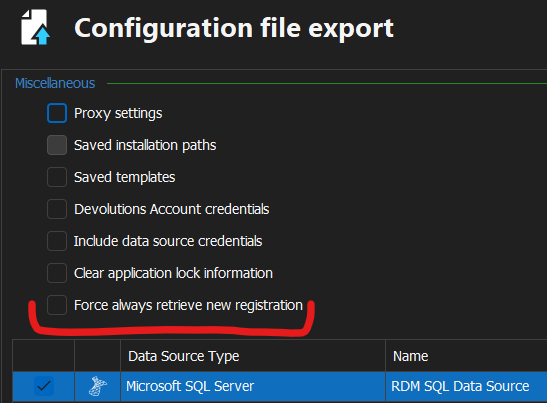
This will do the trick - right? Because this adds
<AlwaysRetrieveNewRegistration>true</AlwaysRetrieveNewRegistration>
to the default.cfg and SafeLocalLicenseToken is not part of the exported cfg.
Brgds Andreas
e175b3ad-7d38-4a0e-84bb-8afd3bc40501.png
Hello Andreas,
Thank you for your feedback.
The new exported default.cfg file will work properly and the user won't get the integration license error prompt on opening RDM for the first time because the SafeLocalLicenseToken tag is not in the file.
Let us know if that new file works properly on a newly created machine.
Best regards,
Érica Poirier