Deleted folders "magically" reappear after going off/online

Hello,
I had a similar issue a while ago where I was not able to reproduce it, but now I am able! :)
2023.2.18, SQL Database, User Vault only
I have a few empty folders from a test in my user vault. I delete them and when I restart RDM they are still gone. But when I click on "Go Offline" and then "Go Online", they are back! I delete them again, Off/Online, they are back...
Also crazy: If I rename such a folder, go Off/Online, the renamed folder is still there, but the folder with the old name also reappears! But when I delete now the 3 folders and go Off/Online, only the two "original" ones reappear. The renamed deleted stays deleted.
WTF?!? Why?
Brgds Andreas
All Comments (5)
Hello Andreas,
Thank you for reporting such issue.
While located on you User Vault, could you please go in Help - Diagnostic - Data Source - Data Source Diagnostic to see if there is any Duplicate Folders? If so, then click on the Remove Duplicates button.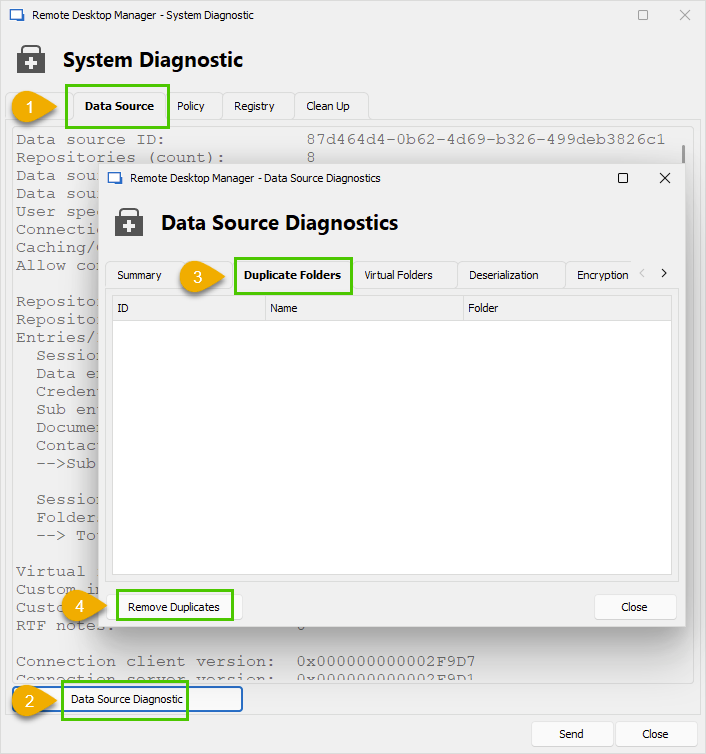
Best regards,
Érica Poirier
21c3f4a9-20e5-4aac-ab7f-ce4307732ed7.png
Hello Eríca,
Data Source Diagnostics is greyed out on my client.
What permissions do I need to give a regular user to be able to do this?
EDIT: I did this now with my admin account and had a small heart attack afterwards...
When I looked back to my user all of my folders were gone and only one was shown. Sh... Then I restarted RDM and they were back! Puh...
But it seems that this has fixed it. The folders were still there, but after I deleted them again, I can´t reproduce it any longer.
Brgds Andreas
Hello,
The user must be an administrator There is another way to list the duplicate folders.
While in the User Vault, please follow these instructions:
- Open the Profiler in the Help menu.
- Set the Debug level to 256 in the Debug Only tab.
- In RDM, hit CTRL+F5 to reload the User Vault.
- Set the Debug level back to 0 to prevent performance issue.
If there are duplicate folders, you should see their IDs at the beginning of the report. The following screen capture doesn't contain any duplicate folder.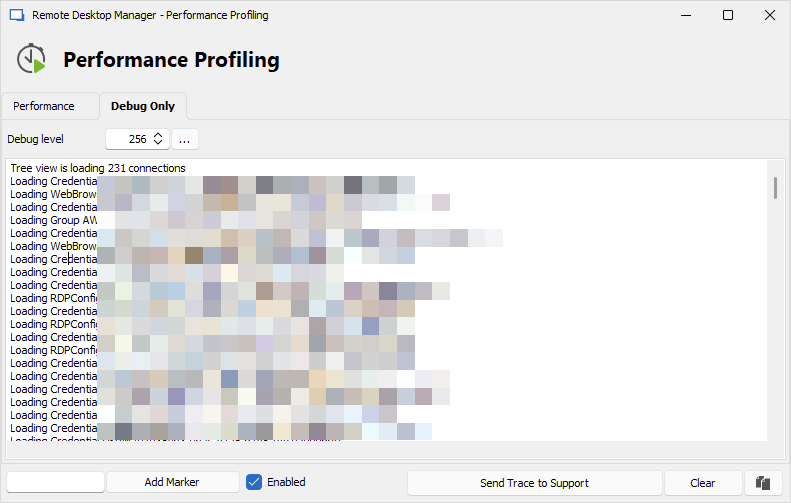
Best regards,
Érica Poirier
0595c809-e414-4eda-a479-2f3cfffde07a.png
Hello Erica,
maybe you didn´t saw that I updated my previous post.
I did this now with my admin account and had a small heart attack afterwards...
When I looked back to my user all of my folders were gone and only one was shown. Sh... Then I restarted RDM and they were back! Puh...
But it seems that this has fixed it. The folders were still there, but after I deleted them again, I can´t reproduce it any longer. Hope this stays like this. But I can´t say now if there were any duplicate folders as with my admin account i was not able to see any folders marked as duplicate.
Brgds Andreas
Hello Andreas,
Thank you for your feedback and glad that the issue is now solved.
It looks like a corrupted offline cache on your machine. Next time please try to invalidate the local cache files using CTRL+F5 within RDM.
Best regards,
Érica Poirier