Local Paste Not Working After Updating RDM To 2023.2.18.0

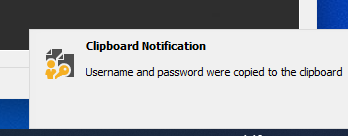
Hi, After updating to version 2023.2.18.0 I can no longer paste locally when RDM is running. I've tried reverting back to an earlier version (2023.2.9.0) but the problem persists. I also ran Clipboard Diagnostic but I assume from the notification that RDM is saying that it's working as expected. Changing "Clipboard copy method" between Legacy and "Paste once" also didn't seem to make any difference.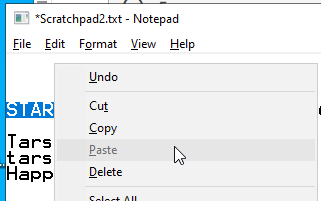
Thanks in advance
Chris
2023-07-25 13_19_56-.png
2023-07-25 13_15_37-_Scratchpad2.txt - Notepad.png
All Comments (4)
Hello,
Thank you for reaching out to us. to better assist you, could you please provide us with the following information:
· A screenshot of your RDM dashboard
· The data source you are using.
· Any other information you think could be coherent.
Once we receive this information, we will be better equipped to diagnose and resolve the issue.
Would it also be possible for you to create a portable installation of RDM and see if this issue still occurs? To do so, you will need to do the following:
1. Download the .zip file below: https://remotedesktopmanager.com/home/thankyou/rdmbin
2. Create a new folder on your Desktop.
3. Extract the content of the .zip file into the folder created at #2
4. Go to this folder once the .zip file has been extracted and run remotedesktopmanager64.exe
5. Connect to your data source.
This will tell us if the issue is tied to the local installation of RDM.
Best regards,
Carl Marien
Hi, I've managed to track down the problem connection. If I connect to suaknas01 paste stops working. The only differences between good and bad connections is the "bad" one doesn't have <AuthentificationLevel>WarnMe</AuthentificationLevel> or <NetworkLevelAuthentication>false</NetworkLevelAuthentication>. I've updated to 2023.2.18.0 again and confirmed the same problem still occurs.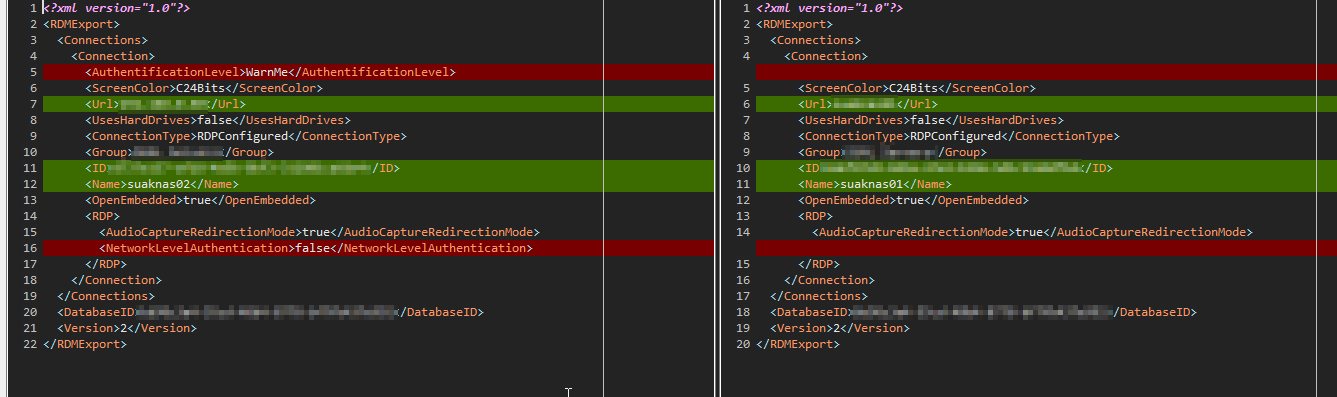
Thanks
Chris
7e2d45b0-8966-4f48-be5d-39bc9f15e347.png
To add some more to this I've tried deleting and recreating the connection for suaknas01 and also duplicating the suaknas02 connection and changing IP address details to the ones for suaknas01. For both the issue still persisted so it appears to be a setting on the server creating the problem.
Hello,
Thank you for your feedback.
I’m glad to see that you have been able to narrow down the possible cause of this issue.
If the issue reveals that it is caused by Rdm please let us know.
Best regards,
Carl Marien