Change multiple entries from Putty -> SSH

So a LOT of my endpoints that were imported came in as a Putty-type item. Some came is as SSH. I like the SSH ones - long storry about the Putty ones, but I want to change them. I don't see an easy way to change one entry, much less edit dozens.
I feel like what I'm looking to do is so trivial that I'm just glossing over a very obvious button. What am I missing?
All Comments (3)
Hello,
I believe doing this should be fairly easy, simply go to View > Search > Advanced Search and change "Name" to "Connection Type" this will then allow you to choose "PuTTY" in the second drop-down menu: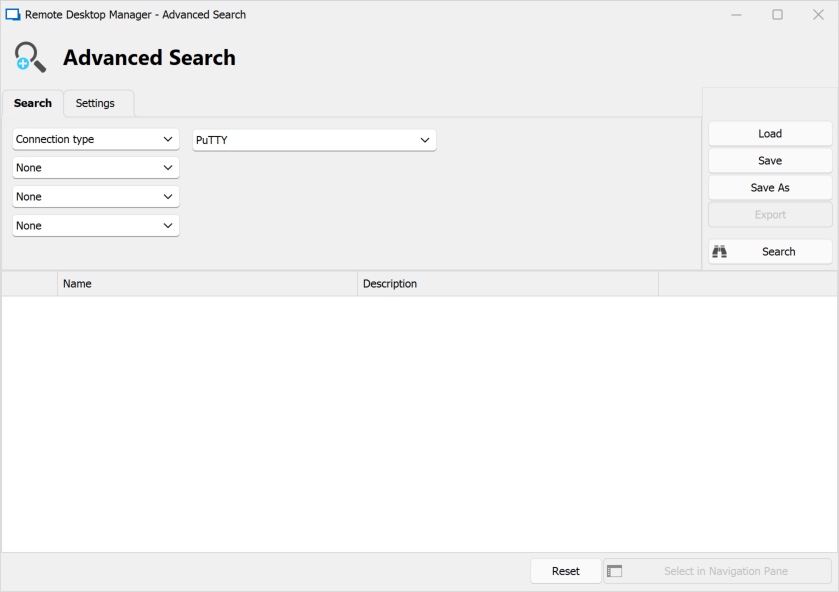
Once this is done, simply highligh/select all of the entries in the results, right-click, and select Edit > Edit (Special Actions)...> Convert To > Convert PuTTY/Rebex Session to SSH...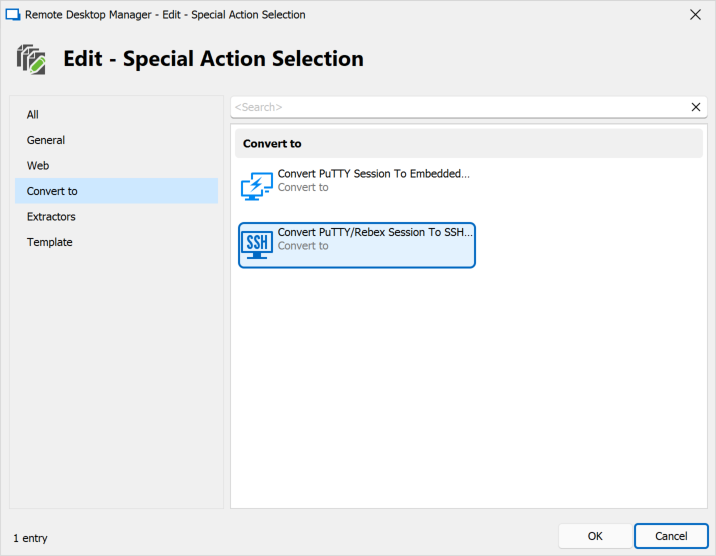
If all the entries were selected, it will convert them all at once to SSH Shell entries.
Let me know if you have further questions.
Best regards,
977fa557-af32-4407-8667-1db4f28c1f1f.png
809417f2-551a-4110-87ae-0fe504851605.png
Oh wow! The Edit Special Actions bit is what i was missing, but you went further to show me how to hit them all easily (since I have a mixed bag in a dozen folders)... I very much appreciate your reply, and couldn't be happier with the tool.
Hello,
My pleasure !
If you ever have any other questions or issues with RDM, don't hesitate to let us know.
Best regards,