Error message box for missing registry key

Hi,
I get this error on my first attempt to open a RDP session after starting RDM. Apart from the additional click on OK I haven't noticed any other issue.
Any idea why I get it and how to solve it? Should I create the missing key?
This is on a Windows 10 PC, connecting to direct RDP and through Azure Bastion (very nice feature added BTW, I could get rid of my nasty powershell scripts...)
Thanks.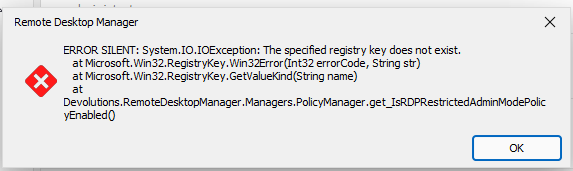
6c8e16c8-16ea-4c0c-aaa9-cde167de0a15.png
download.png
All Comments (5)
Hello,
Thanks for contacting us regarding this,
Could you tell me which version number of RDM you're using ?
Best regards,
Hi,
I was using 2023.2.14. I just upgraded to 2023.2.17, same problem.
Blaise
Hello,
If you go under Help > Profiler > Debug only (tab) and set the level to 0, does the issue persist ?
Best regards,
Hi,
Problem is gone.... thanks.
I had set the debug level to 3 while testing your new developments for direct VPN to Azure Bastion and did not set it back to 0.
You can close the thread.
Blaise
Hello,
No problem, I'm glad the issue is resolved !
Best regards,