Winscp Template not working in 2023.2.14.0 64 bit windows 10

Hello. The template for Winscp stopped working when I changed from 2023.1.27.0 64 Bit Windows 10 (installer version) to RDM 2023.2.14.0 64 Bit Licensed Windows 10 (Zip file version). All I get now in the window asking for the hostname. The rest of the information is not filled out correctly as seen below.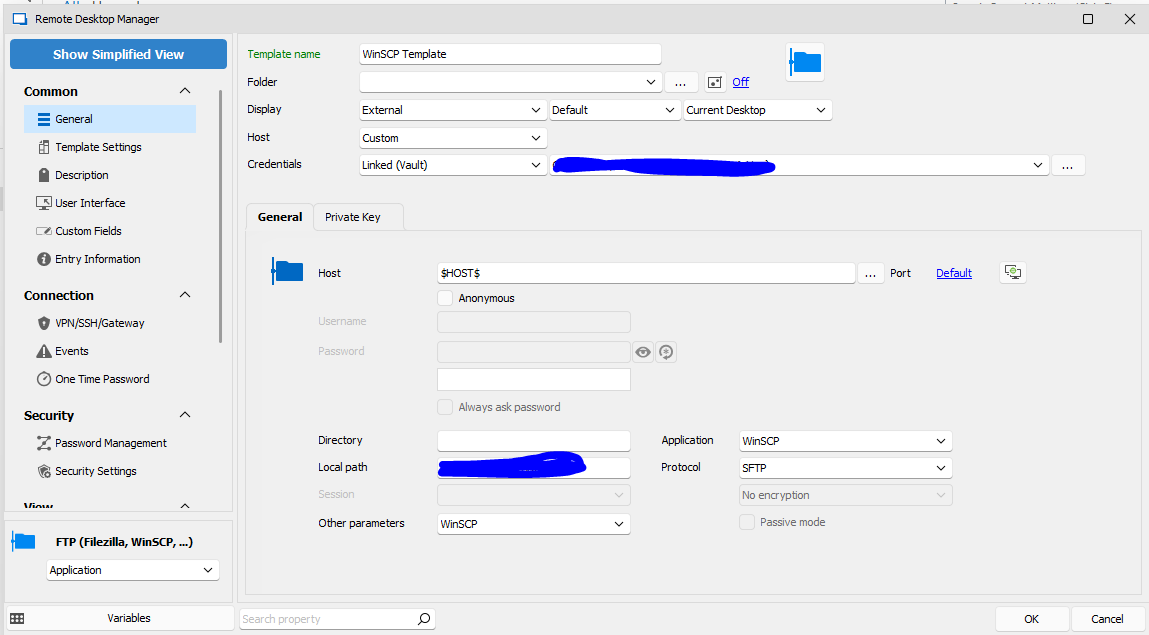
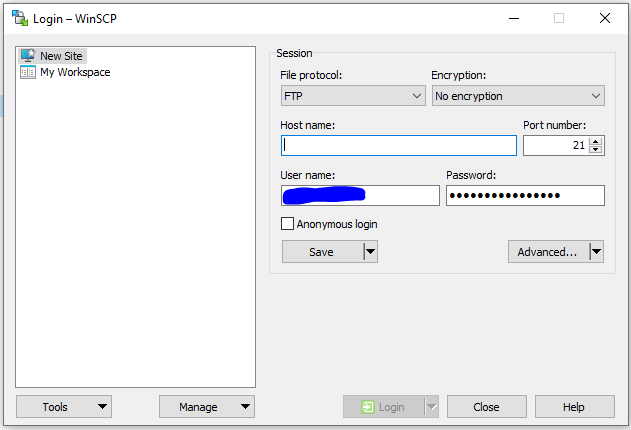
I moved from installed version to zip file version since I lost the ability to update myself with loss of admin permissions in windows. I still have the installer version installed if that makes any difference.
Any ideas?
winscp login window only.PNG
winscp rdm issue.PNG
All Comments (12)
I'm having similar issues passing variable to putty for telnet via template using $HOST$ as well. RDM Open with Template not inheriting variable from host (devolutions.net)
Hello,
Thank you for contacting us on that matter.
I'm sorry to hear that you're experiencing issues with Variables. I will open a case for the engineering department regarding this issue to get it resolved as soon as possible.
In the meantime, could you provide the application logs? This will help us identify the root cause of the problem and find a solution.
Also, I suggest trying a portable version of RDM version 2023.2.9.0. To do so, please follow the steps below:
1. Close RDM.
2. Download the .zip file from the following URL: https://cdn.devolutions.net/download/Devolutions.RemoteDesktopManager.Bin.2023.2.9.0.zip
3. Create a new folder on your Desktop.
4. Extract the content of the .zip file into the folder you just created.
5. Go to the folder where you extracted the files and run remotedesktopmanager.exe.
6. Connect to your data source.
I hope this helps and please let me know if you have any further questions or concerns.
Best regards,
Patrick Ouimet
Patrick,
The version I'm currently using is the portable version (latest). Can you provide the details on the application log debug? I tried to max out the debug but saw what I would call normal debug and now showing any kind of parameters being passed to the command line. Can you provide the necessary details to setup the application logs properly so I can send them too you?
Thank you.
Glen
Hello,
Thank you for contacting us on that matter.
I'm sorry to hear that you're experiencing issues with Variables. I will open a case for the engineering department regarding this issue to get it resolved as soon as possible.
In the meantime, could you provide the application logs? This will help us identify the root cause of the problem and find a solution.
Also, I suggest trying a portable version of RDM version 2023.2.9.0. To do so, please follow the steps below:
1. Close RDM.
2. Download the .zip file from the following URL: https://cdn.devolutions.net/download/Devolutions.RemoteDesktopManager.Bin.2023.2.9.0.zip
3. Create a new folder on your Desktop.
4. Extract the content of the .zip file into the folder you just created.
5. Go to the folder where you extracted the files and run remotedesktopmanager.exe.
6. Connect to your data source.
I hope this helps and please let me know if you have any further questions or concerns.
Best regards,
FYI....I downloaded and unzipped the latest version released today 2023.2.17.0 and using the sample template I now get this dialog.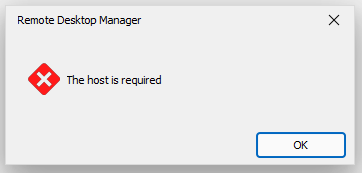
Still waiting on the information to provide you the logs.
Glen
rdm dialog.PNG
Hello Glen,
Could you provide the logs that are related to this article?
https://docs.devolutions.net/rdm/windows/commands/help/support/application-logs/
Best regards,
Patrick Ouimet
Hello.
Here is the application log output when trying to open a connection with a template configured to use WinSCP:
[7/20/2023 5:30:31 AM - 2023.2.17.0 - 64-bit] Error Silent: System.Threading.ThreadAbortException: Thread was being aborted.
at System.Threading.WaitHandle.WaitOneNative(SafeHandle waitableSafeHandle, UInt32 millisecondsTimeout, Boolean hasThreadAffinity, Boolean exitContext)
at System.Threading.WaitHandle.InternalWaitOne(SafeHandle waitableSafeHandle, Int64 millisecondsTimeout, Boolean hasThreadAffinity, Boolean exitContext)
at System.Threading.WaitHandle.WaitOne(Int32 millisecondsTimeout, Boolean exitContext)
at Devolutions.RemoteDesktopManager.Business.HttpBrowserLinker.Run()
[7/20/2023 5:30:31 AM - 2023.2.17.0 - 64-bit] Error Silent: System.Threading.ThreadAbortException: Thread was being aborted.
at Devolutions.RemoteDesktopManager.Business.HttpBrowserLinker.Run()
at System.Threading.ExecutionContext.RunInternal(ExecutionContext executionContext, ContextCallback callback, Object state, Boolean preserveSyncCtx)
at System.Threading.ExecutionContext.Run(ExecutionContext executionContext, ContextCallback callback, Object state, Boolean preserveSyncCtx)
at System.Threading.ExecutionContext.Run(ExecutionContext executionContext, ContextCallback callback, Object state)
at System.Threading.ThreadHelper.ThreadStart()
Regards,
Glen
Hello,
Thank you for your patience.
Could you update your RDM to version 2023.2.18.0 and check if your issue still occurs?
Best regards,
Patrick Ouimet
Hello. I just updated to the version requested (2023.2.18.0) and it still acts the same.
Also now when I just click on a host without opening the template I get a dialog saying "the host is required". The entry does have the host as I can bring up the host under 2023.2.17.0.
Glen
Hi,
I also have the problem with 2023.2.18
1- winscp inegration not working well
I try to run it
I go back to the summary tab of my server : the host name is not displayed anymore. I need to reload your database to get it back
2- if I try to open "integreted SCP" => I get an error. I get a popup telling me to chek my ssh algorithm. I have done it but still impossible to run scp
nothing in the logs
was working fine until I upgrade yesterday to 2023.2.18
I switch back to 2023.2.9 : integrated SCP is working again !
Hello,
Thank you for this feedback.
We are still working on this issue, but the good news, we have found something.
The engineering department has made a fix and is now testing this version.
I will let you know as soon as I have more details.
Best regards,
Patrick Ouimet
Just as an FYI....I went back to 2023.2.9....Winscp did not work. I went back to 2023.1.29 and Winscp works.
Regards,
Glen
Dear Glen,
I appreciate your patience and understanding.
I am pleased to inform you that we have successfully replicated the second issue on version 2023.2.18.0. Our engineering team is already working on rectifying the problem.
I will keep you updated on the progress.
Best regards,
Patrick Ouimet