can not use Remote Desktop Manager for mac to control a other mac in a different network
can not use Remote Desktop Manager for mac to control a other mac in a different network

can not use Remote Desktop Manager for mac to control another mac in a different network,for example,my macbook with Remote Desktop Manager installed is at home,my another macStudio is in my company,they are in different network,then my macbook can't control my macStudio
All Comments (6)
Hi,
We would need more information to understand the issue. How are you trying to connect to your Mac Studio? With an ARD entry? Do you have "Remote Login" enabled on your Mac Studio? Can you ping the address of the Mac Studio you are trying to connect to?
Best regards,
Xavier Fortin
Yes, I am connecting to my Mac Studio through ARD, the "Remote Login" on my Mac Studio is turned off, but the "Remote Manage" is turned on. I can ping the address of the Mac Studio I am trying to connect to. However, the result is that I am unable to connect to my Mac Studio.
Yes, I am connecting to my Mac Studio through ARD, the "Remote Login" on my Mac Studio is turned off, but the "Remote Manage" is turned on. I can ping the address of the Mac Studio I am trying to connect to. However, the result is that I am unable to connect to my Mac Studio.
Hello
Thanks for the update. Are you able to connect using the built in Apple screen sharing application?
Thanks and kind regards,
Richard Markievicz
Yes, I am able to connect using the built-in Apple Screen Sharing application. All I had to do was type in my Apple ID. My Mac Studio would receive an invitation, and I'd click "yes" on the Mac Studio to establish a connection.
Hello
Thanks for the information. I'd like to understand better why it's not working within RDM. Please can you take the following steps:
- Open the "Session Logs" window under "Help" in the ribbon
- Enable the session logs feature
- Try your connection one more time and let if fail
- Locate the corresponding log in the logs window. You can right-click > Reveal in Finder to get the actual log file on disk
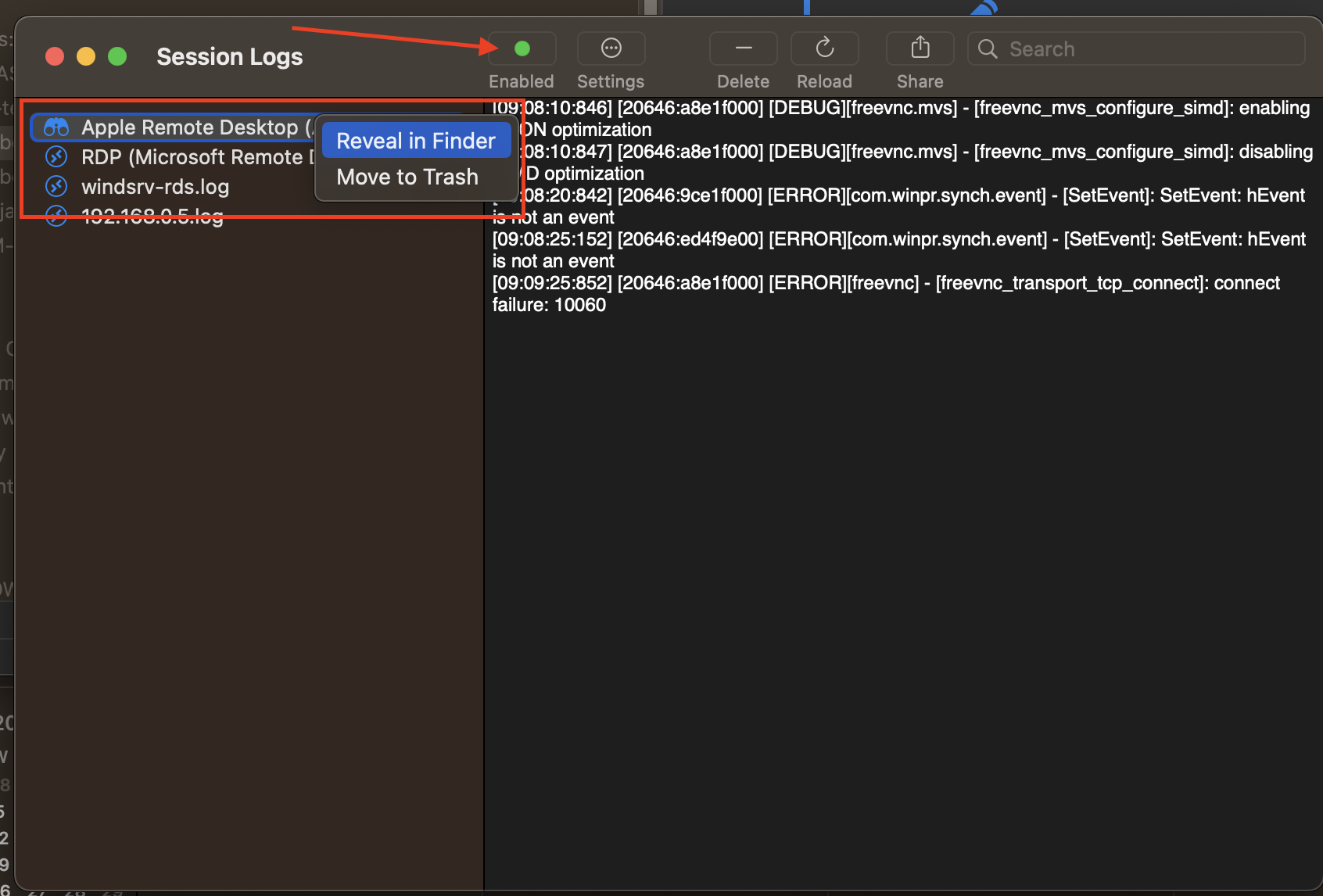
Then you can send it to me either by PM or to support@devolutions.net (mention this forum thread so it will get forwarded to me).
Please let me know if you have questions or something isn't clear
Kind regards,
Richard Markievicz
Screenshot 2023-07-21 at 09.10.47.png