Can't login to RDM - Invalid password entered

Dear Support Team!
We have a problem to use a fresh Remote Desktop Manager installation (2023.2.14.0) on some domain windows servers.
We have a domain policy (registry key) set:
HKLM\SOFTWARE\Policies\Devolutions\RemoteDesktopManager\ForceWindowsCredentialsAndCurrentlyLoggedOnUsernameAndDomain = 1
When a normal user (non-admin) stars RDM and enters his domain username and password (100% sure correct!),
every time he gets the error: Invalid password entered.
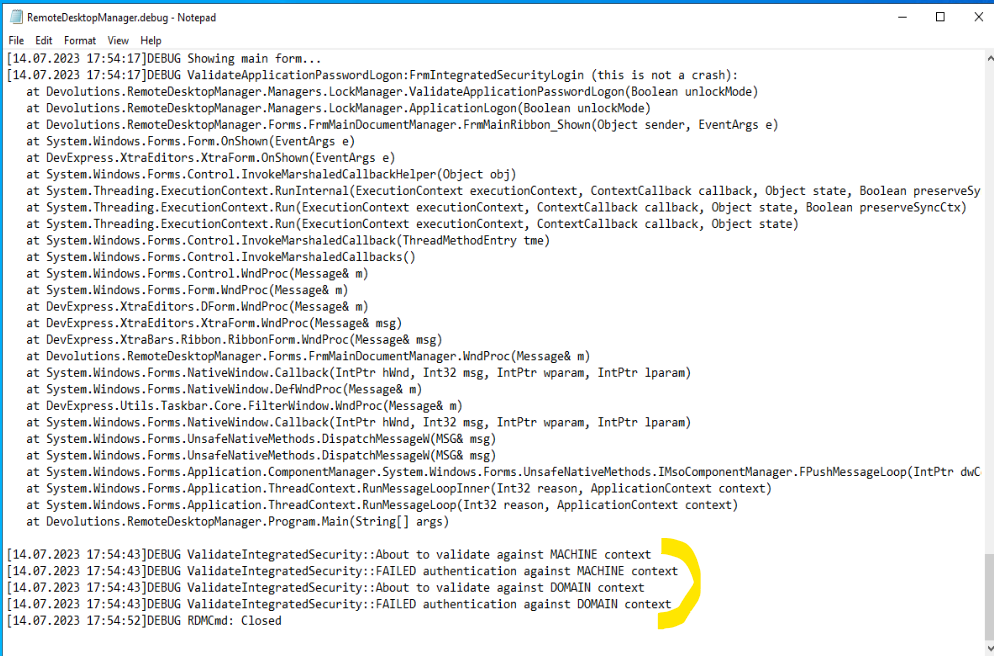
+The screenshots attached.
Could you clarify:
- What is wrong?
- How to fix it?
Thanks in advance.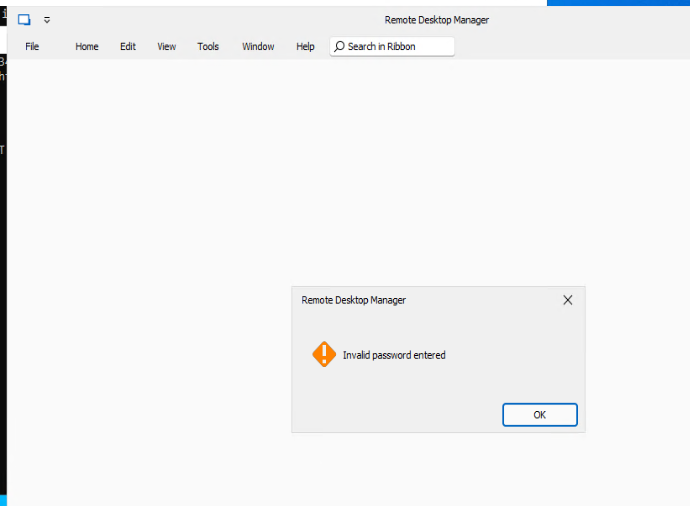

rdm-1.png
rdm-2.png
rdm-3.png
All Comments (10)
Could someone from Devolutions Team help us?
Hello,
You forum and the case that you opened were assigned to an agent, they will be in touch!
Best regards,
Etienne Lord
Hello,
Thank you for contacting us regarding this,
Just to be certain I understand, is this happening on only one computer ?
Can you explain to me in detail what the policy does ?
Where are the credentials in your RDP entry set ?
Best regards,
Hello Zachary!
Thanks for your assistance.
>>>Can you explain to me in detail what the policy does ?
The policy is to harden RDM installation and settings are from your page
https://blog.devolutions.net/2021/03/how-to-apply-group-policies-in-remote-desktop-manager/
Use Windows credentials as application password and force the currently logged on username and domain
%Root%\SOFTWARE\Policies\Devolutions\RemoteDesktopManager\ForceWindowsCredentials AndCurrentlyLoggedOnUsernameAndDomain
>>>Where are the credentials in your RDP entry set ?
None RDP yet...
The problem - We can't open RDM application to work with it:
After we start RDM, it asks a password and after we enter a valid password, RDM shows the message 'Invalid password entered'
We can make a short session to show you the issue.
Reagrds,
Hello,
I would be glad to have a remote session !
I'll open up the ticket, but before I do that, is the email associated to your Devolutions account the one you'd like for me to use when opening the ticket ?
I'd like to be sure to send the link to schedule the remote session to your desired email address.
Best regards,
Hi,
Please, send invite to my email in my current forum profile.
Are you ready for a call now?
Or what timeslots do you have?
My working hours: 10 -18 (UTC+3)
Hello Zachary!
Do you have any news?
Please, update the ticket.
Hello,
Thank you for confirming which email address I should use, an email was sent to you to schedule a remote session.
I look forward to it.
Best regards,
Booked a session via online calendar. Please, check
Hello,
Thank you for your time during the remote session, I've contacted the engineers and am looking to see what they can suggest to resolve the issue.
Best regards,