Not passing credentials to server 2012 r2 box

Ok this is an odd one. We have one 2012 R2 server that
started NOT accepting a saved credential, other 2012 servers have no issues
passing crede3ntials. Wnen logging in VIA RDM we are presented with a normal
windows login screen then pasting in the password it logs right in.
All Comments (9)
Hello Justin,
Thank you for reaching out to us regarding this,
I have a few questions which you can hopefully answer.
- Which version of RDM are you using?
- Which type of data source are you using?
You mentioned that you started encountering this issue recently, Were any changes made on your host or your current workstation?
Let me know,
Best regards,
Samuel Dery
RDM Version 2023.2.14.0 64-bit
Data source was both an AD sync and a manually created host causing the same thing.
Any changes made in the environment were made across the board, after some more internal testing it might be related to a GPO.. but the thing is it's set the same on all hosts and only this one thus far is having this issue.
Always prompt for password upon connection is set to Enabled
So why would this break one machine and not others?
Hello Justin,
Thank you for your reply,
I would have to suspect this may be related to the host itself, If you attempt the connection in MSTSC do you encounter the same behavior?
Let me know,
Best regards,
Samuel Dery
Well when connecting to any recourse using mstsc it will prompt for a password, however this was the behavior forever and expected.
Hello Justin,
Thank you for your reply,
Could you provide me with a screenshot of this credential prompt you're receiving when attempting the connection to this host?
Let me know,
Best regards,
Samuel Dery
This is what happens, it pre-fills out the correct username, but does not send the password over. This is within RDM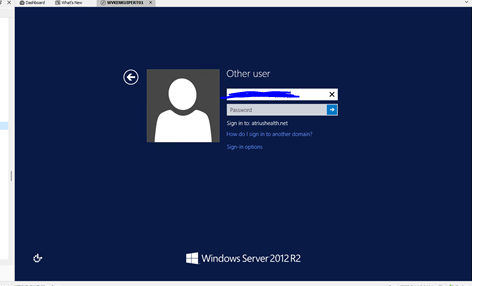
012fdc12-9c03-4fd1-a94e-59de7b6f0cfa.png
Hello Justin,
Thank you for your reply and for the screenshot,
I see, that is indeed odd, you mentioned that it was working for you previously is that correct?
Would it be possible for you to create a portable installation of RDM and see if this issue still occurs? To do so, you will need to do the following:
1- Download the .zip file below:
https://remotedesktopmanager.com/home/thankyou/rdmbin
2- Create a new folder on your Desktop
3- Extract the content of the .zip file into the folder created at #2
4- Go to this folder once the .zip file has been extracted and run remotedesktopmanager.exe
5- Connect to your data source
Let me know,
Best regards,
Samuel Dery
I can try this, however it is not just me it is happening to. Anyone internally who uses RDM has the same behavior.
Hello Justin,
Thank you for your reply,
I see, then another test we could do is using RDC Manager which uses the same ActiveX that RDM does in Embedded.
We have the following knowledge base article regarding this: https://docs.devolutions.net/kb/remote-desktop-manager/troubleshooting-articles/rdc-manager/
Let me know if you encounter the same behavior in RDC Manager when attempting to connect to this remote host,
Best regards,
Samuel Dery