Using SSH Link in VPN/Tunnel/Gateway for SSH Sessions

I've created a SSH Port Forward Entry on localhost:1080 with dynamic mode:
Then I setup a session with proxy mode Socks5 to localhost:1080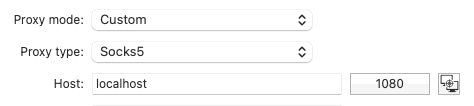
When I then use this, I can see for the Proxy that it is listening and when using the session the connection going through it.
Next I configure another sesion ( for testing) with VPN/Tunnel/Gateway. There I then select an existing SSH Link: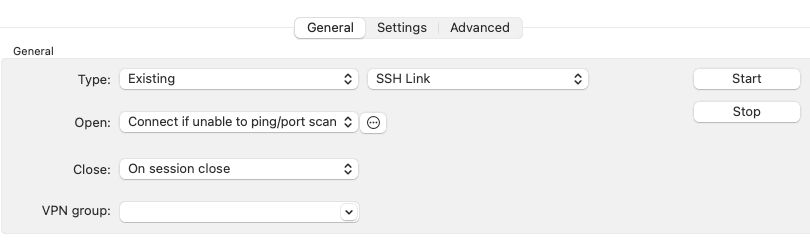
And for Session select the SSH Port Forward session item:
However, when then opening the session I do not see the same entries appearing that it is going through this port forwarder. But I do see that if my port forwarder is not running it will start and listen. Just the connection is not going through it. I would expect for my SSH connection to then be going through this SSH Link.
I'm on 2023.2.6.2
a3707686-3776-49bc-b4e5-563938873058.png
72f86920-35b3-4b5d-8d38-0f88c9ae917f.png
e4b654da-1e9d-471a-93a3-a1f806835877.png
ba402d46-f518-46f7-91c5-f35070ae0a9f.png
All Comments (13)
Hi,
Is your session in the last step configured with the host/port "localhost" and 1080?
Best regards,
Xavier Fortin
No, in SSH shell the host under General is set to the respective SSH server I try to connect to.
I was under the impression that if I set a VPN/Tunnel/Gateway and in there I create an SSH Link entry that it would then work similar as if I set Proxy on SSH Shell itself. Is that not the case?
For certain subnets we have a bastion server (or SSH jump server). So I created folders for each of these subnets within the sessions.
I then want to configure the "proxy" on the folder level so that all of the sessions within that folder can inherit it.
That then makes it easier if something changes on the proxy level so I do not have to change it on all. Further, to create all the sessions I can then more easily duplicate or export/import under a new folder and then it will inherit the proxy information from the folder.
67ef25ec-5a7d-4cec-acba-3b54256bde79.png
Hi,
No, by default, tunnel and port forward entries in configured in VPN/SSH/Gateway do not work like that. Your session would need to be configured to connect directly to the exposed localhost:port from the tunnel/port forward.
To do what you want, you would need to use SSH Tunnel (not Port Forwards) entries and check the "Use over secure gateway" checkbox: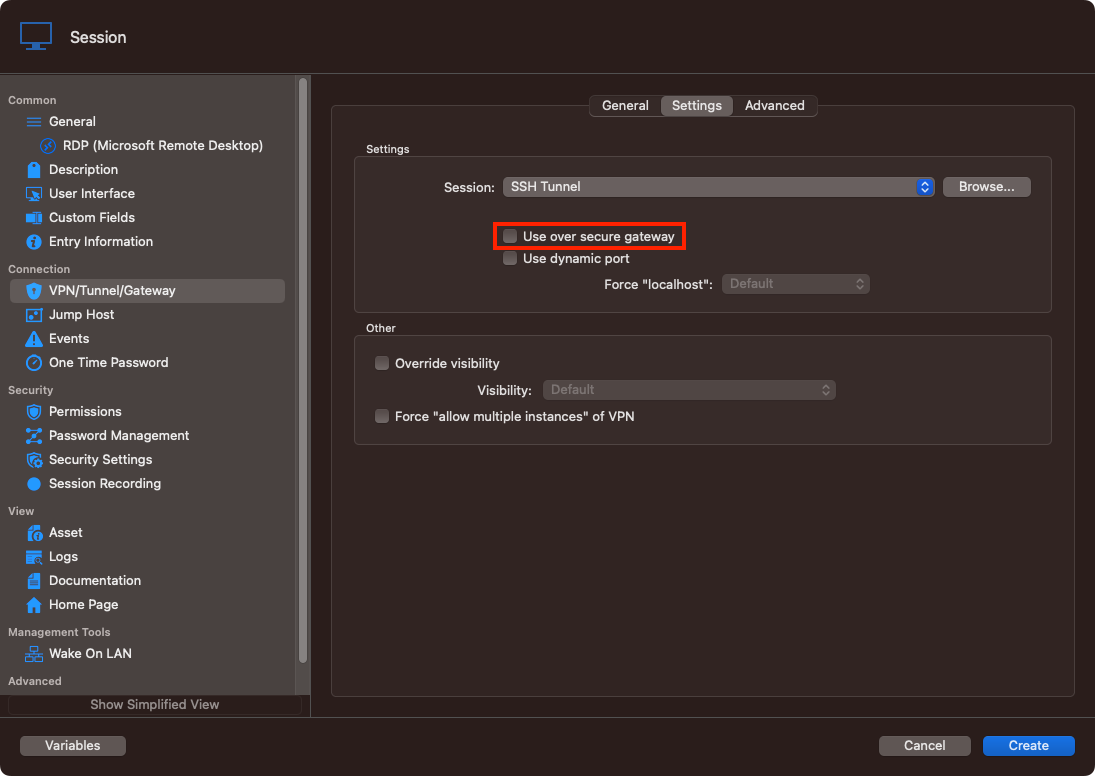
Best regards,
Xavier Fortin
UseOverSecureGateway.png
Thank you, looks like I've got that working now. :-)
Glad to hear it!
Do not hesitate if you have any other issues.
Best regards,
Xavier Fortin
As I mentioned, I got this part working. But still struggling with using it for multiple sessions.
I have it set to Connect if unable to ping/port scan on the Folder level and my sessions inherit from it
Then when I open the 1st session it "fails" to ping and I can see it open my SSH Tunnel and then use it. Great.
Then I open a 2nd session for another server. Configuration the same as they all inherit it from the folder level. When I open it, it. then pings but this "fails" as well. So it then proceeds with opening another tunnel. I can then see in the tunnel window it fails as it cannot bind on the same port. But my 2nd session then opens and uses the tunnel that was opened by the 1st session. This is with custom host and port settings for the ping set to localhost:3390:
My tunnel listens on 53390
If in the custom host and port settings for ping I enter localhost:53390 which is the port my tunnel listens on:
Then I can see on my 1st session I open it pings, and then proceeds to open the tunnel and then connects the session. But my 2nd session I then do not see it opening VPN (good) but is then unable to connect. So it is not using the tunnel then that is already open.
If I say "Ask for confirmation to connect"
Then on my 1st session to asks for confirmation and when I click yes opens the tunnel and connects fine. When I then open the 2nd session and click No (as the tunnel is already open), it fails to connect. If I click Yes then it tries to open the tunnel (which off course fails as the port is already open) but then is able to proceed with the tunnel that was opened on the 1st session.
So how can I set it up so on the 1st session it opens my SSH tunnel and on following sessions it uses that same tunnel that was already opened?
Here are my tunnel settings which obviously work:
On another note, there might be a new bug introduced in the past 1-3 versions as now in my VPN tunnel under settings it doesn't show anything for Session:
And this is with type SSH Link (and obviously I have it as it was configured).
Hello,
We have been trying to reproduce your issues. To help us, do you think you could enable logging and do a log of when you are trying to connect with the second session?
In your session you need to go into Logs and enable logging. If the verbose level could be 2, it would be the best.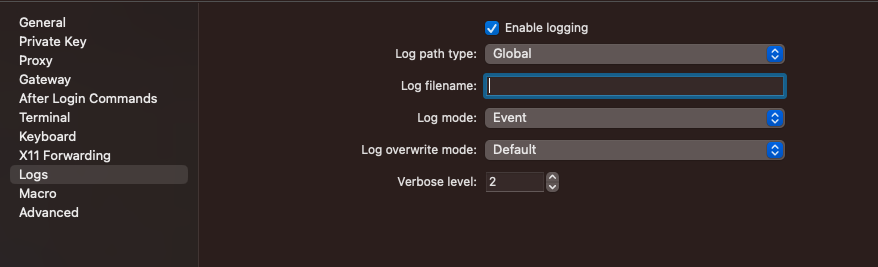
Also I think the image you tried to send on the last post broke because we can't see anything. It is making it hard to figure what exactly you are talking about for each point. If you can resend them, it would really hep us.
Best regards.
Michel Lambert
Screenshot 2023-08-07 at 11.50.02 AM.png
I have it set to Connect if unable to ping/port scan on the Folder level and my sessions inherit from it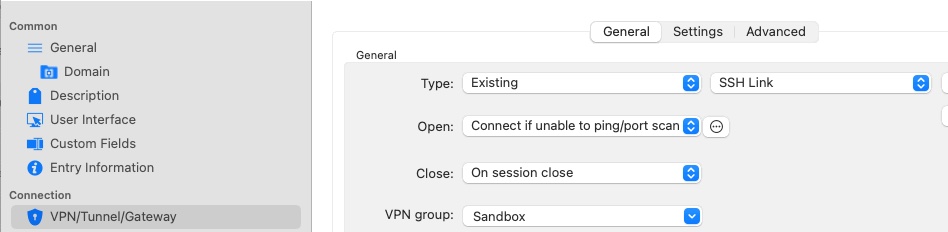
Then when I open the 1st session it "fails" to ping and I can see it open my SSH Tunnel and then use it. Great.
Then I open a 2nd session for another server. Configuration the same as they all inherit it from the folder level. When I open it, it. then pings but this "fails" as well. So it then proceeds with opening another tunnel. I can then see in the tunnel window it fails as it cannot bind on the same port. But my 2nd session then opens and uses the tunnel that was opened by the 1st session. This is with custom host and port settings for the ping set to localhost:3390:
My tunnel listens on 53390
If in the custom host and port settings for ping I enter localhost:53390 which is the port my tunnel listens on: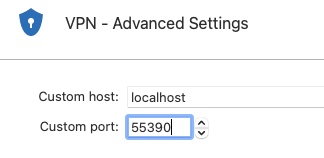
Then I can see on my 1st session I open it pings, and then proceeds to open the tunnel and then connects the session. But my 2nd session I then do not see it opening VPN (good) but is then unable to connect. So it is not using the tunnel then that is already open.
If I say "Ask for confirmation to connect"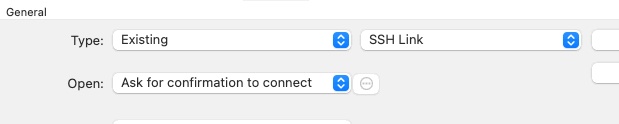
Then on my 1st session to asks for confirmation and when I click yes opens the tunnel and connects fine. When I then open the 2nd session and click No (as the tunnel is already open), it fails to connect. If I click Yes then it tries to open the tunnel (which off course fails as the port is already open) but then is able to proceed with the tunnel that was opened on the 1st session.
So how can I set it up so on the 1st session it opens my SSH tunnel and on following sessions it uses that same tunnel that was already opened?
Here are my tunnel settings which obviously work: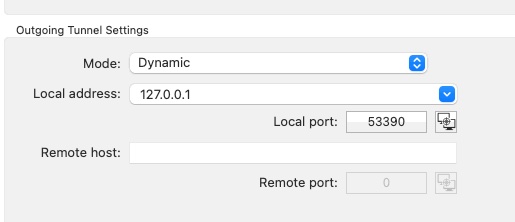
On another note, there might be a new bug introduced in the past 1-3 versions as now in my VPN tunnel under settings it doesn't show anything for Session:
And this is with type SSH Link (and obviously I have it as it was configured).
Image6.jpg
Image5.jpg
Image4.jpg
Image3.jpg
Image2.jpg
Image1.jpg
Here is the log when the tunnel is not yet open:
[8/7/2023 10:50:28 AM] Devolutions Protocols version: 2023.8.2.1 macOS
[8/7/2023 10:50:28 AM] Terminal font: Menlo [Menlo, fixed=True]
[8/7/2023 10:50:28 AM] Starting SSH, verbose level: 2
[8/7/2023 10:50:28 AM] Setting up connection
[8/7/2023 10:50:28 AM] Using proxy type: SOCKS5
[8/7/2023 10:50:28 AM] Connecting to port: 22 (IP any)
[8/7/2023 10:50:28 AM] SOCKS5 authentication negotiation
[8/7/2023 10:50:28 AM] SOCKS5 no authentication required
[8/7/2023 10:50:28 AM] SOCKS5 connection
[8/7/2023 10:50:28 AM] SOCKS5 connection complete
[8/7/2023 10:50:28 AM] SSH banner: SSH-2.0-OpenSSH_8.0

[8/7/2023 10:50:28 AM] Sending kex init
[8/7/2023 10:50:29 AM] Received kex init
[8/7/2023 10:50:29 AM] Selected algorithms: curve25519-sha256, rsa-sha2-256, chacha20-poly1305@openssh.com, chacha20-poly1305@openssh.com, implicit by cipher, implicit by cipher, none, none
[8/7/2023 10:50:29 AM] Sending Ed25519 kex init
[8/7/2023 10:50:29 AM] Received Ed25519 kex reply
[8/7/2023 10:50:29 AM] Accepting connection to an unidentifed server this one time
[8/7/2023 10:50:29 AM] Sending new keys message
[8/7/2023 10:50:29 AM] Received new keys message
[8/7/2023 10:50:29 AM] Sending userauth service request
[8/7/2023 10:50:29 AM] Received extension info message
[8/7/2023 10:50:29 AM] Server accepts public key types: ssh-ed25519,ssh-rsa,rsa-sha2-256,rsa-sha2-512,ssh-dss,ecdsa-sha2-nistp256,ecdsa-sha2-nistp384,ecdsa-sha2-nistp521
[8/7/2023 10:50:29 AM] Received service accepted message
[8/7/2023 10:50:29 AM] Using provided key data
[8/7/2023 10:50:29 AM]    the key is passphrase protected
[8/7/2023 10:50:29 AM] Sending userauth init request
[8/7/2023 10:50:29 AM] Received userauth failure: publickey,gssapi-keyex,gssapi-with-mic,password
[8/7/2023 10:50:29 AM] Starting authentication by key
[8/7/2023 10:50:29 AM] Validating public key: rsa-sha2-512
[8/7/2023 10:50:30 AM] Received userauth key ok
[8/7/2023 10:50:30 AM] Sending userauth public key signature: rsa-sha2-512
[8/7/2023 10:50:31 AM] Received userauth success
[8/7/2023 10:50:31 AM] User authenticated successfuly by public key
[8/7/2023 10:50:31 AM] Sending session channel open request: 0/-
[8/7/2023 10:50:31 AM] Received global request: hostkeys-00@openssh.com , no need to reply
[8/7/2023 10:50:31 AM] Received debug message:
/home/ehendrix/.ssh/authorized_keys:1: key options: agent-forwarding port-forwarding pty user-rc x11-forwarding
[8/7/2023 10:50:31 AM] Received debug message:
/home/ehendrix/.ssh/authorized_keys:1: key options: agent-forwarding port-forwarding pty user-rc x11-forwarding
[8/7/2023 10:50:31 AM] Received channel open confirmation: 0/0 WS 200000/0 MPS 32000/32768
[8/7/2023 10:50:31 AM] Sending pty request: 0/0 xterm-256color width = 224 height = 54
[8/7/2023 10:50:31 AM] Received channel success: 0/0
[8/7/2023 10:50:31 AM] Sending environment variable request: LANG=en_US.UTF-8 0/0
[8/7/2023 10:50:31 AM] Received channel success: 0/0
[8/7/2023 10:50:31 AM] Sending shell request: 0/0
[8/7/2023 10:50:32 AM] Received channel success: 0/0
And here it is when it is open but then doesn't use it:
[8/7/2023 10:41:39 AM] Devolutions Protocols version: 2023.8.2.1 macOS
[8/7/2023 10:41:39 AM] Terminal font: Menlo [Menlo, fixed=True]
[8/7/2023 10:41:39 AM] Starting SSH, verbose level: 2
[8/7/2023 10:41:39 AM] Setting up connection
[8/7/2023 10:41:39 AM] Connecting to port: 22 (IP any)
[8/7/2023 10:42:54 AM] Disconnection in progress
[8/7/2023 10:42:54 AM] Bytes sent: 0, Bytes received: 0
[8/7/2023 10:42:54 AM] Packets sent: 0, Packets received: 0
[8/7/2023 10:42:54 AM] Kex completed: 0
[8/7/2023 10:42:54 AM] Disconnecting
Note, I 1st tried with it already open and after that with it already closed hence timestamps. :-)
Thank for the logs, we are looking into them.
We are going to try to come with a solution as soon as possible
Best regards
Michel Lambert
Hi hendrix_erik,
We will open a ticket to invistigate this. It's possible that it is a limitation with the "Use over secure gateway" (which is what you are using in those most recent tests right?)
Best regards,
Xavier Fortin
Yes, I am using "Use over secure gateway".
Hello hendrix_erik,
Sadly, we are not able to reproduce the issue on our side.
Do you think you could send us a video of the log of the tunnel during the issue so we can have a general idea
of what is happening?
Best regards.
Michel Lambert