Problem with Calling PSEXEC in a LOCAL POWERSHELL ACTION on a REMOTE-COMPUTER and RemoteDesktopManager Variables
Problem with Calling PSEXEC in a LOCAL POWERSHELL ACTION on a REMOTE-COMPUTER and RemoteDesktopManager Variables

Hello, i have a problem with calling a psexec statement on all my remote computers. I built myself a LOCAL powershell statement.
The call is:
c:\pstools\ .\psexec \\<REMOTE-COMPUTER> -u <USERNAME> -p <password> -d -i 2 "C:\<program call>"
If I put the values in the call - NO RDM variables - the call runs correctly on all remote computers. It runs correctly when I run the command in the powershell window of the machine that has Remote-Desktop-Manager installed.
Example (The Administrator Account on the Remote-Computer is disabled; the Remote Computers is not a Domain-Member):
c:\pstools\ .\psexec \\192.168.1.1 -u service -p test -d -i 2 "C:\test.bat"
However, if I want to run the statement on multiple remote computers using a Remote-Desktop-Manager-Playlist or on a specific remote computer using "Run script using agent" and I use Remote-Desktop-Manager variables in the call c:\pstools\ .\psexec \\$HOST$ -u $USERNAME$ -p $PASSWORD$ -d -i 2 "C:\<program call>" ALWAYS the error message appears in the Powershell window on the remote computer: Wrong username or password.
I use the following Remote-Desktop-Manager-settings:
a) LOCAL Powershell Script - checked
- RUN as ADMINISTRATOR
- use session permissions
b) Remote Computer
b.1 General - Values
Credentials: custom
Username und Passwort have Values
b.2 Security / Security - checked
Allow password variable
b.3. administrative tools / Tools - Value
Credentials: Use session credentials
Does anyone here have any advice?
All Comments (3)
Hello,
Which RDM version and data source are you using?
You could also try the Remote PowerShell (Remote) Macro/Script/Tool entry and enable Allow batch execute - then you're able to run the script against a playlist or individual sessions.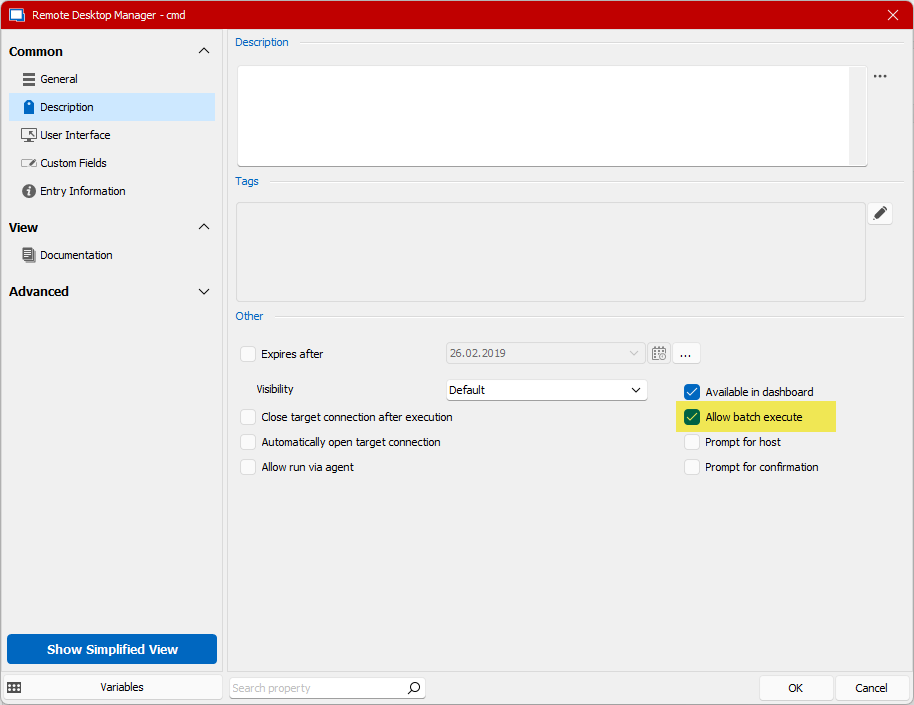
Testing Variables could also help to verify that the variables are resolved properly.
Regards,
Min
6d9115de-c4f7-497d-be57-7dcea6f4f8ef.png
Thanks for your answer.
Facts:
- RDM Enterprise 2022.2.20.0
- Your proposal: checked "Allow batch execute" => no positiv result
I test width my needed variables:
Remote Computer / connection / events / BEFORE conncetion
=> Powershell Skript
--------------------
$computer="$HOST$"
$user="$USERNAME$"
$pw="$PASSWORD$"
write-host $computer
write-host $user
write-host $pw
PAUSE
--------------------
=> positiv result ; all Variables show in LOCAL Powershell Window in the remote computer correct
I think is a problem with the $PASSWORD$ Variable
My original calling (Example: username = service; password = test)
c:\pstools\ .\psexec \\$HOST$ -u $USERNAME$ -p test -d -i 2 "C:\<program call>"
=> the Script works perfect
I test width:
c:\pstools\ .\psexec \\$HOST$ -u service -p $PASSWORD$ -d -i 2 "C:\<program call>"
=> I became the error: Wrong username or password
Hello,
would it be possible for you to try the Portable version?
Regards,
Min