Entry Shortcut Creation, Bulk Moving and Batch Opening

Hey there,
I have a workflow which involves making many shortcuts of entries and categorizing these shortcuts in folders. The connection type is RDP. The shortcuts in the folder should be able to be bulk opened by selecting all the shortcuts of entries and then batch opening them.
We upgraded to RDM Teams + Business HUB for data source recently.
Previously with RDM free and Google Drive data source, we would create folders with as many shortcuts in them as ~40-60. And we could shift left click--->right click open selected entries, and every single rdp window externally would be opened in a chain, so a total of 40-60 windows open at the end.
So I decided to export our .RDM file and import to the vault I setup.
Problem I had firstly was that no shortcuts were imported. That's not a big deal but would like to know why. We can rebuild the necessary shortcuts just might take a day or two.
Secondly:
When right clicking an entry--->edit Create shortcut, the shortcut behaves differently to how we were previously using them.
1) The icon is different and just looks like one big arrow (not RDP icon with small arrow)
2) You can't double click the shortcut and open a session
3) You can't shift select multiple entries and open a batch of sessions (very important for our workflow)
4) Cannot move the shortcut to a new folder, nor bulk move the shortcuts to a new folder, move is greyed out. (important for our workflow and works fine with RDM free + Google drive)
Is this something to do with permissions? I am using an admin user and I have assigned managers permission to myself. I don't understand why I can delete a shortcut but not move one in RDM?
Thanks so much,
Jon
All Comments (4)
Hello Jon,
Thank you for contacting us about this,
The issue you're getting is likely due to there not being any shortcuts in the way you know them with Devolutions HUB.
Instead Shortcuts in the Devolutions HUB are seemingy meant to send you directly to the original entry from which the shortcut was created.
This is why the only option you'll find on a shortcut within the RDM dashboard is "Select Entry in Navigation Pane", and "Go To" in Devolutions HUB on the web interface.
As for why it is that you can not move a shortcut, I'm not exactly sure. However it seems clear that the behaviour you're experiencing is not due to your permissions, but rather with how shortcuts were designed and implemented in Devolutions HUB.
This is also why the logo is different on the shortcut entry, because in a sense, it's as if the shortcut is it's own entry type with one purpose rather than being an extension of the original entry.
Let me know if you have further questions or concerns regarding this and it will be my pleasure to help.
Best regards,
Thanks for your reply mate! That makes perfect sense.
I guess I can actually just use duplicates to achieve what I need :)
Cheers mate.
Hello,
My pleasure !
If you ever have further questions regarding this, feel free to let us know.
Best regards,
Hello,
You might want to try the Playlist entry. It was created to open multiple entries at once. When creating a playlist entry, you can select which connections you want to open.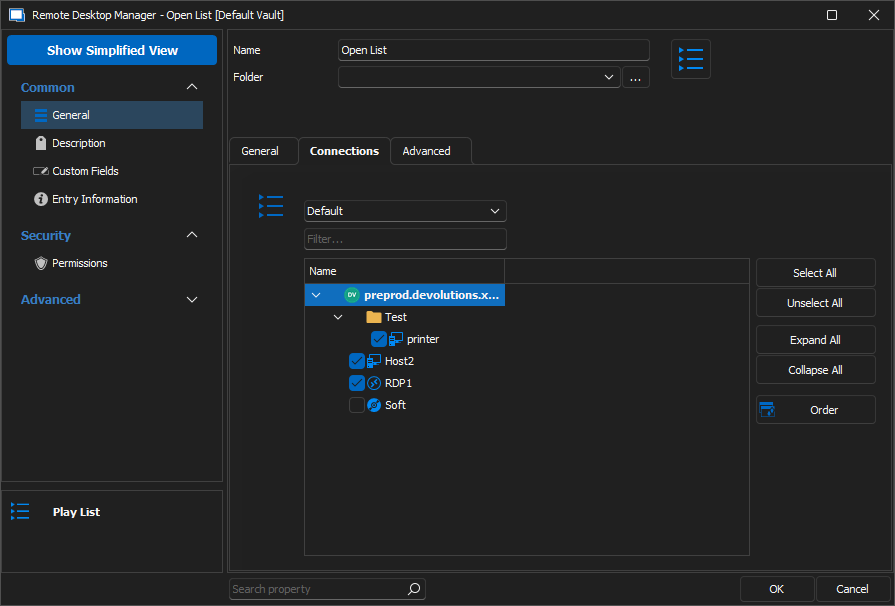
Have a good day!
Maxime Morin
2d16f83e-2b49-42dc-9569-acf6febc6186.png