Export - Import password history

Hello,
When I export the SQLite local vault to .RDM or .XML file and import it in Personal Hub (or different computer), passwords histories are not imported.
Is there a solution for that?
Regards
All Comments (14)
Hello,
When you're in the process of exporting your vault, please make sure to check the "include credential" option. This is an important step to ensure that all password is included in the export.
Best Regards,
Carl Marien
Hello,
I did check the "include credential" option.
This is a part of the .RDM file (I renamed some values for obvious reasons), as you can see, the "ItemID" is the same.
Actually, the import seems to work, but when I show the password history of an entry, the history is empty.
If I export the imported credential list, for example, the content of the .RDM files are the same.
I also tried with and without ChangeID.
Regards
Hello,
It appears there was an issue with the screenshot you sent. Could you kindly
resend it?
Best Regards,
Carl Marien
Hello,
Sorry I simply forgot to put the code in the post...
<?xml version="1.0"?>
<RDMExport>
  <Connections>
    <Connection>
      <ConnectionType>Credential</ConnectionType>
      <Group>Paramètres\Listes des mots de passe</Group>
      <ID>a63b7b58-53c2-4ec2-9dd3-ad43c2571887</ID>
      <Name>%listname%</Name>
      <Credentials>
        <CredentialType>PasswordList</CredentialType>
          <PasswordListItem>
            <Description>%description%</Description>
            <Host>%ip%</Host>
            <Id>5a8781b7-323f-45c6-8b53-675336595667</Id>
            <SafePassword>%safepassword%</SafePassword>
            <User>%user%</User>
          </PasswordListItem>
        </PasswordList>
      </Credentials>
      <MetaInformation>
        <PasswordHistory>
          <PasswordHistory>
            <ItemID>5a8781b7-323f-45c6-8b53-675336595667</ItemID>
            <LoggedModifiedBy>%computername\%username%</LoggedModifiedBy>
            <ModifiedBy>%computername\%username%</ModifiedBy>
            <ModifiedDateTime>2023-03-22T13:58:15</ModifiedDateTime>
            <SafePassword>%safepassword%</SafePassword>
          </PasswordHistory>
          <PasswordHistory>
            <ItemID>5a8781b7-323f-45c6-8b53-675336595667</ItemID>
            <LoggedModifiedBy>%computername\%username%</LoggedModifiedBy>
            <ModifiedBy>%computername\%username%</ModifiedBy>
            <ModifiedDateTime>2020-11-20T09:25:02</ModifiedDateTime>
            <SafePassword>%safepassword%</SafePassword>
          </PasswordHistory>
        </PasswordHistory>
      </MetaInformation>
    </Connection>
  </Connections>
  <DatabaseID>9c76ae3d-79c3-499f-a06b-5b3ead34a9b5</DatabaseID>
  <Version>2</Version>
</RDMExport>
As I said, I removed some datas, but the <ItemID>, <PasswordHistory> and other necessary information are here.
Regards
Hello,
I wanted to let you know that I have forwarded all the relevant information to our engineering department. Unfortunately, we haven't been able to identify a solution currently.
Best regards,
Carl Marien
Hello,
This should be fixed once RDM 2023.2.15.0 releases.
Regards,
Hubert Mireault
I installed the version 2023.2.18.0
When you show an entry's password history, you'll see all the previous password of the credential list, even if it's from another entry.
Regards
Hello,
Could you possibly provide us with a screenshot illustrating the issue at
hand?
Best regards,
Carl Marien
Hello,
Here is a screenshot of the problem.
I took one entry in the password list, clicked on history button and it showed me the result on the right.
The window on right should show only a few value but it shows a compilation of all the previous passwords of all the entries in the password list.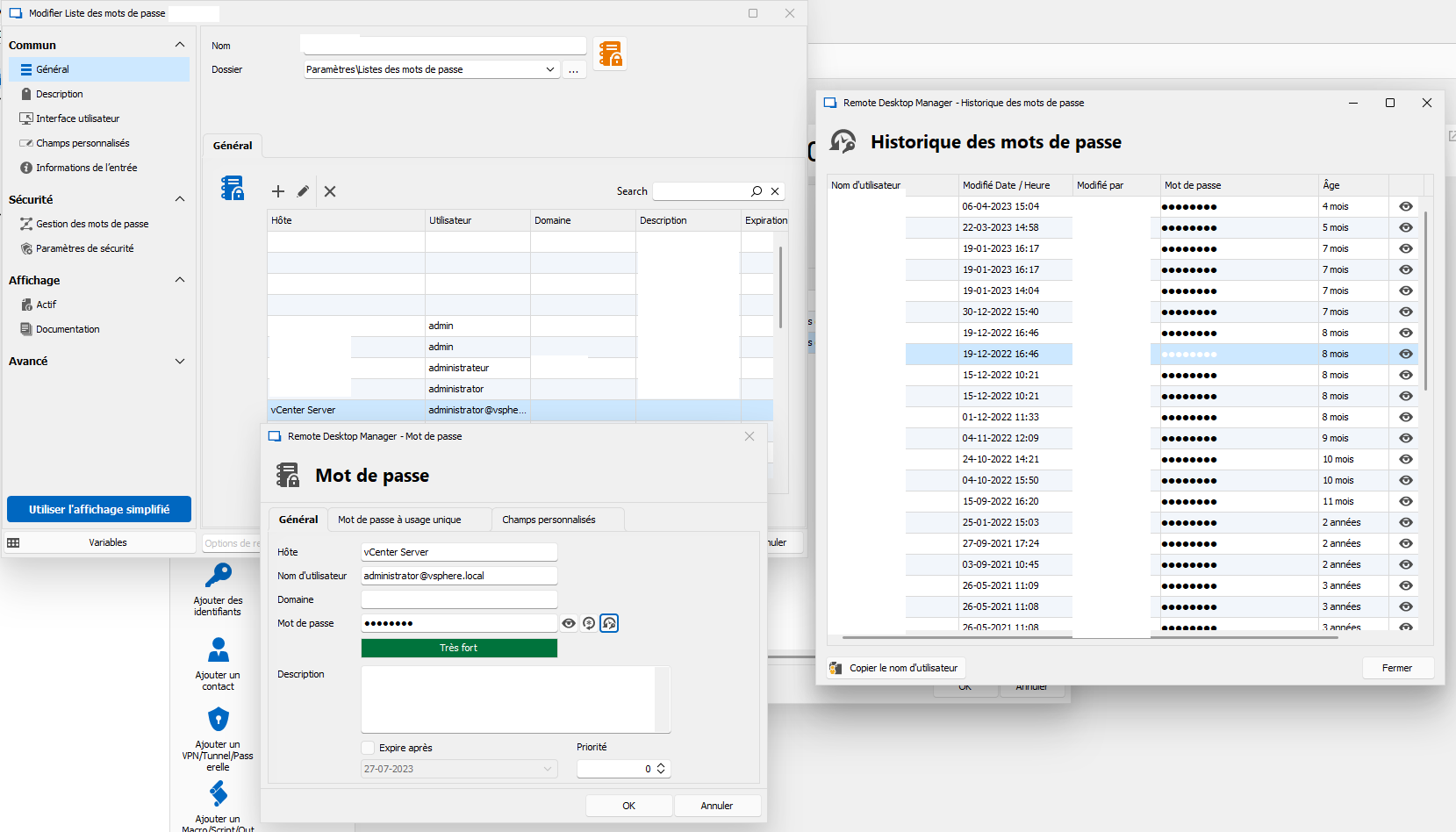
RDM_PWD_Issue.png
Hello,
I wanted to update you that despite my investigation, I have not found a way to change the hours of expiration in a password entry. However, I will reach out to our engineer as soon as possible to address it.
Best regard
Carl Marien
Hello,
The hours of expiration are not the problem. This is actually what should be showed. This is the same entry but local source instead of the previous picture wich was from the password list imported in Devolution Personal Hub.
Kind regards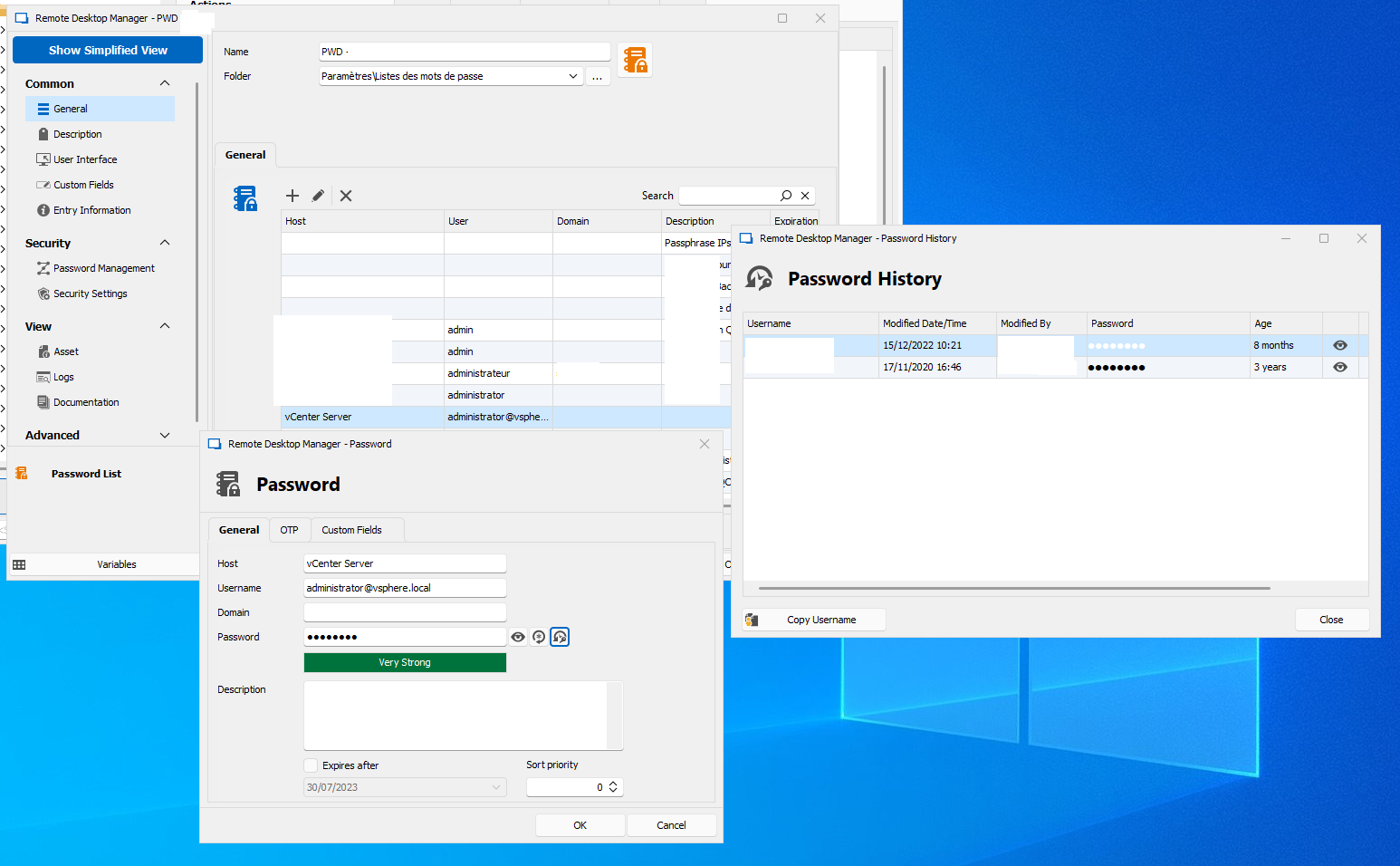
RDM_PWD_Correct.png
Hello,
We want to do a remote session with you, if possible, so that we can have a look at your issue.
can we open an internal ticket so we can send you a remote session link to your email?
Best regards,
Carl Marien
Hello,
Sure, you can do that.
Kind regards
Hello,
We asked you for a remote session with you via email so that we can have a look at your issue.
best regard
Carl Marien