iDRAC9 embedded browser virtual console

Hello everyone, did anyone manage to get the iDRAC virtual console window to work when using the windows (Edge) embedded browser?
In my case, it just stays black and runs into a timeout after a while. In the error window (2nd picture) it says something generic like: Cannot connect to the viewer, close an try again.
In the main window it complains about a popup blocker (3rd picture), even thou the viewer tab can be opened without problems.
Since MS transitioned to edge, i try to use edge more in RDM, with mostly great results.
iDRAC used is the newest version, 7.00.00.00. I had this problem with prior versions as well, like a year ago, i was just to lazy to do anything about it...


asd2.png
asd.png
grafik.png
All Comments (13)
Hello,
I was just testing the iDrac connection settings yesterday. I just used the built-in iDrac module and everything works fine.
54c556e2-7b13-4638-94e4-c4d10369c1d8.png
Nice, didn't see the iDRAC option the last time i checked.
The viewer works, but the password autofill doesn't, any idea about that?
I had to use "Use auto fill timer" with 1000ms.
That's all i have set and it's working :)
Hello,
Glad that you were able to find the solution! Let us know if you have any further questions :)
Best regards,
Etienne Lord
Yeah, i tried 2000ms without success, both with idrac 7 and idrac 5.10.30.00
Well, at least the viewer works!
@Etienne Lord
Maybe you habe some ideas, why the autofill doesn't work with the iDRAC entry. The settings are pretty basic, not that there are many options..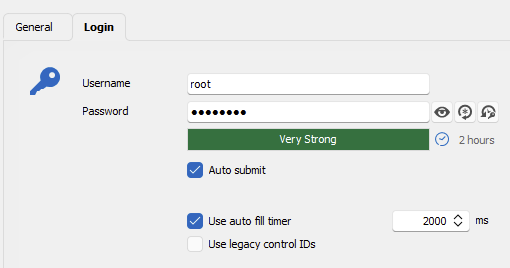
grafik.png
Hello,
We got a ticket open to have our iDrac updated to iDrac9. Once this is done, I will have a look!
At the moment, I would not be sure why it would not autofill. As far as I remember, it was always tricky to make the autofill work for iDrac, but we would normally recommend creating a Website instead.
Best regards,
Etienne Lord
Hi, i didn't read the last patchnotes, but it seems to be working now with the newest version 2023.2.32.0
I testet with irmc 7.00.00.00 und 7.00.30.00
Thank you!
Hello,
Glad to hear that it's now working, let us know if you have any further issues or questions!
Best regards,
Etienne Lord
Hello
I wanted to share that RDM 2023.3 is now available, and once you update you'll find that the existing DRAC connection has been renamed to "Dell iDRAC (Web)". This is still the supported way to connect to the DRAC management interface.
However, you'll also find under "Sessions" a new connection type "Dell iDRAC". This provides a native connection to the virtual console of the DRAC server that offers better integration than going through a web browser session. I'd encourage you to give this a try and we welcome any feedback.
One limitation is that it's currently necessary to select the connection mode manually (the virtual console implementation switched from the Avocent protocol to VNC over websockets in the DRAC 7+ firmware). An update in the near future will allow this to be negotiated automatically.
Finally I wanted to share that it's on our roadmap for the 2024.1 version to start exposing DRAC management functionality via a native interface instead of the embedded web browser.
Please let me know if something isn't clear or you have any questions
Thanks and kind regards,
Richard Markievicz
Hello
happy to see the iDRAC integration. For me it worked only with local iDRAC users.
If I try to login with a domain user (Active directory configuration in idrac module is done) I got this message: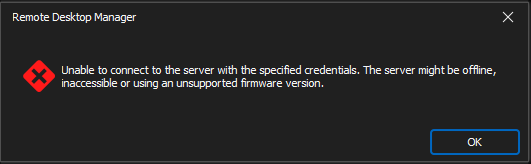
Is it my fault or is a login via domain services not supported?
I also tried to enter the credentials manually username@domain and the password.
Thanks for help!
Patrick
4d84e885-5925-4fe5-9505-277f054afc01.png
Hello
happy to see the iDRAC integration. For me it worked only with local iDRAC users.
If I try to login with a domain user (Active directory configuration in idrac module is done) I got this message:
Is it my fault or is a login via domain services not supported?
I also tried to enter the credentials manually username@domain and the password.
Thanks for help!
Patrick
Hello Patrick
First, I'm glad things are working with your local DRAC servers.
I have to check for the Active Directory account if we are supposed to do anything special on our side. The DRACs we have in our lab are not tied into Active Directory.
Can I ask what DRAC version(s) you are running that are integrated with AD?
Thanks and kind regards,
Richard Markievicz
Hello Richard,
thank for quick answer.
It does not work on some version. As example Version 3.36.36.36(Build 21) (Integrated Dell Remote Access Controller 9)
Thanks
Patrick
Hello Patrick
Which connection mode do you use? Is it "Default" or "Automatic", or something else?
It doesn't look like we need to do anything special to support a domain login; did you try the username format "domain\username"?
If possible, please generate a diagnostic log for me:
- In Options > Types > Sessions > Apple Remote Desktop (ARD) / VNC
- Under "Advanced", check "Enable logging for ARD and VNC"
- Provide a path to create the log file (e.g. c:\users\rmarkiewicz\desktop\rdm-vnc.log)
- "Ok" the changes and close and reopen RDM
- Reproduce the problem
- The log file should be created, you can send to me by PM
Afterwards, disable logging again as it has a non-zero effect on performance.
If something isn't clear or you have further questions please don't hesitate to post back.
Kind regards,
Richard Markievicz