PowerShell Batch Edit question

Can the "Edit - Special Action > PowerShell Command" be used to modify the properties of a folder connection type?
I'm trying to edit / remove the highlighted property from a number of folders that it has been set.
<?xml version="1.0"?>
<ArrayOfConnection>
<Connection>
<ColorMode>Inherited</ColorMode>
<ConnectionType>Group</ConnectionType>
<CreatedBy>ACOMPUTER\user</CreatedBy>
<CreationDateTime>2023-07-06T23:44:15</CreationDateTime>
<CredentialConnectionID>B87B29D9-9239-4D7B-86D8-9B53DCD3BA9F</CredentialConnectionID>
<Group>test</Group>
<ID>dd72c0cf-d863-426f-af41-1278c4c5b40f</ID>
<Name>test</Name>
<TabGroupMode>Inherited</TabGroupMode>
<TemplateSourceID>55416a52-8373-4420-b324-7ace19288076</TemplateSourceID>
<UpdateDateTime>2023-07-06T23:44:40</UpdateDateTime>
<UpdatedBy>WINDOWS10\Connetic</UpdatedBy>
<GroupDetails>
<DefaultAction>CopyPassword</DefaultAction>
</GroupDetails>
</Connection>
</ArrayOfConnection>
I attempted:
$connection.GroupDetails.DefaultAction = "";
$RDM.Save();
But it doesnt work, in fact I tried some basic changes to even the name and it only seems to affect all of the sessions contained within.
Thanks in advance!
--
Eric Sakariasen
Connetic IT Support
All Comments (3)
Hello,
To be able to modify folders' properties only, you need to do it from the Advanced search dialog.
Then, you select the folders you want to modify and right click - Edit - Edit (Special Actions)...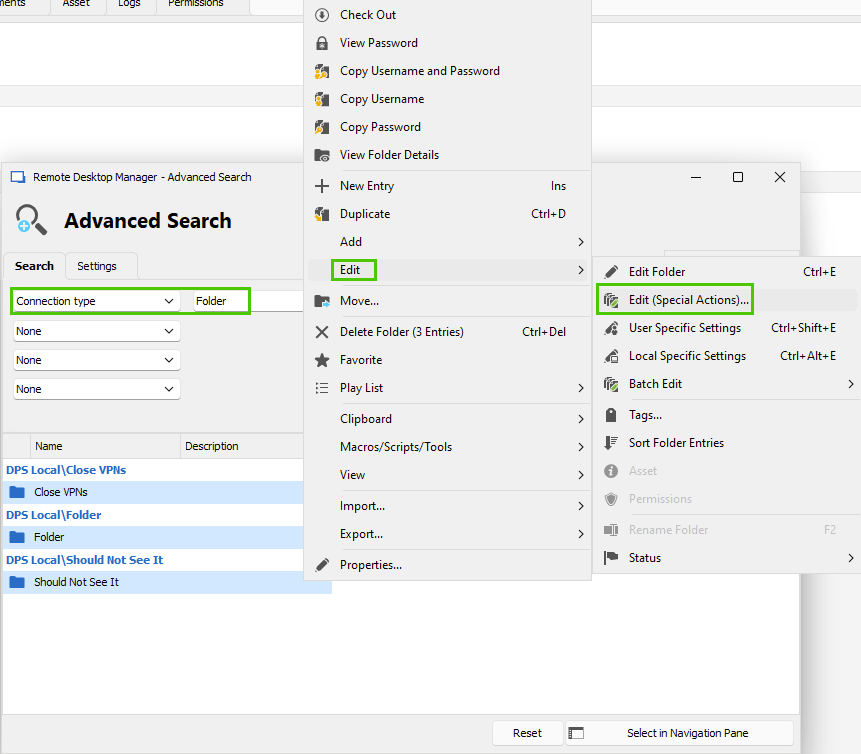
Let us know if that helps.
Best regards,
Érica Poirier
efb7f868-4ff3-4bec-a33a-ec641dc6ba2e.png
Erica, this worked perfectly, thanks!
--
Eric Sakariasen
Connetic IT Support
Hello Eric,
Thank you for your feedback and glad it helped!
Best regards,
Érica Poirier