Mac Keystrokes RDP Hyper-V

Hello... referring this post https://forum.devolutions.net/topics/27434/send-clipboard-keystrokes-with-predefined-macro
I have the following problem: I connect via RDP to an Hyper-V Host in this session sending keystrokes with my shortcut is working but if I open a Hyper-V Server console and want to insert the password, it is not possible with my way (shortcut). The only possible way is with your Type Clipboard Button in RDM. For me the question is how you paste the values? maybe it is possible to send me the source code for this (only a snipped) other you have a solution for me. The click on the Button in RDM is not enough for me because I put a lot password a day in some logon screens.
I try the same with Royal TSX and it works with my solution also with Microsoft Remote Desktop from the AppStore.
All Comments (12)
Hi Martin,
In order to help you, I will need more information. You mention your way (i.e. shortcut) a couple of time, but what do you mean by that exactly? What shortcut are we talking about here?
To my understanding, the Type Clipboard feature is a mean to workaround limitation where the pasteboard isn't yet shared between the local and remote host (i.e. initial login window I believe). For this, with Type Clipboard, we just send key directly instead of pasting.
Would your issue be resolved with a shortcut to the Type Clipboard action?
Best regards,
Xavier Fortin
Hi Xavier,
please take a look in your Messages. THX
Got it!
Yeah, your using Apple Script, this is actually how we did it a while back both for macros and the Type Clipboard action. We switch to using the CGEventPost method because it was more reliable and was quite simpler on a programmatic level.
That being said, I've tried your apple script, and configured it in automator, and it seems to work without issue for me. But I might have misunderstood something. Is it generally working, but in specific instance doesn't?
Also, have you made sure Remote Desktop Manager has the "Allow assistive applications control the computer" right? See:
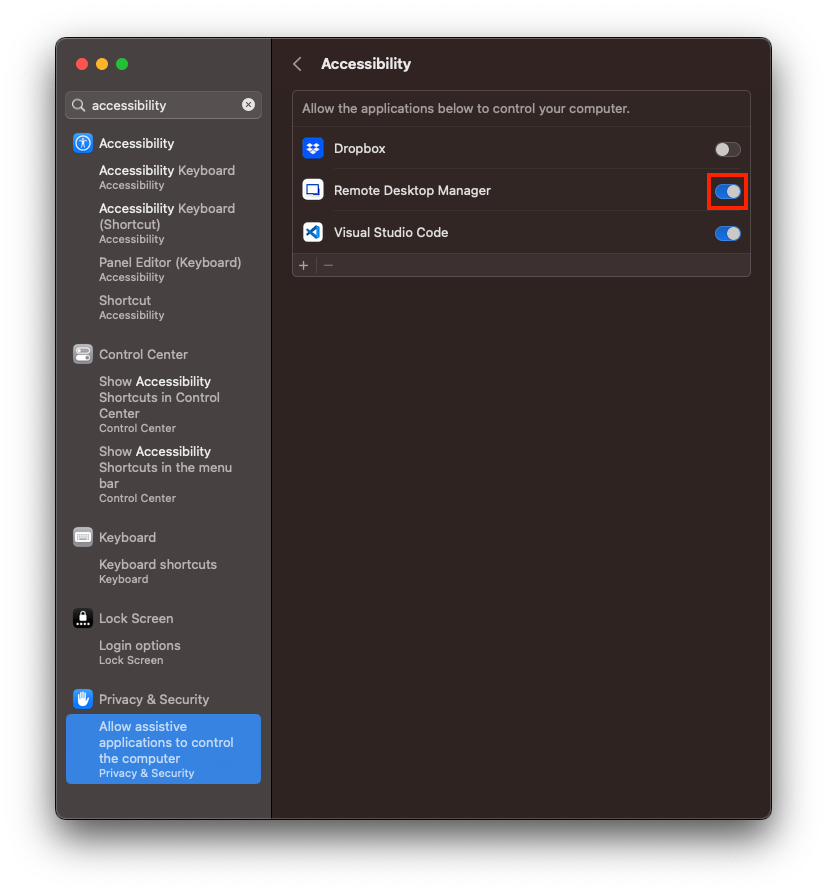
Best regards,
Xavier Fortin
Hi... yes RDM is enable at Accessibility and it works. I have the following situation: open RDP Session, inside I open a Hyper-V remote console and in this it is not possible to insert the logon password with my Apple Script. When I use your Type Clipboard button it works. With my Apple Script it works with Royal TSX and Microsoft Remote Desktop but not with RDM. Have you a small Apple Script with the CGEventPost for Automation that also make the same as my Apple Script?