Mac Keystrokes RDP Hyper-V

Hello... referring this post https://forum.devolutions.net/topics/27434/send-clipboard-keystrokes-with-predefined-macro
I have the following problem: I connect via RDP to an Hyper-V Host in this session sending keystrokes with my shortcut is working but if I open a Hyper-V Server console and want to insert the password, it is not possible with my way (shortcut). The only possible way is with your Type Clipboard Button in RDM. For me the question is how you paste the values? maybe it is possible to send me the source code for this (only a snipped) other you have a solution for me. The click on the Button in RDM is not enough for me because I put a lot password a day in some logon screens.
I try the same with Royal TSX and it works with my solution also with Microsoft Remote Desktop from the AppStore.
All Comments (12)
Hi Martin,
In order to help you, I will need more information. You mention your way (i.e. shortcut) a couple of time, but what do you mean by that exactly? What shortcut are we talking about here?
To my understanding, the Type Clipboard feature is a mean to workaround limitation where the pasteboard isn't yet shared between the local and remote host (i.e. initial login window I believe). For this, with Type Clipboard, we just send key directly instead of pasting.
Would your issue be resolved with a shortcut to the Type Clipboard action?
Best regards,
Xavier Fortin
Hi Xavier,
please take a look in your Messages. THX
Got it!
Yeah, your using Apple Script, this is actually how we did it a while back both for macros and the Type Clipboard action. We switch to using the CGEventPost method because it was more reliable and was quite simpler on a programmatic level.
That being said, I've tried your apple script, and configured it in automator, and it seems to work without issue for me. But I might have misunderstood something. Is it generally working, but in specific instance doesn't?
Also, have you made sure Remote Desktop Manager has the "Allow assistive applications control the computer" right? See: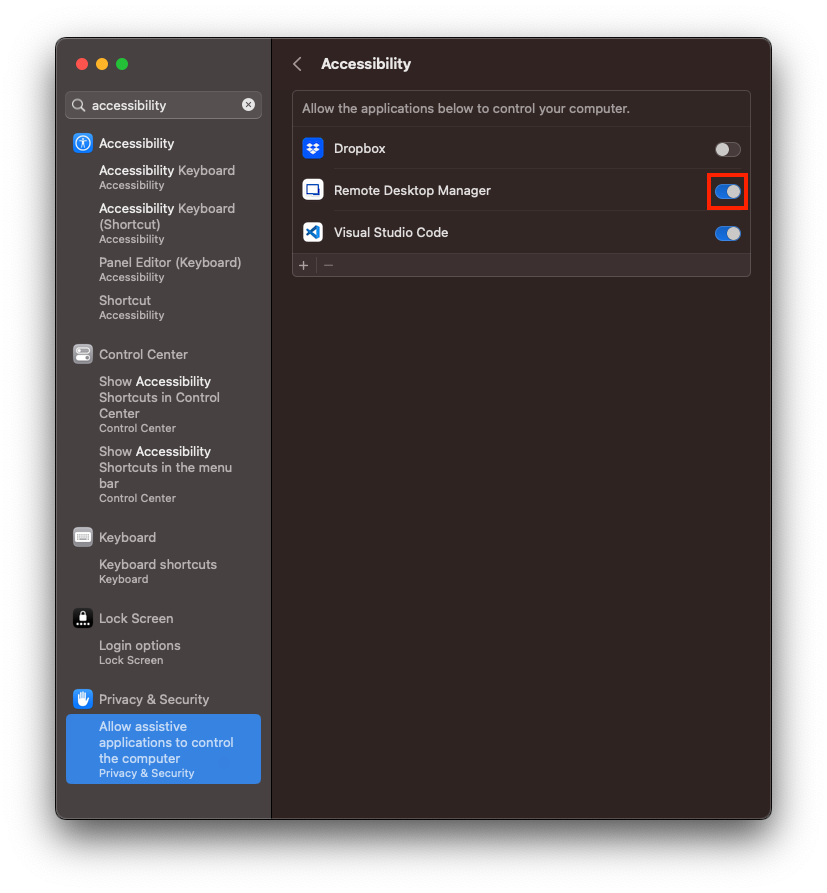
Best regards,
Xavier Fortin
AssistiveAccess.png
Hi... yes RDM is enable at Accessibility and it works. I have the following situation: open RDP Session, inside I open a Hyper-V remote console and in this it is not possible to insert the logon password with my Apple Script. When I use your Type Clipboard button it works. With my Apple Script it works with Royal TSX and Microsoft Remote Desktop but not with RDM. Have you a small Apple Script with the CGEventPost for Automation that also make the same as my Apple Script?
It would be hard to integrate this in Automator, CGEventPost is part of the CoreGraphics library and I don't think it is exposed directly in AppleScript. Actually, I believe AppleScript should be using CGEventPost in background for it's keystroke command (although I'm only speculating). So, why it wouldn't work in this specific circumstance is a mystery to me.
I'd like you to try something for me though. Could you set the Settings -> Types -> RDP -> Keyboard -> "Send input as unicode" to Yes?
Make sure that your session does not override this setting by ensuring the corresponding setting is left to Default:
Could you try your Automator shortcut again and see if it changes anything?
Best regards,
Xavier Fortin
SendInputAsUnicode - Entry.png
SendInputAsUnicode.png
I tried this, it doesn't work. Which makes me wonder why it works at Royal TSX. It rules out a problem with Hyper-V or the server.
There might be a subtle difference in how they transfer key event to RDM.
I'll open a ticket so that we can try to reproduce this on our side.
Best regards,
Xavier Fortin
Hi Martin,
So far, I have been unable to reproduce your issue.
The steps are as follow:
- I connect to an Hyper-V Host with and RDP session in RDM
- From the Hyper-V Manager app, I open one of the VM
- In the authentication page of the VM, I focus the password field and execute the Services -> Input Clipboard action (which is configured with AppleScript you provided to me)
In my case, the password is autofilled properly, with and without the "Send input as unicode". Am I misunderstanding your use case? Maybe you could provide a small video demonstrating the issue?
Best regards,
Xavier Fortin
Hi Xavier,
im confused now. You used my AppleScript with a keyboard shortcut? Can you send me all settings of your RDP connection maybe there is a prob? Thanks! What you describe is exactly this what I want but with my settings it is not possible to insert the password at the hyper-v console.
Hi Martin,
I actually was not using the shortcut though, just the menu item directly in the Remote Desktop Manager -> Services menu.
Could you try a thing for me? Could you add the shortcut you've configured for you AppleScript in the following table (in Settings -> User Interface -> Shortcuts):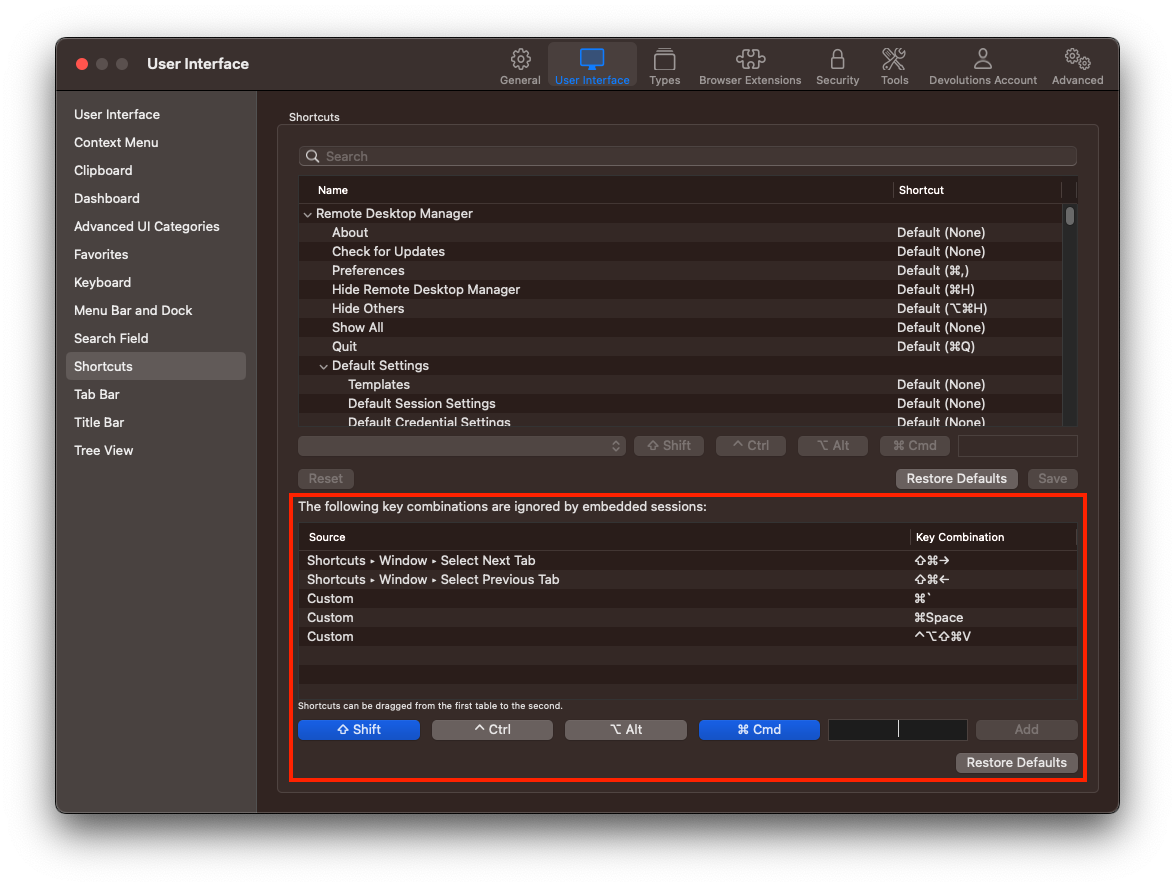
Best regards,
Xavier Fortin
SessionIgnoredKeyCombinations.png
Hi Xavier,
you are my hero! it works! perfect my problem is solved and RDM now better as before :) THANKS! I added only the key combination and it works!
Glad to hear it!
Yeah, I didn't think of this at first, that the shortcut could be the issue and not necessarily the script itself.
Do not hesitate if you have any other issues!
Best regards,
Xavier Fortin