Macros with custom variable input prompt

Hi together,
I would like to create a macro in RDM that asks me for an input at startup.
The entered value in the pop-up window should then be inserted within the macro and then inserted in the session (SSH).
I've already done some research, but couldn't find anything on this.
I probably need to use the $CUSTOM_FIELD[x]$ variables, however I don't know how to implement the popup if it is possible.
Specifically, I am talking about a script that changes the configuration of an interface on a switch.
The key sequence macro would then look like this in my imagination:
delete interfaces $CUSTOM_FIELD1$
set interfaces $CUSTOM_FIELD1$ description XXX
set interfaces $CUSTOM_FIELD1$ unit 0 family ethernet-switching
set protocols dot1x authenticator interface $CUSTOM_FIELD1$
Are there any ways to implement it this way or which respectively solve my problem?
Thanks in advance.
I am looking forward to your answers!
Best regards
All Comments (6)
Hello,
At the moment I don't think what you're trying is possible. The good news is, we currently have plans to add parameters to typing macros for RDM 2023.3. This would allow the scenario you're talking about, by allowing prompting for the parameters when executing the macro.
If I take your example, instead of using the $CUSTOM_FIELD1$ variable, it would be something like {1} in your script, and it would be replaced by whatever you enter when prompted.
If you want an example of the feature, you can look at the Command Line entry, which already has the parameters feature.
Regards,
Hubert Mireault
Hello,
that's good to hear!
Can you send me a sample file for this (Command Line entry)?
Thanks in advance
Hello,
I've attached to this post a ZIP containing a .RDM export file for a very basic example of how the feature works. You can import it in your vault by right clicking > import > RDM, then select the file. It will contain one command line entry.
What it does is very simple. In the first tab the command line is configured: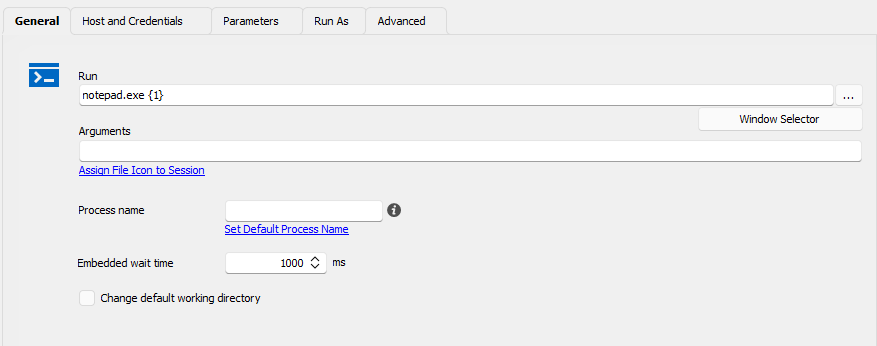
Note that the {1} is for the parameter feature.
Then, in the parameters tab, I've configured the first parameter for the file path: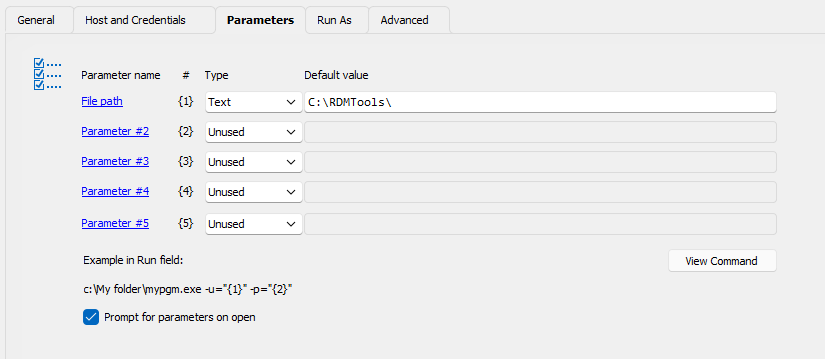
Since I've checked "prompt for parameters on open", this means when I run the entry, I will be prompted for the parameters. You can see that I've already prefilled the parameter with the start of a path.
When I run the entry, I'm presented with a prompt for the file path, with the parameter prefilled: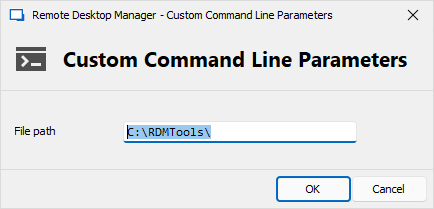
From there, I can modify the parameter, in my case adding "TestFile.txt" at the end to open that file for my test. Notepad then take this as its first parameter, and successfully opens the file.
I hope this helps you understand how the parameters feature works. This is what I had in mind that we could implement for the typing macro.
Let me know what you think.
Regards,
Hubert Mireault
6191f286-4cb5-4014-a1e2-4d3085c28dde.png
13c4eaa8-d510-4f04-bbfe-a9f1554a0483.png
96dcbddb-2806-4633-bf6c-314b4684b73d.png
Notepad + Filepath.zip
Hello,
oh, okay, I was thinking that this would also solve my problem in the SSH session.
I will wait until the next update.
Thanks a lot
Please message here when they update. Are you trying to find online essay examples but are having trouble doing so? You may discover here many excellent essay examples on our website, that will help you complete your essay projects on time.
Hello,
We've implemented the custom parameters feature for Typing Macros. You'll be able to try it out in our 2023.3 release this fall.
Regards
Jonathan Del Signore