Computer List locks up Remote Desktop Manager

Anytime I go to the Computer List (mainly accidentally because I know the names of the computers I need to connect to) I have to end up killing Remote Desktop Manager because it takes over an hour to what it's doing and never returns a list. We have over 100K machines in our directories, but other tools I have only take a minute to pull the full list.
It just says "Loading computer list, please wait..." using a TOP-MOST-WINDOW... so I can't even get rid of the silly window even after switching to other apps.
Is there an option to stop the automatic search? If not please add one or at least provide a CANCEL button!
All Comments (1)
Hello,
I will verify if we can add a cancel button for the AD search. In the meantime you can disable it and only use the network scan which has a Cancel button: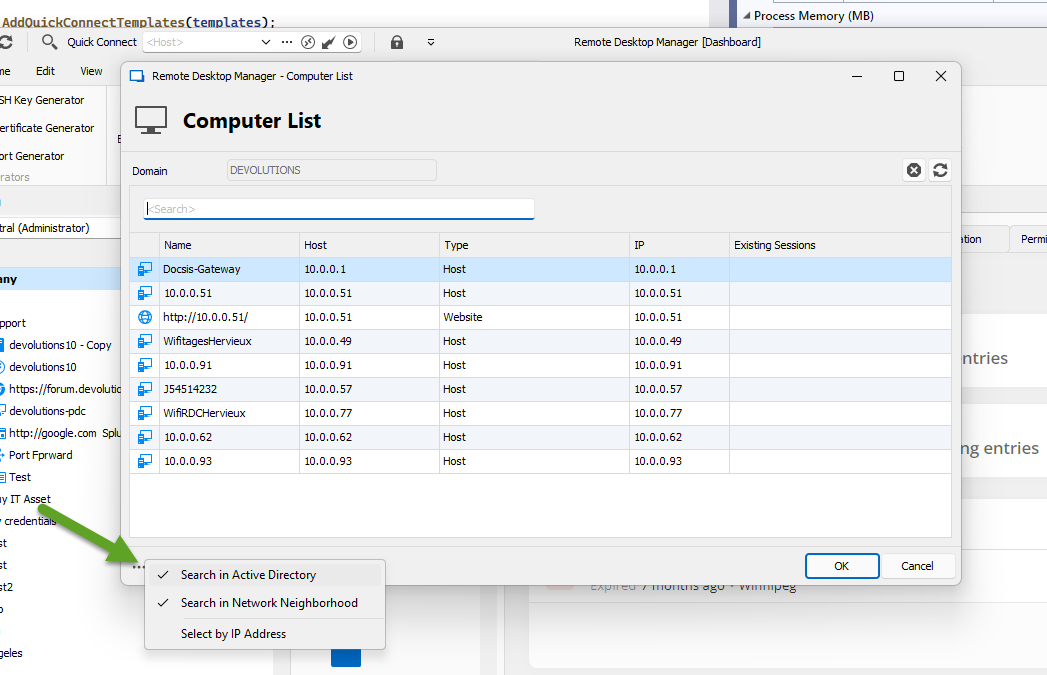
By thr way, you need the latest version for that.
Regards
David Hervieux
48d58edf-a96f-46c3-a4ec-a2191d4a9523.png