Custom field names are resetted after editing again

Hello,
When I edit an entry with custom field names, they are simply reset to default after saving. The same is true when I duplicate an entry with custom field names, the duplicate then has only the default names (Custom #1, Custom #2, etc.). This is a serious bug that has destroyed some of our data! How on earth got this unnoticed to production?!
All Comments (9)
How can I search for custom field names? Seems impossible? I don't see another way to find out what names got deleted by your software.
Version is 2023.2.9.0 64-bi with SQL Database. I need an option to search for custom field names ASAP, since I have no other option to find our what got deleted by this bug!
Did some more testing. As soon as I edit an entry with custom field names, all of them on that entry are gone! It's enough to just open the entry and then save it. This is ridiculous, a software that is altering our data on it's own that easily is a big no go!
Hello,
My team has been able to reproduce the issue. A high priority ticket has been opened to our engineering department. We are currently testing a workaround by restoring the entry to a previous version. We will get back to you soon.
Sorry for the situation.
Best regards,
Jeff Dagenais
Hello,
I run into the same issue but I was able to restore the version before with the Entry history function.
Please let me know if this work in your case as well.
Regards,
Min
The entry history works, but how can I tell which entries have been been altered that way? It seems impossible to search for custom field names? If I use the Advanced search and search for Custom Field name "Custom #1" I get back a lot of items that don't have that name set as a custom name (yet, until someone changes it and the now still present names get lost). Also reverting back isn't an easy solution, since those items were initially changed for a reason. If someone changed e. g. a password and the custom field names got lost in this process, then I can't just simply restore the item from history, since that way the intended changes get lost. Unless it is possible to restore just single fields from a history entry and keep the rest, this is useless for us.
Also we are working a lot with the duplicate function. All custom field names in duplicates are changed to defaults upon creation, therefore they dont even have a history entry with the custom field names included.
We are now practically unable to edit a single entry without writing every custom field name again before every single change, which is basically impossible for us to handle.
Hello Earthrise,
A new version of RDM (2023.2.12) is now available and it contains the fix for the issue: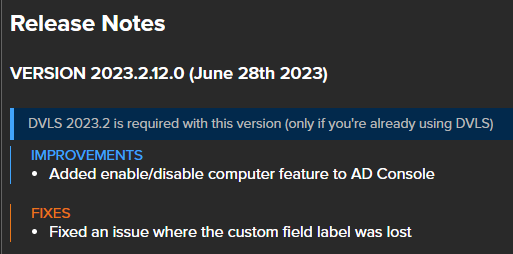
We apologize for the inconvenience it caused.
Best regards,
Richard Boisvert
4b5630db-350a-4630-9ceb-de8be1ded2ad.png
The problem is solved with this update, however, I still got no answer how to determine what entries have been altered by this?
Hello Earthrise,
If you go to Administration > Reports > Logs and History > Activity Logs Report: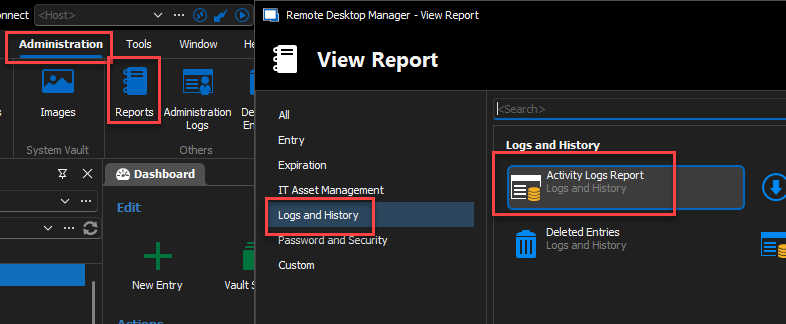
You can then check Message and put Entry Edited. By Default, it will display the last 7 days.
You will then see all the entries that were modified.
This list can also be exported if you prefer.
Best regards,
Richard Boisvert
ec0eaa21-da55-4a6c-b1b3-3b05f352cc2b.png
5d439f0f-dd26-42c6-887e-eef1f3b24e28.png
41787052-6fb5-4043-8606-52ea55caffcd.png