RDP Devolutions Cloud unavailable.

We get the following errors:
ystem.Exception: Unable to connect to Devolutions account.
bei Devolutions.RemoteDesktopManager.Business.WebAuthentication.WebAuthentication.GetEndpoints()
bei Devolutions.RemoteDesktopManager.Business.WebAuthentication.WebAuthentication.Authenticate(String defaultUser, Boolean persistToken, Dictionary`2 extraAuthenticationParameters, Boolean skipWaitingForLucid)
bei Devolutions.RemoteDesktopManager.Business.DataSources.HubPersonalWebAuthentication.Login()
bei Devolutions.RemoteDesktopManager.Business.DataSources.HubPersonalConnectionDataSource.Login()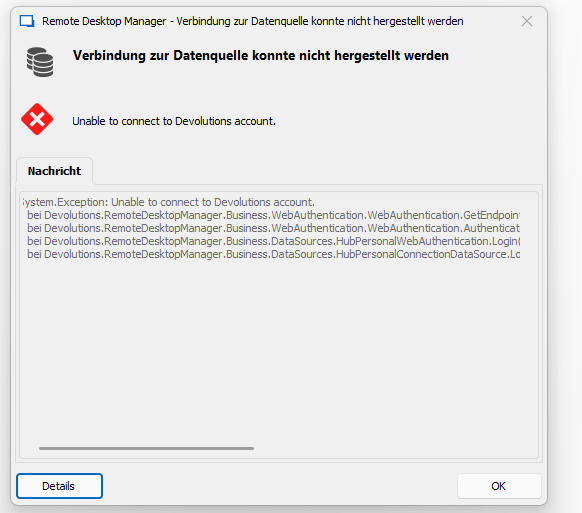
6fcd57d2-17c2-44ed-8ff4-45b7fd8a5438.png
All Comments (4)
Hello,
Could you try to Log off your account File => Devolutions Account => Sign Out and Sign in again?
If this doesn't work, would it be possible to remove and add the data source again?
File => Data Sources
Regards,
Min
Hello,
it works again, the internet access was partly disturbed.
Can I make a backup of the HUB personnel entries to use offline in an emergency?
Is it possible to use it offline
Hello,
Thank you for your swift reply!
Indeed! To enable the offline mode in an Hub Personal data source, please follow the steps listed here https://docs.devolutions.net/kb/remote-desktop-manager/how-to-articles/enable-offline-mode-hub-personal-data-source/
Best regards,
James Lafleur
Thank you for the info
Best regards