Missing Macros/Scripts/Tools and VPNs from Administration menu.
Missing Macros/Scripts/Tools and VPNs from Administration menu.

Hi
Has the Macros/Scripts/Tools and VPNs been move away from the Administration menu in 2023.9.0 or is this a bug.
Client Windows 11
Datasource: Devolution server.
From previous version:
6ebadb69-4c37-4d46-a060-246cde26db35.png
All Comments (12)
They have been grouped into the System Vault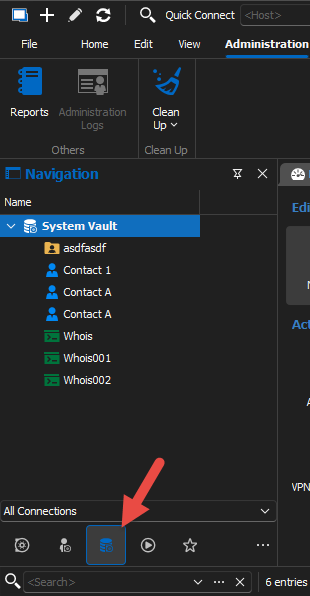
Stéfane Lavergne
b86aa063-c892-4b9b-b003-89f6eb85cc69.png
Then I found it.
But when I create a VPN/Tunnel/Gateway - Microsoft RDP Gateway I get: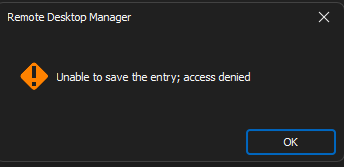
and get an Error e-mail form the server :
Error:
NotFoundException -
Exception of type 'Devolutions.Server.V2.Domain.Exceptions.NotFoundException'
was thrown. at Devolutions.Server.Controllers.ControllerGuard.ConnectionExists(Guid
id, Connection& connection) at
Devolutions.Server.Controllers.APIControllers.V2.BackendApiController.ReleaseLockEdit(Guid
connectionID) at lambda_method3577(Closure , Object , Object[] ) at Microsoft.AspNetCore.Mvc.Infrastructure.ActionMethodExecutor.SyncActionResultExecutor.Execute(IActionResultTypeMapper
mapper, ObjectMethodExecutor executor, Object controller, Object[] arguments)
at Microsoft.AspNetCore.Mvc.Infrastructure.ControllerActionInvoker.InvokeActionMethodAsync()
at
Microsoft.AspNetCore.Mvc.Infrastructure.ControllerActionInvoker.Next(State&
next, Scope& scope, Object& state, Boolean& isCompleted) at
Microsoft.AspNetCore.Mvc.Infrastructure.ControllerActionInvoker.InvokeNextActionFilterAsync()
--- End of stack trace from previous location --- at
Microsoft.AspNetCore.Mvc.Infrastructure.ControllerActionInvoker.Rethrow(ActionExecutedContextSealed
context) at
Microsoft.AspNetCore.Mvc.Infrastructure.ControllerActionInvoker.Next(State&
next, Scope& scope, Object& state, Boolean& isCompleted) at
Microsoft.AspNetCore.Mvc.Infrastructure.ControllerActionInvoker.InvokeInnerFilterAsync()
--- End of stack trace from previous location --- at
Microsoft.AspNetCore.Mvc.Infrastructure.ResourceInvoker.<InvokeNextExceptionFilterAsync>g__Awaited|26_0(ResourceInvoker
invoker, Task lastTask, State next, Scope scope, Object state, Boolean
isCompleted) --- Default
Source:
Devolutions.Server
-------------------------------------------------------------------------
The entry is created.
But I cant see it in the VPN/Tunnel/Gateway on an RDP Entry when choosing Microsoft RDP Gateway.
3496def2-026e-43a9-9393-49b859b908ab.png
I'm validating with the team to try to figure out what is going on. Chances are there's an issue with the build.
Stéfane Lavergne
We found the issue on Devolutions Server end of things and a fix will be released as soon as possible
Benoît Sansregret
Hello,
Version 2023.2.2.0 is now available and a fix has been done for your issue. Let us know if it works for you.
Best regards,
François Dubois
Now I can create the Microsoft RDP Gateways with out errors, but I can’t select them from an entry or folder.
They do not show up in the drop-down menu.
Client: Windows 11
RDM Version 2023.2.12
DVLS Version 2023.2.2
Hello,
Are you using RDM or the web interface to edit your connection ? I just reproduced it in web, but it seems to work in RDM. A workaround would be to use RDM for now, but we will work to fix our web interface as soon as possible.
Best regards,
François Dubois
I created them in an earlier version of RDM.
I assume I should have seen them into the new System Vault, but I do not see them there, this are Template.
So, I can’t delete the old ones.
When I am trying to creating a new one it does not list the website templates.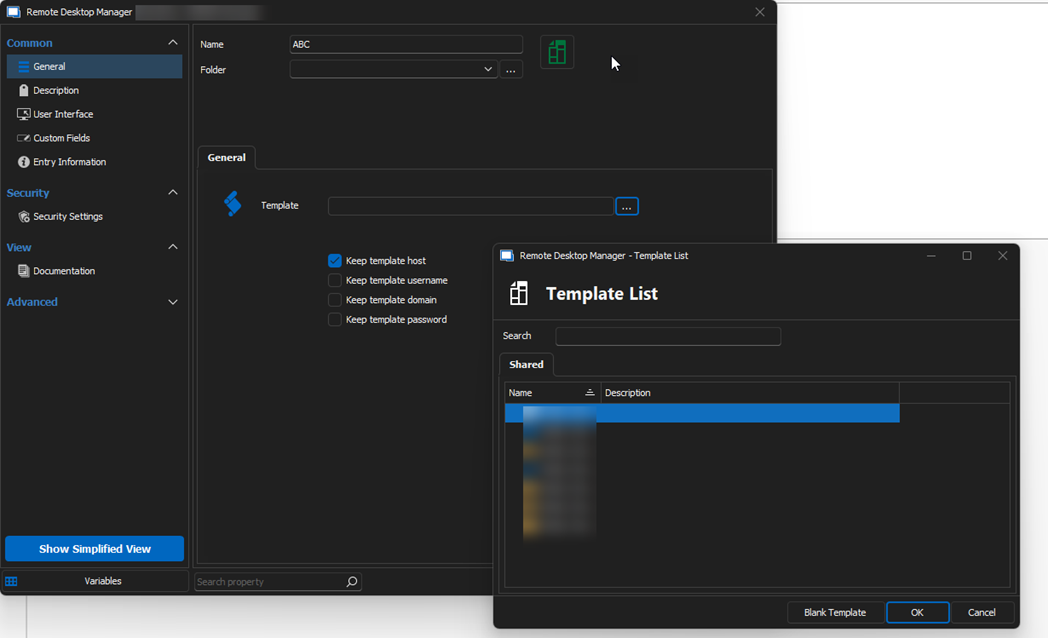
7ac961b5-02d8-41af-ac15-dfd3da7b3af4.png
Hello,
Thank you for the info. You are right, I reproduced that behavior and it seems to be an issue. I talked with a colleague this morning, he is investigating and will write back here once he find something.
Best regards,
François Dubois
Hi,
We found what the issue was internally and will start working on a fix as soon as possible.
As a work around you should be able to create the entry in your shared vault and clipboard it in the system vault without issues.
We will make sure to keep you posted on future development.
Regards,
Jean-Francois Duchesne
Now I see only one of each.
But in the system vault I do not see them, and the web templates that they are using I can’t see in the templates.
But they are working.
If I create a new Web Template I see it in the File…Templates but not in the list (A) of templates to select
from when creating a new Template in the system vault.
Client Windows 11
RDM Version 2023.2.14
DVLS Version 2023.2.3.0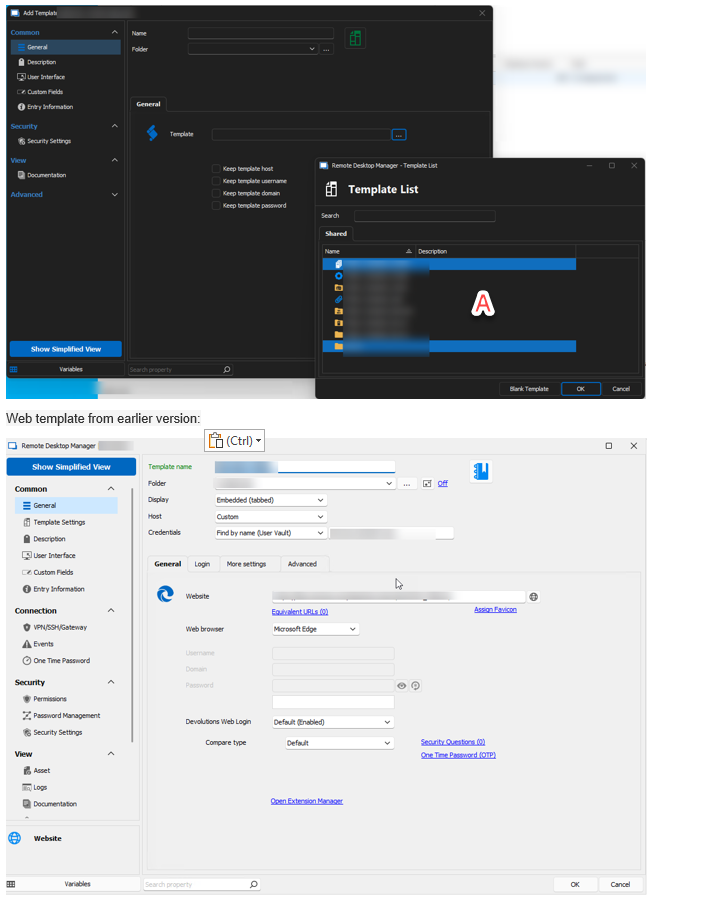
046a5e76-ba70-4a6d-9345-819c8ff31a3e.png
Hello,
We've modified the Template Macro entry to let you use templates without restrictions in the System Vault. This should be available for 2023.2.16
Regards,
Jafran Majeau