RDM jump host detection in local network

Hi,
we have several customers in our RDM database to which we connect via jump host from our company network. If we are in the network of our customer, we have to manually disable the jump host to connect directly or use the "direct conection (without jump host)" which is quite uncomfortable.
Is there a way to let the RDM detect if the jump host is in the same network or at least reachable and then ignore the jump host and connect directly automatically?
All Comments (7)
If you configure the Jump via the VPN section, you can select Connect if unable to ping/port scan or one of the other options.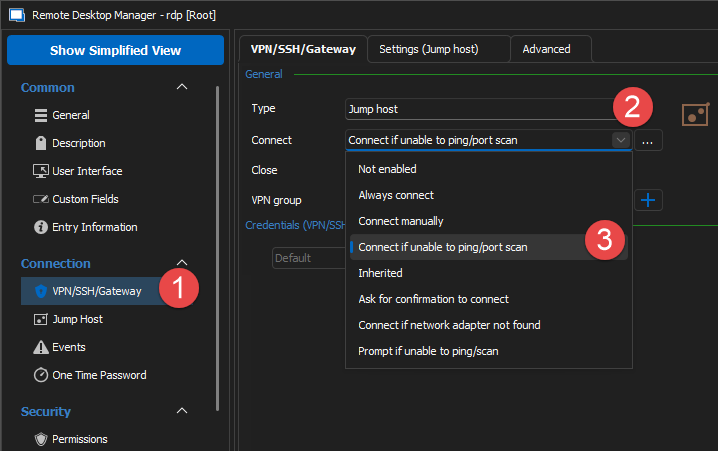
Stéfane Lavergne
acc234f1-313a-4df3-ba0a-a9c8a6a54150.png
Hi Stéfane Lavergne,
I can't get this to work properly. Maybe you can help me with the configuration?
folder structure:
customer
- EXTIP Jumphost (RDP)
- INTIP Jumphost (RDP)
- Folder servers
- server1
- server2
The situation:
we have an external IP address EXTIP on which we can connect from our company network to our customer. On this EXTIP, there is a NAT from the firewall to the internal jumphost.
Configuring this EXTIP as a jumphost in RDM and inherit it on all server connections works fine from our company network.
Now when I am in the network of the customer, I don't want to go this route, I want to connect directly to the servers WITHOUT using the "direct connect" Button (because of habits) OR through the internal IP address INTIP of the jumphost at the customer (depends on the customer) WITHOUT using the "direct connect" Button
I tried to configure it this way:
the INTIP is configured as the jumphost on the servers folder. On the INTIP is the VPN gateway configured as you pictured it, with the jumphost entry being the EXTIP and I ping the INTIP. Did I get somewhat confused?
Just to make sure I understand.
- From your local network
- Jump via EXTIP (RDP)
- From customer, depending on the customer
- Direct
- Jump via INTIP (RDP)
Is this correct?
Stéfane Lavergne
Yes, exactly!
So for the customers that you want to have direct access, configure your Jump via the VPN/SSH/Gateway tab and set the Connect condition to Connect if unable to ping/port scan; everything should be good. Make sure the ping/port scan can work, you may need to figure it.
As for the others, I need to think... I will talk to colleagues to see if there's a way to make this work automagically.
Best regards,
Stéfane Lavergne
Note: I'm assuming you are carrying your laptop around, if this is not the case, you could use a Local specific settings to configure the proper jump IP.
The Alternate Host feature could maybe work here:
- Instead of 2 jump hosts, create a single one
- Description - Alternate host
- Set to Ping
- enter both IP
- INTIP
- EXTIP
Now, when you open the session, it will ask the jump host to start. The first thing the jump host will do is ping EXTIP, if that works it will connect if not it will ping INTIP and try to connect there. I'm assuming this will only work if both have the same credentials to connect.
Let me know if this solution could work for you.
Best regards,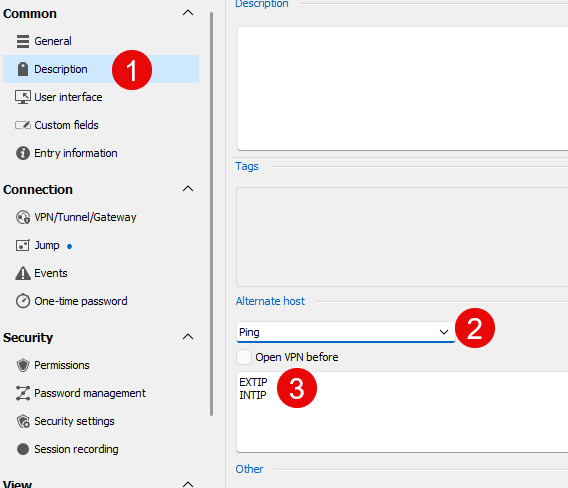
Stéfane Lavergne
3e821a8e-d7a8-46e5-b00c-92de28625d22.png
yes, that is exactly what we need :)
I had to use "Port Scan" instead of Ping because Ping is not always open, but it worked in my testing. I have to test it at a customer too and will give feedback.