Could not connect to specify host. SSH with Gateway

Hello there,
Starting to use and try this tool. Want to setup all connections, but...
In our environment there are several hosts with test, acceptance, and production state.
Connecting with SSH thought Gateway. It is possible to do it in TST and ACC environments, but in PROD env I have an error.
In Gateway we have MFA protection and after starting I have message from MFA tool, looks like Gateway passed and after there is error.
Could you please advise something - what can I check or how to see extended logs?
20230612_111906243_RDM.jpg
All Comments (3)
Hello,
Thank you for contacting us on that matter.
Which version of RDM and what type of data sources are you currently using?
In that case, would it be possible for you to create a portable installation of the beta version of RDM and see if this issue still occurs? To do so, you will need to do the following:
1- Download the .zip file below:
https://devolutions.net/remote-desktop-manager/home/thankyou/rdmbinbeta/
2- Create a new folder on your Desktop
3- Extract the content of the .zip file into the folder created at #2
4- Go to this folder once the .zip file has been extracted and run remotedesktopmanager.exe
5- Connect to your data source
This test will allow us to rule out your local installation of RDM as a possible cause for this issue.
Please note that if you are using an Advanced Data Source, I would recommend skipping step #5 and using the default data source created by the portable installation of RDM instead.
Best regards,
Patrick Ouimet
Hello Patrick,
Thank you for trying to help.
--- 1.
Which version of RDM and what type of data sources are you currently using?
From my first post it was 2023.1.29.0 64-bit and Local DataSource.
And I did regarding your solution and tried the same with portable 2023.2.6.0 64-bit (Beta)
Result is the same: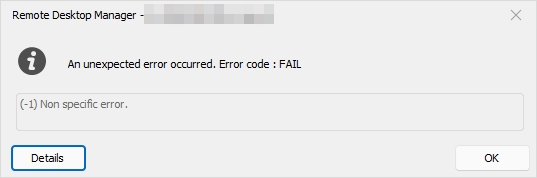
--- 2.
If I create separation SSH session where I connecting to Jumphost and from Jumphost in manual mode input ssh user@host - it works.
--- 3.
Also, interesting - if I just turn off my laptop network while connected to server, I got message where all are clear: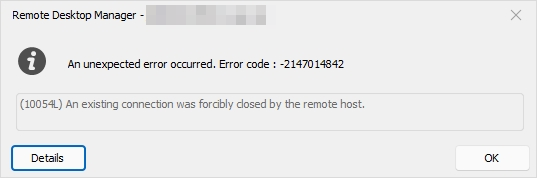
Instead of message from this topic's source where it is non-clear.
--- 4.
I created a new DataSource (XML Individual Free) and created a new session - the problem is the same.
BR
Hello,
Thank you for contacting us on that matter.
Which version of RDM and what type of data sources are you currently using?
In that case, would it be possible for you to create a portable installation of the beta version of RDM and see if this issue still occurs? To do so, you will need to do the following:
1- Download the .zip file below:
https://devolutions.net/remote-desktop-manager/home/thankyou/rdmbinbeta/
2- Create a new folder on your Desktop
3- Extract the content of the .zip file into the folder created at #2
4- Go to this folder once the .zip file has been extracted and run remotedesktopmanager.exe
5- Connect to your data source
This test will allow us to rule out your local installation of RDM as a possible cause for this issue.
Please note that if you are using an Advanced Data Source, I would recommend skipping step #5 and using the default data source created by the portable installation of RDM instead.
Best regards,
02cfe154-beca-4ad6-b4ad-698f69f8b76d.png
48dd7c72-98d1-4ab9-97f4-5b39cdd71a92.png
Hi Dmytro,
I wanted to let you know that I'll be reaching out to you via email to discuss some sensitive information related to this issue.
Once we've completed our investigation or have a fix, I'll update this post so that the entire community can benefit from the information.
Best regards,
Patrick Ouimet