Active Directory Synchronizer doesn't create groups from OUs

Is this a known bug or am I doing something wrong? I have Sync working, and it brings in all my machines, but they just get dumped into one giant list which is less than ideal. I need it to put them in groups based on the OU structure like it says it will do.
Does anyone have this working and did you have to do anything special to make it work?
I checked the box for "Create folders from OU/containers" and set the Level to 4 since we have nested OUs. I didn't even get the first level. I just got a dump of 1000+ servers in one giant list.
Any help would be great.
Thanks.
All Comments (12)
Hello,
What RDM version and data source type are you using?
Could you please try to set the Level option to 0?
If it's still doesn't help, could you please post screen captures of your AD Sync entry properties? Ensure to hide any sensitive information.
Best regards,
Érica Poirier
Using RDM 2023.1.26.0. I'll try setting it to 0.
Are there any instructions anywhere on how to set up these synchronizations? I couldn't find anything so just kind of made it up as I went along. Some info such as what the different settings do would be helpful.
Hello,
There is sadly no documentation page for the AD Synchronizer entry. I have sent a request to our documentation to publish a knowledge base article about it.
Best regards,
Érica Poirier
Setting it to 0 did resolve the issue. SO now I'm curious what the box is even for and what it does it you use a different number.
I'm also curious about Silent Mode and Verify folder on mismatch do under the Advanced tab. I'd assume Silent just doesn't pop up the confirmation/summary window at the end, but have no idea on the mismatch thing.
Thanks.
My other question sis about the Synchronize Automatically checkbox. WHat does that do? I don't see any settings about specifying how often to sync, what time to sync, etc so I'm not sure what checking that box actually does. I'd love it to sync automatically, but only if it won't affect my work so I'd like it to go overnight or something like that.
Hello,
Thank you for your feedback.
The Level option is to regroup in one folder all items in OUs down to the number of levels that has been set.
You are right about the Silent mode option. For the Verify folder on mismatch, it's to verify if the entry has been moved to another folder base on the Create folders from OU containers option. Then the Action on entry mismatch will be applied.
Finally, the Synchronize automatically is tied to the Background services in RDM.
Let us know if you have further questions.
Best regards,
Érica Poirier
Hello,
There is sadly no documentation page for the AD Synchronizer entry. I have sent a request to our documentation to publish a knowledge base article about it.
Best regards,
Seriously. This feature is great when it's working, but the lack of documentation is truly abysmal.
@itsystems,
I am managing the documentation team here at Devolutions and we have opened a ticket to address the missing documentation in this specific thread. We are working hard to have all the features documented and when some are missing, this is when your feedback it's important. Thank your for pointing it to us.
We will get back in this thread when documentation will be ready.
Best regards,
Jeff Dagenais
Hello,
For your information, the first version of the AD Synchronizer entry article is available here.
Our documentation team will improve it in the next few days to add the missing information.
Thank you for your patience.
Best regards,
Érica Poirier
Hello;
Version: 2024.1.15.0
In the documentation, there should be a box called:
Create folders from OU/containers
But my "Settings" Tab is called "Felder", thats german for "fields".
So where can i get the setting Create folders from OU/containers 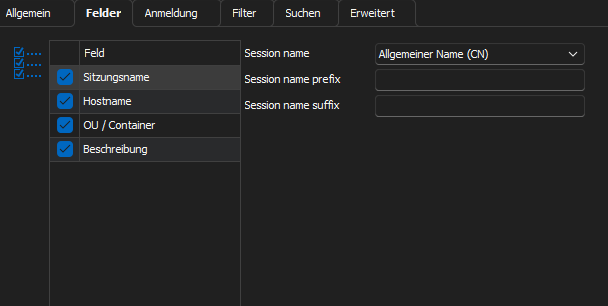
10d58ded-cc41-41cd-9f2f-54ef305c55fc.png
Hello Lukas,
You can set this option now in the Container / OU section:
There you can also seld a folder template that will be used for the structure:
Regards,
Min
707e9db7-c790-40e7-89a1-6b0437eae46b.png
AHHH thanks.
I had to delete all the "old" entries, first
now it works