can't type on search box

After update to 2023.1.29.0 i can't type on search box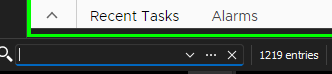
3ac51db4-803f-4fd8-8485-aad6b5c597bc.png
All Comments (6)
Hello,
Thank you for contacting us on that matter!
Which version of RDM and what type of Data Source you are currently using?
Would it be possible for you to create a portable installation of the latest version of RDM and see if this issue still occurs? To do so, you will need to do the following:
1- Download the .zip file below:
https://remotedesktopmanager.com/home/thankyou/rdmbin
2- Create a new folder on your Desktop
3- Extract the content of the .zip file into the folder created at #2
4- Go to this folder once the .zip file has been extracted and run remotedesktopmanager.exe
5- Connect to your data source
This test will allow us to rule out your local installation of RDM as a possible cause for this issue.
Please note that if you are using an Advanced Data Source, I would recommend skipping step #5 and using the default data source created by the portable installation of RDM instead.
Best regards,
Patrick Ouimet
the issue is the same with the portable version
Hello Diego,
Thank you for performing this test for us.
Just to confirm, do you have any applications that are currently running in the background that could potentially be blocking any keyboard input or keeping the focus of your keyboard? It's important to ensure that all applications are closed or paused during the test to get accurate results.
Thank you for your cooperation and assistance. If you have any further questions or concerns, please don't hesitate to let us know.
Best regards,
Patrick Ouimet
No other applications are running
If i open Advanced Search separated window i can search entry
The same server with the older version works
sorry, but this morning search text box works back with out done anything
Thx for your attention
Regards
Diego
Hello Diego,
Thank you for your time and for getting back to us.
I am glad to hear that your issue has been resolved. If you ever need any further assistance, please feel free to reach out to us through our forum, by phone, or by sending an email to the address provided at service@devolutions.net.
For more information, you can visit this page: https://docs.devolutions.net/cloud/technical-support/
Best regards,
Patrick Ouimet