Apple Remote Desktop - Full screen option, and remember stretch setting
Apple Remote Desktop - Full screen option, and remember stretch setting
0 vote

Hello,
It would be awesome if the ARD session supported full screen similar to the RDP counterpart. Additionally, I think it would be a good idea to remember the state of the stretch-to-fit button at the top of the ARD season. Maybe add a setting to see the default for that button etc...
All Comments (33)
Hello,
Thank you for your request. We saw your other thread here and have opened a ticket so we can see what we can do about these improvements.
Regards,
Hubert Mireault
Hello Sam
I've added the default setting for stretch-to-fill (preserve aspect ratio) in the Apple Remote Desktop connection settings. That will be available in the 2023.2 release within the next few weeks.
We're working on the full screen support and I'll post back once I have an update.
Kind regards,
Richard Markievicz
Neat. As I have been using RDM for work this week the biggest annoyance I have run into is the interoperability of Ctrl vs CMD key as I tab switch between PC and Mac. Is it possible to remap key anywhere? I can do a separate feature request but it would be nice to be able to capture key combinations on the host system like Ctrl+c for example and have a remap setting that sends this key combo to the Mac as CMD+c etc...
I can do the remapping on the Mac but I am quite accustomed to using CMD key when I am working directly on my MacBook but I am within a windows environment when using the MacBook through ARD.
Anyway RDM is awesome and I showed it to all my developer friends.
Thanks
Hello Sam
To my knowledge, this feature isn't available in RDM Windows. I'll have to enter a ticket for it. There is precedence for this kind of support in RDM; for example RDM Mac users face similar issues when connecting to Windows machines via RDP. To that end, RDM Mac gives two ways to manage that:
- On a per-session basis you can remap entire modifiers (that is, tell RDM to send "Ctrl" when you press "Command")
- On an application-wide basis, you can remap shortcuts within RDP sessions (that is, tell RDM to send "Ctrl+C" when you press "Command+C")
It sounds like you're looking for the second option - an application wide setting that would, when connecting via ARD, send "Command+C" in place of "Ctrl+C" (for example). Does that sound right?
Kind regards,
Richard Markievicz
Richard,
I think that sounds exactly like what I am looking for. Remapping the ctrl key to the cmd key for ARD sessions would fix my interoperability problem. However, I would still want ctrl to be ctrl for RDP sessions and only have the remapping on ARD sessions. In my workflow, I often have an RDP session to our staging instance and an ARD session to my MacBook open. I usually use the shared clipboard between the two sessions to copy some text on the RDP session and paste it into a doc in the ARD session. There is a heavy mental tax for having to change my hands from Ctrl+c to Cmd+V to copy and paste as I switch tabs. Eventually, I start to get the key combinations scrambled and start having difficulty keeping ctrl and cmd(windows key) with the correct tab.
Implementing a feature like you describe on Windows would be wonderful for me.
Hi Sam
For sure, I understand the burden when switching between systems. To be really clear though - and I'm just talking about ARD sessions - would you want to completely remap "Ctrl" > "Command", or would you want to remap just specific, configurable shortcuts (e.g. Ctrl+C to Command+C)?
Thanks and kind regards,
Richard Markievicz
Richard,
I think just remapping the key such as ctrl to cmd and cmd/windows to ctrl is the optimal solution. I can't think of a reason people would want to try and remap specific combos over just having the ARD session swap ctrl and cmd so that both keys still function on the Macbook. This would make all key combinations function in an expected way to me. However, that is just one opinion so take that as you will. :)
Thanks,
Sam
Hi Sam
I've entered a ticket for this on our side. I don't have a timeline for working on that, but we'll post back on this thread once we have some news.
Thanks and kind regards,
Richard Markievicz
Hello
Just a small update for you; RDM Windows 2023.2.9 was released today and the ARD session settings contains a toggle for "Preserve Aspect Ratio". If you unselect this, your session will launch stretched-to-fill by default.
I hope this helps. If you have further question or comments, please don't hesitate to post back
Kind regards,
Richard Markievicz
hi Richard Markiewicz, just chiming in my opinion as well.
I think the two issues mentioned here are both the most important missing features for users that remote desktop from Windows into Mac.
- making ARD sessions support full screen
- ability to remap modifier keys (CTRL on PC <-> CMD on Mac).
can you say if (and when - just rough estimate) it'll ever be implemented?
thanks!
Hello
Thanks for adding your voice to the feature request.
Both these items are currently in backlog but I hope to address them in a short timeframe (sometimes in the next few weeks).
Thank you for your patience
Kind regards,
Richard Markievicz
Hello
The 2023.3 release of RDM is available, and supports full screen mode for Apple Remote Desktop and VNC sessions. Once you update, please let me know if you have any issues or questions about that.
The ability to remap modifier keys is still in the product backlog and I'll update this post again once I have some more news.
Thanks and kind regards,
Richard Markievicz
thanks for updating!
I tested, and it works as expected, the full screen on ARD is indeed a wonderful addition.
a regression - for some reason my mouse scroll does not work (using mx master 2s).
thanks for updating!
I tested, and it works as expected, the full screen on ARD is indeed a wonderful addition.
a regression - for some reason my mouse scroll does not work (using mx master 2s).
Hello
First, I'm glad that the full screen mode is working well for you.
We did have a change to support proper mouse scroll events with Apple Remote Desktop (which should allow scrolling with variable speed instead of the old method which was always a fixed rotation). A couple of other users reported it was working well for them, but there's obviously an issue in this case, so I apologize for the inconvenience.
Can I ask what version of macOS you are connecting to (or perhaps you see this on all / multiple macOS server versions)?
One other thing you could do is enable debug logging for ARD:
- In Options > Types > Others, under "Other" check "Enable logging for ARD and VNC" and provide a path to create the log file (e.g. c:\users\rmarkiewicz\desktop\ard-rdm.log)
- "Ok" the change and restart RDM
- Open an ARD session and try scrolling around in some windows with your mouse
- You can then send the generated log file to me by PM. It will contain the raw scroll events and I can see what's actually entering the system.
- Afterwards, disable logging again because it has a non-zero effect on performance.
Please let me know if something isn't clear or you have further questions.
Thanks and kind regards,
Richard Markievicz
Hello
First, I'm glad that the full screen mode is working well for you.
We did have a change to support proper mouse scroll events with Apple Remote Desktop (which should allow scrolling with variable speed instead of the old method which was always a fixed rotation). A couple of other users reported it was working well for them, but there's obviously an issue in this case, so I apologize for the inconvenience.
Can I ask what version of macOS you are connecting to (or perhaps you see this on all / multiple macOS server versions)?
One other thing you could do is enable debug logging for ARD:
In Options > Types > Others, under "Other" check "Enable logging for ARD and VNC" and provide a path to create the log file (e.g. c:\users\rmarkiewicz\desktop\ard-rdm.log)
"Ok" the change and restart RDM
Open an ARD session and try scrolling around in some windows with your mouse
You can then send the generated log file to me by PM. It will contain the raw scroll events and I can see what's actually entering the system.
Afterwards, disable logging again because it has a non-zero effect on performance.
Please let me know if something isn't clear or you have further questions.
Thanks and kind regards,
Hello Richard Markiewicz, very sorry for the late reply, been really busy this few months.
I did as you requested, and attached the log file.
it happened on Ventura and now also on macOS 14.5 Sonoma. I'm using the latest version of RDM (2024.2.16.0 64-bit).
in the first part I tried, on multiple windows, (only) vertical scroll, and later tried (only) horizontal scroll - both do not work.
additionally, for your information, the settings you mentioned probably changed names, so for whoever might encounter this, the new path is:
File -> Settings -> Types -> Sessions -> Apple Remote Desktop (ARD) -> Advanced -> enabled logging...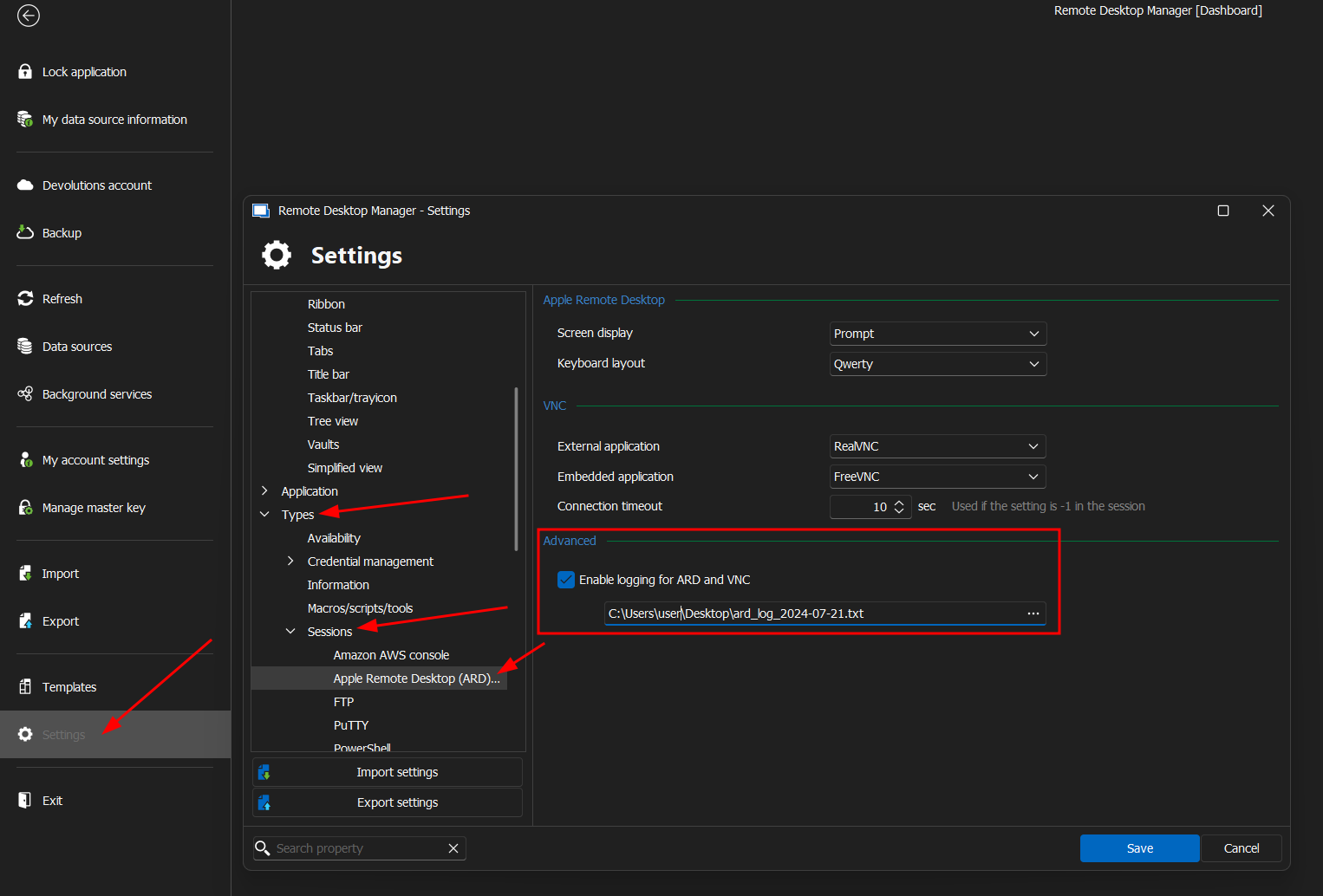
again sorry for the late reply, hope you'll have some solution for me, as I'm eager to ditch NoMachine and move to use your software :)
2024-07-21_09-28.png
Hello
Thanks for the log.
It's strange because I do see scroll events being sent. Does the scroll not work at all, or perhaps it's just very slow? Can you try an online test like this one https://cpstest.org/scroll-test.php and see if any events are reaching the server?
(We have to translate the scroll speed to what the macOS Server expects, and it's not straightforward, so there could be a bug there with your particular mouse. Do you have another mouse you can check with to help isolate the issue?)
Please, let me know if something isn't clear or you have further questions
Kind regards,
Richard Markievicz
Also one thing I forgot - I guess you tried this in different windows (e.g. Safari, Finder)? Some applications on macOS (notably Launchpad) implement scroll using gestures rather than wheel events, which we don't support currently.
Thanks and kind regards,
Richard Markievicz
Also one thing I forgot - I guess you tried this in different windows (e.g. Safari, Finder)? Some applications on macOS (notably Launchpad) implement scroll using gestures rather than wheel events, which we don't support currently.
Thanks and kind regards,
Hi,
I tried in multiple windows and applications.
additionally, I just tried a wired microsoft mouse, the result same - no scolling what so ever.
anything else I can do to help diagnose the issue?
Hello again
I just want to double-check my information: I think you wrote that this a regression, right? So the mouse scroll used to work for you on some earlier version of RDM?
Thanks and kind regards,
Richard Markievicz
Hello again
I just want to double-check my information: I think you wrote that this a regression, right? So the mouse scroll used to work for you on some earlier version of RDM?
Thanks and kind regards,
yes, you're correct.
I just installed 2023.2.35.0 to make sure, and yes, scrolling does work (only vertical, and very slow, but works).
Hello
Ok, thank you, I understand.
Apple Remote Desktop (Screen Sharing) is built on top of VNC (the RFB protocol) with a lot of proprietary extensions and improvements. The older versions of RDM only implemented the RFB messages for scrolling, which do not work very well. Apple has their own scroll messages in ARD and that is what we implemented, and likely where the regression occurred.
The ARD scroll message has quite high fidelity and does not map cleanly to the scroll events we get in Windows; and at least in this case there is obviously a bug in that mapping. However I can't reproduce the problem on my side so I'm a bit hesitant to try and fix it "blind".
Would you be able to share the scroll settings for your mouse? Normally this is in the Windows "Settings" app (under Bluetooth & Devices) but it's quite possible you have a driver installed for your Logitech that provides a custom setting / configuration utility for this. I'd be really interested to see how it's setup so I can try and recreate that here.
If you have any questions, or something isn't clear, please let me know!
Kind regards,
Richard Markievicz
However I can't reproduce the problem on my side so I'm a bit hesitant to try and fix it "blind".
as a software dev, I fully understand. one thing I can suggest is a test build - I don't mind trying it.
also please note - the version that has the scrolling working, is also not really functional.
the scrolling is really really slow, maybe I'll make a screen capture later, but just restoring it won't really help.
edit: I attached the screen cap in the zip file, and bear in mind, it is with me scrolling as fast as I can
Would you be able to share the scroll settings for your mouse? Normally this is in the Windows "Settings" app (under Bluetooth & Devices) but it's quite possible you have a driver installed for your Logitech that provides a custom setting / configuration utility for this. I'd be really interested to see how it's setup so I can try and recreate that here.
sure, here they are:
https://i.imgur.com/YbCblmt.png
https://i.imgur.com/QgnZRra.png
https://i.imgur.com/DjGewWg.png
https://i.imgur.com/ymchzbk.png
p.s. I don't use any logitech software.
Recording 2024-07-30 205526.zip
Hello
Yes, I don't think that restoring the old behaviour is the proper solution.
Test builds are a little tricky as there's quite a long integration-build process for RDM (it's a huge program, and ARD/VNC is shipped as a dependency). So I do appreciate the offer, but I don't think that will work. However - if I could provide a small program that just emulates the mouse wheel logic and outputs the values on your machine, that could be really helpful. I don't know what kind of development you do - if I was to provide the source of a very simple .NET Framework or .NET 8 desktop application, would you be able to compile and run it on your side?
Thanks and kind regards,
Richard Markievicz
mostly node js, but I guess I could compile a .net project.
send it over!
Hello again
I pushed a project to my personal GitHub here. If you have the .NET 8 SDK installed you can build and run by just executing `dotnet run`; otherwise you can grab the artifacts from the build action and just launch it directly (requires the .NET 8 Windows Desktop runtime to be installed).
There is a green area at the bottom of the window where you can scroll your mouse vertically, and the raw deltas will be output at the top. I'm interested in a sample of scrolling around (fast, slow, up and down) that I can replay on my side and try to reproduce the issue. I strongly suspect the input we are getting is not what we expect, for some reason.
Thanks and kind regards,
Richard Markievicz
Hello again
I pushed a project to my personal GitHub here. If you have the .NET 8 SDK installed you can build and run by just executing `dotnet run`; otherwise you can grab the artifacts from the build action and just launch it directly (requires the .NET 8 Windows Desktop runtime to be installed).
There is a green area at the bottom of the window where you can scroll your mouse vertically, and the raw deltas will be output at the top. I'm interested in a sample of scrolling around (fast, slow, up and down) that I can replay on my side and try to reproduce the issue. I strongly suspect the input we are getting is not what we expect, for some reason.
Thanks and kind regards,
hi, thanks for the project.
I ran both code compilation and artifact binary, and in both the scrolling in the green area does not generate any output on the top.
attached a screen cap to demonstrate.
Recording 2024-08-02 112733.zip
Hello again
Ok, sorry about that - I'm not sure the issue. It's literally a one-liner in a standard WinForms event handler for mouse moves. It might be related to the control focus, but worked well on my machine.
If you don't mind trying again, I've changed the code to use a low-level mouse hook which will trap all mouse input on the system (meaning - the form doesn't need to be focussed and scrolls will be logged as long as the application is running).
Sorry for the inconvenience
Thanks again,
Richard Markievicz
works now, the results are attached as text file
scroll_output.zip
Hello
Thanks for that. I remain quite confused.
You're getting standard wheel deltas from the mouse; each "click" of the mouse wheel represents a value of 120. If you scroll very fast, you might get 240, 360 or even 480 (it's hard for me to scroll that fast with my mouse).
With the same mouse on macOS, it represents the scroll delta as a decimal. A single "click" of my mouse wheel gives a value of 0.1; scrolling faster with standard settings I can get it up as high as about 6.0 or 7.0.
So: in RDM, we take the wheel delta (e.g. 240) and divide by 120 to give the number of "clicks" that you scrolled. In that example it's 2 (240 / 120). And that's the value that we send to the Mac for the delta. I can see it working like this in your log file, assuming you're scrolling at a leisurely rate and getting 120 deltas, we're sending a delta value of 1 to the Mac.
That's all correct as far as the code goes and I get the same result on my system, the difference being that the scrolling actually works for me. (I do note that the delta translation is quite naive: we can't just divide the delta by 10 to get the "1 click = 0.1 delta on macOS", it should be calculated as some kind of curve; but for now it should work but without complete accuracy).
Out of interest - have you customized the scroll speed on the remote Mac? I suspect not - it's not obvious how to do this - but the option is buried in System Settings > Accessibility.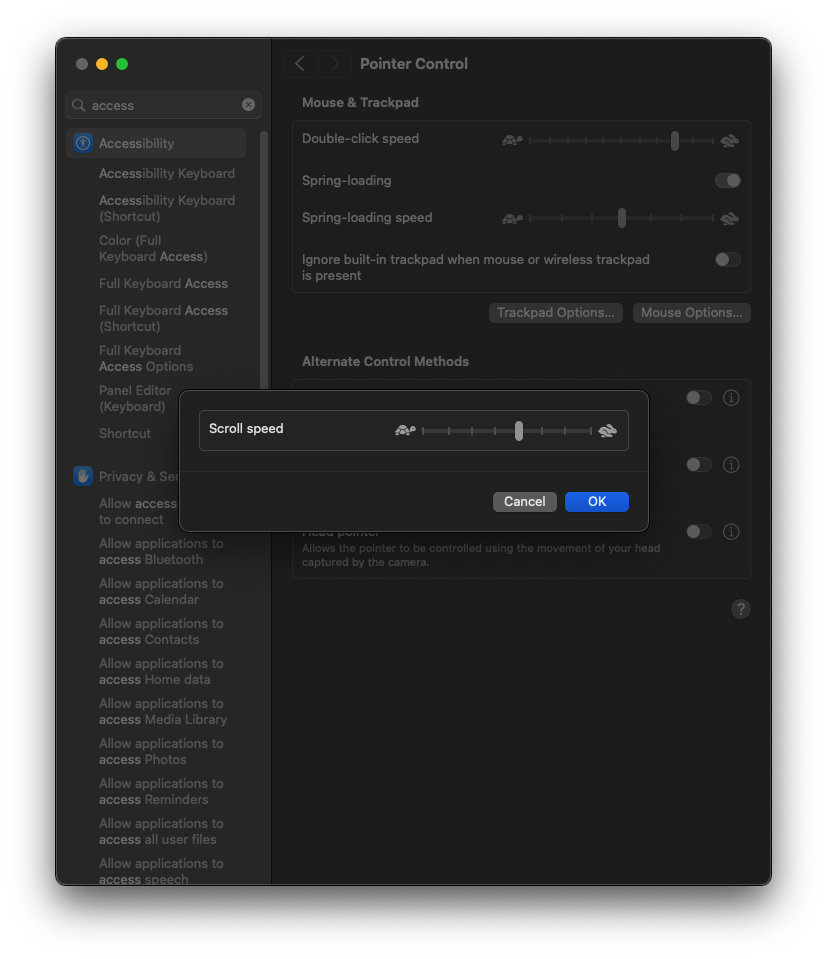
Thanks and kind regards,
Richard Markievicz
Screenshot 2024-08-02 at 11.58.39.png
Out of interest - have you customized the scroll speed on the remote Mac? I suspect not - it's not obvious how to do this - but the option is buried in System Settings > Accessibility.
it is one point to the left, of what you showed. I don't remember touching that.
I do remember however, trying to get the mouse on the macOS to scroll more lines at once.
had to dig to find what I used - it was an app called DiscreteScroll, but it was only used for a while, and then removed.
maybe it changed settings in a "destructive" way?
edit: it seems not, because I just tried it again, and the difference is massive.
anyway, I don't think that's the culprit, but if you have any ideas I'm open to try anything
Hello
Interesting. I made a test on my side: I run DiscreteScroll and connect to the machine using RDM/ARD - and I get the same results as you. Scroll messages are sent and logged properly, but no scrolling happens on the remote machine. I quit DiscreteScroll, reconnect; and scrolling works again. I can reproduce this easily.
It sounds like this might not be your issue, since you removed the application and notice a big difference when installing it again. It does give me an important hint, though.
I took a look at DiscreteScroll and see that it's installing an event tap to rewrite scroll wheel events. This gave me a good idea to write my own event tap and simply observe the difference in events posted from the Apple's own ScreenSharing.app and our implementation.
Thanks for your patience, I'm looking into this
Kind regards,
Richard Markievicz
Hello again
Ok, I did some digging here. The macOS event system actually exposes 3 different delta values for each axis of scroll movement (so, 6 values total). Documentation on these fields is quite thin but they each have different characteristics (whether they support acceleration, cumulative events, etc, etc) and behave differently whether you're using a regular notched mouse or a trackpad. We're only setting one of them - basic values with no acceleration.
DiscreteScroll installs an event tap (which can intercept and modify or discard events); it takes one of the scroll deltas out of the event, multiplies it by the number of lines configured, and then forwards the event on. But it actually takes a different delta than the one we set; so it finds a value of "0", multiplies it by the number of lines, then forwards it - of course, multiplication by 0 gives an answer of 0, so the scroll events that we inject are effectively rewritten to do nothing.
So, two things:
- I strongly suspect that some other application (if not DiscreteScroll) on your machine is manipulating mouse events. Sadly I can't find any tool that enumerates the mouse event taps on the system (the only one I can find enumerates keyboard taps only) to test this. It would be trivial to write one, but distribution is tricky as macOS apps generally need to be properly signed and notarized. I don't think it's worth investigating this much further; there are hundreds of applications with legitimate reasons for interacting with the event stream in this way. DiscreteScroll itself doesn't modify the system state in any permanent way, so if you're sure it's gone and not auto-starting on your machine, then it should not be causing any side effects.
- You've found an interesting edge case. I had thought it sufficient to set only one of the mouse event deltas, but it seems like it's actually important to set all of them; and then different applications will handle that in different ways depending on the type of scrolling they want. Unfortunately this will be a bit tricky - as I wrote earlier, the mapping from the Windows side is counterintuitive and the documentation from Apple is effectively non-existent.
To summarize: I do believe I know what's needed to fix this, but it's not very straightforward either. I will work on that but you can expect it to be a couple of weeks before we have any update (additionally this is a busy time of year with various team members on summer vacation). I do think there is a 3rd party application on your Mac that's driving this problem, but - to be clear - I would call that a side-effect rather than the actual issue. The fix is on our side.
Please, let me know if something isn't clear or you have further questions
Richard Markievicz
To summarize: I do believe I know what's needed to fix this, but it's not very straightforward either. I will work on that but you can expect it to be a couple of weeks before we have any update (additionally this is a busy time of year with various team members on summer vacation). I do think there is a 3rd party application on your Mac that's driving this problem, but - to be clear - I would call that a side-effect rather than the actual issue. The fix is on our side.
Please, let me know if something isn't clear or you have further questions
thanks for your checks and investigation of this issue. I have no problem waiting for a fix.
but, I've no idea what else is tapping the scrolling events.
I'm still using NoMachine (and hoping to replace with your RDM), and the scrolling seem to always work fine there, regardless of whether DiscreteScroll is running or not.
if you can think of a way for me to check, please let me know.
will your fix solve my issue, even without me finding the 3rd party app that's causing this?
and while we're at the subject of scrolling - does horizontal scrolling work fine? (e.g. with a dedicated mouse wheel, or shift+scroll of the main wheel?)