Autologin with VNC
0 vote

Hello,
I'm using RDM to manage several Server via VNC sessions.
We must put manually the Credentials for Windows Login.
I'm using FreeVNC (Client RDM) and UltraVNC on Servers.
The request: implementing the Windows autologin via VNC
Thanks
All Comments (12)
Hello
Thanks for the feature request. Unfortunately, I'm not sure what you ask for is possible. It's certainly not a feature of VNC (which very much just gives access to the remote console); it might be a feature of certain VNC servers.
Is what you ask for possible when using the UltraVNC Viewer application? If yes, we should be able to replicate that in FreeVNC. However, I believe that even when using MS Login authentication with Ultra, there's no way to bypass the login / lock screen.
Please let me know if something isn't clear or if you have further questions
Kind regards,
Richard Markievicz
Hi Richard,
I found a solution with Autoit (Scripting Language for automating)
The script below works and automate the following procedure: open VNC session - VNC authentication - ctrl+alt+del - Windows login
I think will be possible to implement it in RDM.
What do you think about?
Thanks and Regards
ShellExecute("C:\Program Files\uvnc bvba\UltraVNC\vncviewer.exe")
Sleep(1000)
send ("IP", 1)
send ("{ENTER}")
Sleep(1000)
send ("VNCPassword", 1)
send ("{ENTER}")
Sleep(1000)
send ("^+!{DEL}")
Sleep(2000)
send ("WindowsUser")
send ("{TAB}")
send ("WindowsPassword")
send ("{TAB}")
send ("{ENTER}")
Hello,
I believe if you configure a typing macro within the VNC entry's properties you may be able to get your the Windows Login automated.
I have an article here from our documentation that I believe may help you with this: https://docs.devolutions.net/kb/remote-desktop-manager/how-to-articles/entry-types-events-settings/event-auto-typing-macro/#typing-macro
Best regards,
{CTRL-ALT-DEL}{DELAY}username{TAB}password{ENTER}
Very good! Works!
Now last step, I would mask the username and password. How can I recall from a Credential Entry?
Thanks
Hello,
Just so clarify, do you mean masking your credentials within the properties of the entry ?
Best regards,
I mean masking within the Macro entry or, if possible, use the user and pass of a credentials entry inside the macro script.
Or tell me which are the possibilities.
Regards
Hello,
Was the username and password written down within the Macro ?
Or are you using variables ?
Perhaps using variables would be a good way of not showing the password within the macro.
As mentioned in the same article: https://docs.devolutions.net/kb/remote-desktop-manager/how-to-articles/entry-types-events-settings/event-auto-typing-macro/#macro-password
Best regards,
Yes Username and password are inside the Macro in text plain.
I don't want use variables but recall username/password from a Credentials Entry.
That it's possible or is there another way?
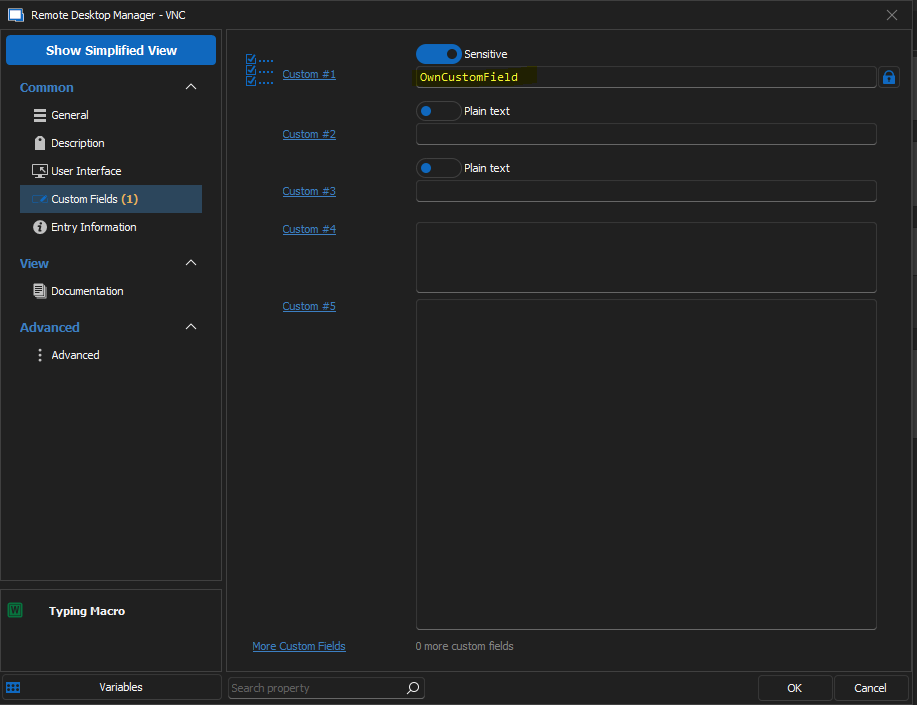
Maybe, I found a solution...
Inside the script of the Macro, how can i refer to the own custom field?
c9e1ac74-8807-4e76-8467-f779b3f2e473.png
Hello,
I believe what can be done is linking your credential entry to the session entry the the "Linked (Vault)" option and then setting up $USERNAME$ and $PASSWORD$ variables within your macro.
The credentials that the variable will resolve will be the ones within the credential entry, since those will be the credentials configured within the session entry.
Just be sure the "Allow Password in Variables" option is enabled in the security settings.
Otherwise, your custom field can be referenced by adding the $CUSTOM_FIELD1$ variable (the number changes based on which field you're trying to reference).
Best regards,
Hi,
1. Could you add the Credentials Option in the Macro?
So it's possible distinct session entry credentials and macro entry credentials.
2. $CUSTOM_FIELD1$ it reference to the session entry and not to the macro.
It doesn't works in this way. I have to call the macro custom fields themselves.
Regards
Hello,
According to our engineers, you can use the "Tools" section within the properties of the entry and from there link different credentials and use the appropriate variables.
As for your second point, what you're mentioning is normal and not something we plan on changing. To quote one of our engineers: "Macros are designed to use the variables of the entry on which you're executing them."
This means if you wish to use anything from the macro, you'll need to put it in the macro directly.
Best regards,