WinSCP window cannot be detected

Hi RDM team,
i use RDM 2023.1.28.0 64-bit on Win11 with WinSCP 6.1 with the settings: external desktop and SFTP.
It was working before, but I'm not sure since when (with RDM 2023.1.28 or with WinSCP 6.1) i get the following popup window.
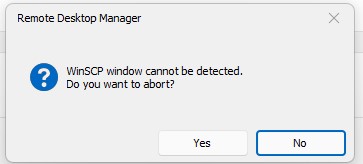
I found an old forum post https://forum.devolutions.net/topics/27825/winscp-window-cannot-be-detected but this solution doesn't solves my problem.
Any ideas why this happens?
many thanks and rgs Bob
Screenshot RDM2023128-WINSCP61.jpg
All Comments (10)
Hello Jens,
Thank you for reaching out to us regarding this matter.
We appreciate your concern and are happy to assist you in any way we can.
Regarding your question, are you experiencing difficulty establishing a WinSCP outside of Remote Desktop Manager? If so, we will be happy to open a case for you and exchange information on your entry properties to help resolve the issue. Once the issue has been resolved, we will post the results here to keep the community informed.
Thank you for bringing this to our attention. Please do not hesitate to contact us again if you have any further questions or concerns.
Best regards,
Patrick Ouimet
I'm having the same issue since I've updated WinSCP to v6.1. I was using RDM 2022.3.35.0 and it was working until today when I updated WinSCP to the latest version.
Afterwards, I've updated RDM to v2023.1.28 but it didn't fix the issue. So it seems like something might have changed on WinSCP side which prevents the window from being tabbed correctly in RDM.
I'm not having difficulty establishing a connection with WinSCP outside of RDM. In fact, I don't have issues establishing a connection in RDM either... it's just that RDM isn't able to embed the WinSCP window, which stays in its external window... And if I click on my RDM window, then I have the same issue as Jens, it says that WinSCP can't be detected.
Hello Dave,
Thank you for this feedback. I understand your concern, and I want you to know that a case has already been opened with the engineering department. Rest assured that we are working on this issue right now.
As for your concern about our system's entry and its use of an external application to open a session when selecting the external display, please note that this is normal behaviour. When you select the external display, your entry will work as if it is outside of RDM.
I appreciate your patience and understanding, and please know that I will keep you updated on any news from the engineering department. If you have any further concerns, feel free to let me know.
Best regards,
Patrick Ouimet
As for your concern about our system's entry and its use of an external application to open a session when selecting the external display, please note that this is normal behaviour. When you select the external display, your entry will work as if it is outside of RDM.
Désolé, je n'avais peut-être pas été clair. J'ai le problème effectivement, peu importe si j'affiche dans une fenêtre externe, ou si je l'affiche en mode "Embedded". Je croyais que le problème concernait uniquement le mode Embedded, mais au fond il semble que c'est carrément WinSCP qui ne soit plus détecté, peu importe le mode d'affichage.
Thanks for the follow-up! :-)
Hi,
same issue for me
I agree with Dave. I am using WinScp 6.1 and RDM 2023.1.28
Integration is not working anymore : whatever choice you pick from in the way of display WinSCP, RDM is not able to detect WinSCP. So RDM get stuck until we get the little popup after the timeout.
Swithing WinScp back to version 5.21.8 and the integration with RDM is working again
Hello,
Thank you for letting me know about those comebacks.
I'm glad to hear that you've found a workaround for the issue you were experiencing in RDM. It's good to know that our users are resourceful and able to find solutions on their own.
I want to assure you that our engineering department is still working hard to solve this issue. Rest assured that we are doing everything we can to resolve the issue as quickly as possible.
As soon as I have any news from them, I will be sure to let you know. In the meantime, please don't hesitate to reach out if you have any further questions or concerns.
Best regards.
Patrick Ouimet
Hi
We've made a tentative fix to allow embedding with the latest version of winscp. This should be available starting with version 2023.1.29
Regards,
Jean-Francois Duchesne
Many thanks.
I can confirm, the problem doesn't occur any longer with RDM 2023.1.29.0.
Great Job!
many thanks
Hi,
using version2023.2.18
Better but still not working for me.
the winscp login window popup (it should not)
If I select a configured item then the winscp windows os docker winthin RDM
But before i do not have to configure all my serveur within Winscp
Hello Yves,
Thank you for providing your valuable feedback.
I have initiated a case on your behalf and will communicate with you via email to gather further information and investigate the issue at hand.
Best regards,
Patrick Ouimet