Embedded Command Line (External Application) as a Tab

Previous versions of RDM we could embed as a tab the "Embedded Command Line (External Application)" for things like a continuous ping or the likes eg ping 1.1.1.1. -t
Now this example always are opened in an external Window - regardless that we have selected Embedded (Tabbed). Is there a way to configure this back to Embedded once again?
All Comments (8)
Hello Dale,
Thank you for contacting us.
I have a few questions that I hope you can answer.
- May I know which version of RDM you are currently using?
- What type of data source are you utilizing?
Furthermore, could you recall the version of RDM you were using previously?
In addition, I wanted to suggest the possibility of using the "Command Line" entry type, which can be found under the "Macro/Script/Tool" section. This entry type might be useful in your case.
Please let me know if you have any further queries.
Best regards,
Samuel Dery
Hi Samuel,
Using version 2023.1.23.0 64-bit, and data source can be either online or local.
As stated open a command prompt to run a simple ping command as a tab used to work in 18 months ago with RDM versions back then however now always runs in an external window. For example would like an embedded item the runs say "ping 1.1.1.1 -t"
I looked under the "Macro/Script/Tool" section as suggested and could see nothing there that assist resolving this. So any other suggestions or tips to have this working would be appreciated.
Regards.
Hello,
I've just tested and it works fine for me. Could you verify if you are running RDM in Elevated mode?
Regards
David Hervieux
Hi David,
Do you mean check "run as administrator" in advanced settings for Command Line entry? We have tried that and no difference.
Changed starting RDM " as "run as administrator", and now Command Line initially opens externally then after a few secs translates to being embedded. Is this usual behaviour?
Regards,
Hello Dale,
Thank you for your reply,
From my understanding, this would indeed be the expected behavior,
Let me know if you have further questions regarding this,
Best regards,
Samuel Dery
Hello,
Embedding a command line involves utilizing a workaround to link an external window, but there is no assurance of its functionality. Notably, it is incompatible with applications like TeamViewer."
Have you tried this tool instead?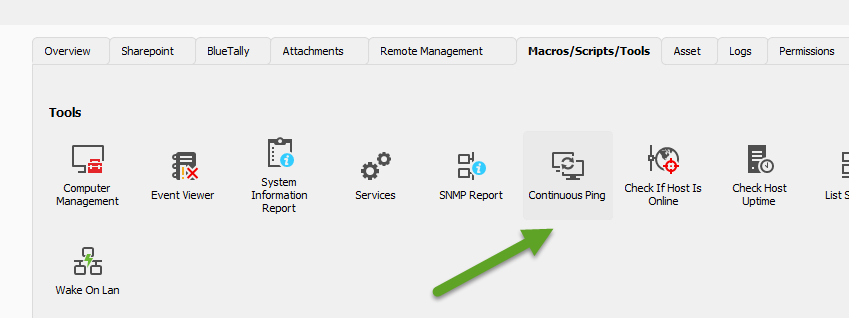
Regards
David Hervieux
0cd2a942-12bc-489f-9620-d0ccb37c4f15.png
Thank you to David and Samuel for your help.
Samuel's tip to start RDM " as "run as administrator" resolved the issue.
Hello Dale,
Thank you for your reply,
Perfect, I'm glad to hear that is it now working as expected for you!
Best regards,
Samuel Dery