Azure Bastion

Hi
I can see in the release notes that Azure Bastion support is released, how do you setup so you can connect to a Azure VM over Bastion?
Regards Lars
Remote Desktop Manager connected with Devolutions Server running newest versions.
------------------------Signature------------------------
Sorry if any of above sounds harsh or provoking, it is NOT meant as such, but I have Asperger's and don't always know.
My intentions is always to be friendly.
-------------------------------------------------------------
All Comments (5)
Hi Lars
Indeed Azure Bastion is supported in recent (RDM 2023.1.x) versions.
Please note that the integration depends on the Bastion host being in the "standard" SKU and the "native client support" feature being enabled. These are prerequisites for using the Bastion from a native client.
First, Azure Bastion is represented as a VPN type in RDM: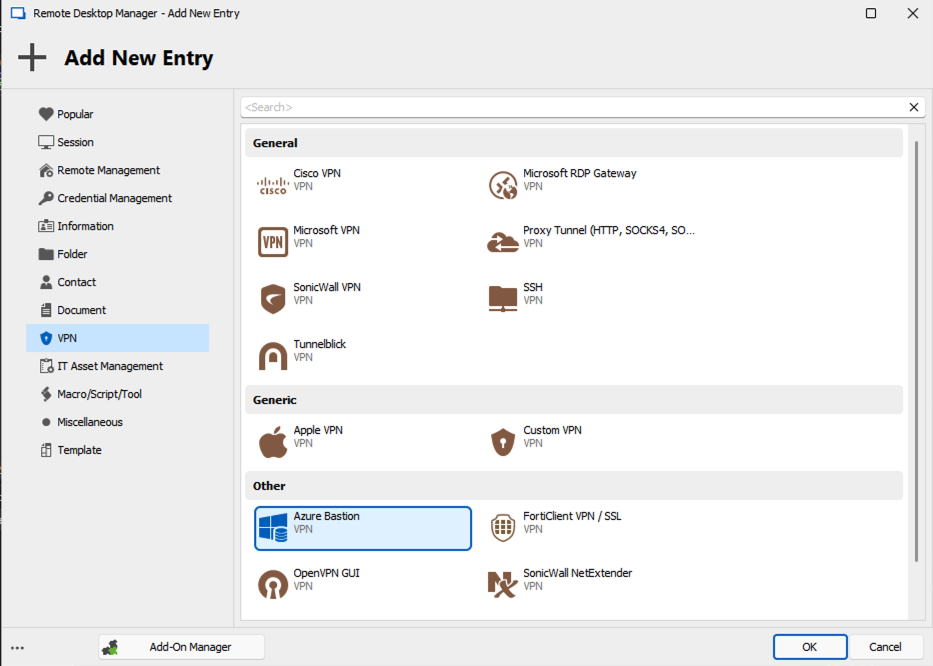
In the simplest case, you can create an RDP connection entry representing your virtual machine resource. The host name should be the resource name in Azure. Then, in the VPN/SSH/Gateway tab, select "Always Connect" and "Azure Bastion". You will be able to configure the Bastion connection in the Settings (Azure Bastion) tab page.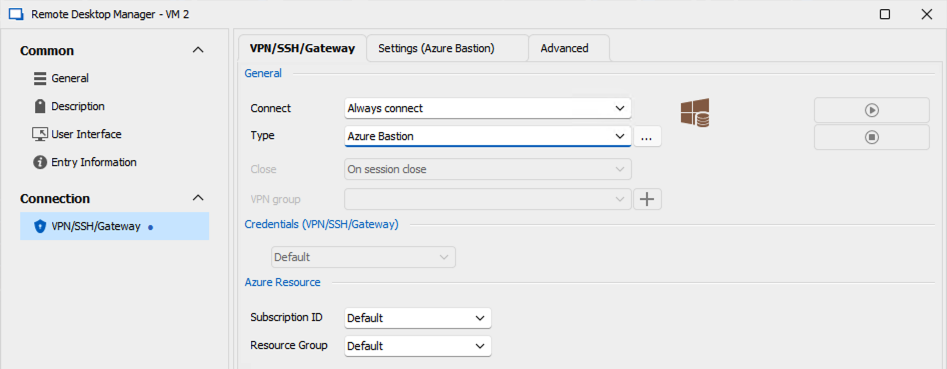
You'll need to provide the Host (Bastion name), subscription ID and resource group. This is the subscription and resource information for the Bastion, although for this example it's assumed the Bastion and VM live in the same subscription and resource group.
Note the "connection mode" setting: RD Gateway is faster - it downloads an .rdp file from the Bastion and launches it; but of course it only supports RDP. If you want to use things like non-standard ports or SSH, you'll need to change to "TCP Tunnel" mode. This operates the same as the `az cli` Bastion tunnel command.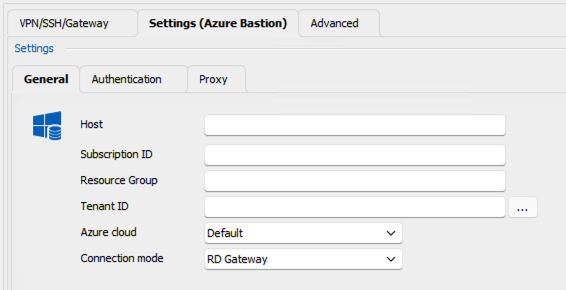
Finally, check the authentication settings. You can opt to try and use the current Azure PowerShell and/or `az cli` login context(s), or use interactive authentication (optionally provide a hint for the username):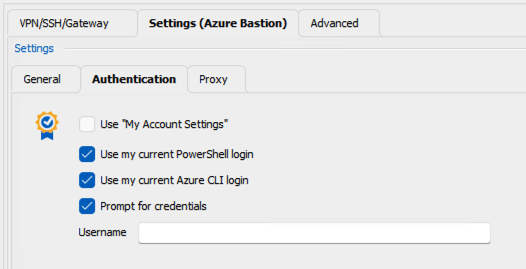
Now, when you launch your RDP connection to the VM, you'll first see RDM connect to the VPN (Azure Bastion) and for interactive auth (and if your credential isn't yet cached) you'll be prompted to authenticate against the Azure portal. Once the Bastion connection is established, the RDP session will launch.
That's a really quick overview of a very simple scenario. In terms of what's possible, we have support for:
- Cross-tenant authentication and sovereign (e.g. Azure US Government) clouds
- RDP and SSH connections
- Specify standalone Azure Bastion VPN entry(ies) and directly link or inherit onto your folders and connections
- Ability to target Bastions to resources that live in separate subscriptions or resource groups
- IP based connections
- User-specific Bastion credentials in shared data sources
We don't have much (if any) documentation around this currently (the feature was new in 2023.1 and has been evolving based on community feedback). In the meantime please feel free to post back with specific questions or comments. You may also find this thread interesting, although at this point it's quite long and hard to navigate.
Please don't hesitate to post back with questions or comments
Thanks and kind regards,
Richard Markievicz
Screenshot 2023-05-25 at 14.28.35.png
Screenshot 2023-05-25 at 14.28.28.png
Screenshot 2023-05-25 at 14.28.20.png
Screenshot 2023-05-25 at 14.27.27.png
Hi
Thank you for a very elaborate answer!
Unfortunately the customer I wanted to connect to use Basic tier.
Do you see a future where some kind of automated/integrated login login to a Bastion host on Basic tier?
What I an using now is a web connection directly to each machine, but the web connection can't type the password as MS is changing the ID of the password box for every load of the page.
/Lars
Remote Desktop Manager connected with Devolutions Server running newest versions.
------------------------Signature------------------------
Sorry if any of above sounds harsh or provoking, it is NOT meant as such, but I have Asperger's and don't always know.
My intentions is always to be friendly.
-------------------------------------------------------------
Hi Lars
I'm afraid I don't see a workaround for this case; as you say if the ID of the password box changes on every load it will be extremely tricky to automate the login. I'd welcome any suggestion from the community of how we could work around this. Sadly this seems to be one way Microsoft restricts the basic tier of Azure Bastion.
Please don't hesitate if you have further questions or comments,
Kind regards
Richard Markievicz
Okay, thank you for the update.
In this case, Microsoft is randomizing it seams that they use "form-label-id-XX-err" (Where XX being a number).
So maybe if the password field could support wildcard?
/Lars
Remote Desktop Manager connected with Devolutions Server running newest versions.
------------------------Signature------------------------
Sorry if any of above sounds harsh or provoking, it is NOT meant as such, but I have Asperger's and don't always know.
My intentions is always to be friendly.
-------------------------------------------------------------
Hello again
I'm not sure this is possible. I did find a related thread: https://forum.devolutions.net/topics/32102/rdm-able-to-deal-with-submit-buttons-that-change-id-on-every-page-refr#130217.
Essentially, the recommendation is to either use a custom script (Under Login > Custom) or a typing macro. Let me know if either of those would be options in this case. If something isn't clear or you have further questions, I can ask someone with more knowledge of this feature to chime in here.
Thanks and kind regards,
Richard Markievicz