How can I launch an AWS SSM Tunnelling session prior to RDS?

Hi. The only way I can access certain resources is via AWS SSM Tunnelling which is like a local SSH Proxy. It is initiated from a powershell command:
aws ssm start-session --target i-0e233a09c72571234 --document-name AWS-StartPortForwardingSession --parameters portNumber="3389",localPortNumber="9999" --region eu-west-3
I then RDS to localhost:9999 and it works.
How can I configure this in RDM?
Thanks.
AWS links: Start a session - AWS Systems Manager (amazon.com)
All Comments (5)
Hello,
You can use the Before Open from the Events section to initiate your AWS SSM tunnelling before opening the connection to the remote host.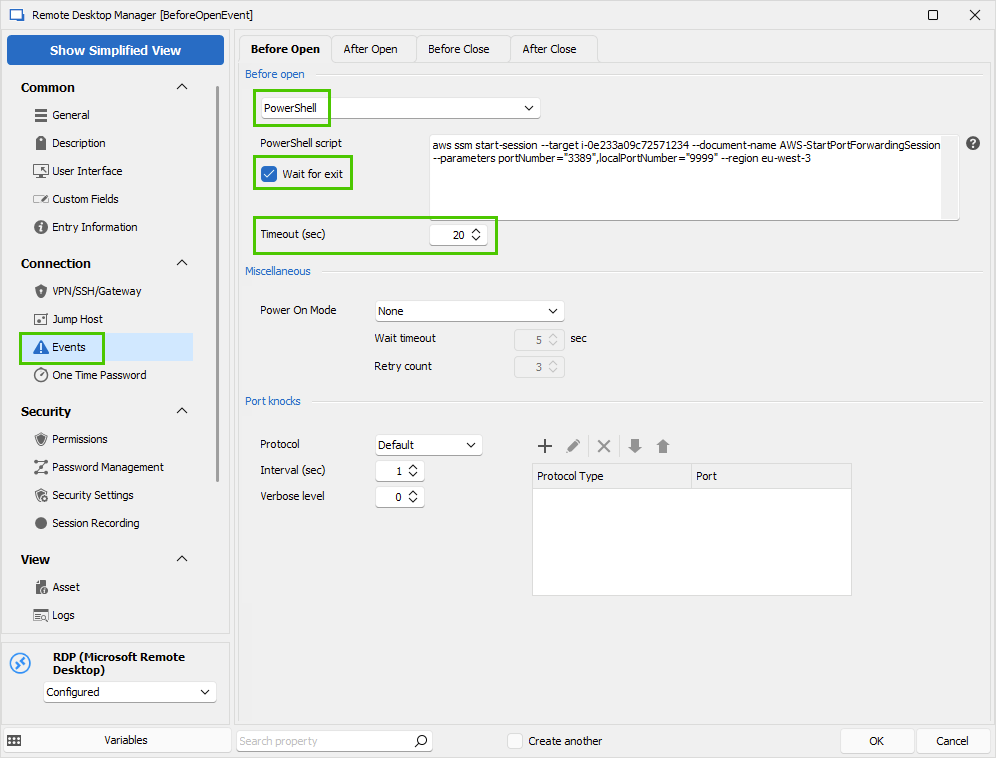
Let us know if that helps.
Best regards,
Érica Poirier
9b59ac5c-745e-4acb-a09f-eba0db933f58.png
Hi Erica, this is almost perfection we are so close.
The problem I have is that the Before Open script executes in parallel to the RDP connection and the tunnel can't complete in time, it needs a few seconds.
Is there any way to force the session to delay for a few seconds?
The wait for exit feature won't work as I need the tunnel to remain active for the session to work.
I don't think timeout would work either as this is not a delay.
I have a related question: I noticed that you can refer to the connection name as a variable $RDM.Connection.TabTitle = $RDM.Connection.Name + " (" + $date + ")"
Is there any way I could take a substring of that? i.e. if the session was called: "SERVER01: i-0e233a09c72574152" to substitute a substring into the script command like follows:
aws ssm start-session --target right($RDM.Connection.Name, 19) --document-name AWS-StartPortForwardingSession --parameters portNumber="3389",localPortNumber="9999" --region eu-west-3
(hope that makes sense)
Thanks
Hello,
Thank you for your feedback.
For your information, a ticket has been submitted internally to create an AWS VPN entry in RDM. Once this will be available, we will post it here.
About your current configuration, please disable the Wait for exit option. RDM will wait for the whole time set in Timeout property before launching the session.
Let us know if that helps.
Best regards,
Érica Poirier
That solution works perfectly. Thank you.
Hello,
Thank you for your feedback and glad the provided solution solved your issue.
Best regards,
Érica Poirier