Duplicate SSH sessions on same working directory

Hello team.
Is there a feature that allows me to duplicate running SSH terminal and to have new duplicate session opened on same working directory as previous session I duplicated with?
This feature came to be very useful to me especially when working directory is too long and I am not on terminal of first session to copy working directory path (i.e. running a command/script, inside vim...etc.).
If this feature is available and can be enabled, please let me know how I can do that. Because I tried to check on session config and I didn't find this can be enabled.
Thank you.
All Comments (5)
Hello,
Thank you for contacting us regarding this !
Forgive my confusion, however if I'm understanding the question correctly, you should be able to duplicate the connection when right-clicking the tab of the opened SSH Session: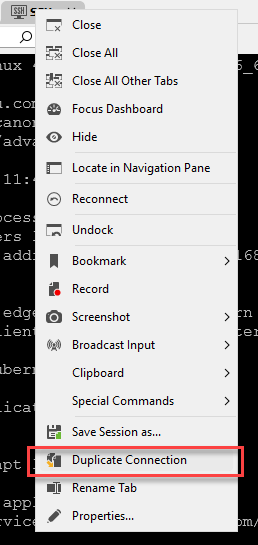
Let me know if this helped !
Best regards,
c9640a23-08d5-44e9-baba-f51a6a6919c9.png
Hello Zachari and thank you for your response.
Duplication is working just fine. However, It duplicates a new session and the terminal is set to home directory (which is the normal thing when you start a new session without duplication).
What I am asking for (which I've seen on other terminals) is if there is a way to let the new duplicate window open on the same exact folder of current session? rather than opening the new session on home folder.
for example, my session is running on directory /etc/networking. Now, if I will duplicate, the new session will be /home/myDir.
what I am asking for if we can make the new duplicate session to automatically open on directory /etc/networking instead of /home/myDir
I hope this is make it clear a bit.
Best,
Am
Hello,
Thank you for contacting us regarding this !
Forgive my confusion, however if I'm understanding the question correctly, you should be able to duplicate the connection when right-clicking the tab of the opened SSH Session:
Let me know if this helped !
Best regards,
Hello,
To my knowledge, what you're requesting isn't really possible at the moment.
I think what you could do is perhaps create an SSH template that, when used to open the session by selecting the Open with Parameters > Open with a Template option, will override any preconfigured settings or options (in your case, the directory).
Let me know if this helps !
Best regards,
Thank you Zachary.
It think that may work if I can run a pre-script that runs when I duplicate the session. I can copy working directory from previous session and set it for new session.
Not sure if this can be done via the "template" option you've mentioned?
Hello,
To my knowledge, what you're requesting isn't really possible at the moment.
I think what you could do is perhaps create an SSH template that, when used to open the session by selecting the Open with Parameters > Open with a Template option, will override any preconfigured settings or options (in your case, the directory).
Let me know if this helps !
Best regards,
Hello,
The template will act as a preconfigured entry that you can then use to override another entry when using the "open with a template" option.
If what you mentioned can be preconfigured in the template, then it should work.
Otherwise, it will not.
Best regards,