ssh shell coloring

Hello team,
I frequently use syntax hilighting for ssh shell. I have, though, a few challenges if you can help with:
1- I see transparent option in coloring schema. That's, however, turn to white when I select it. I need this this to be transparent because I want some text higlight background to always match shell background. I want only to hliglight foreground. as a workaround, now I use a background highlight color that matches the default background color. However, when I change default background color the words will look ugly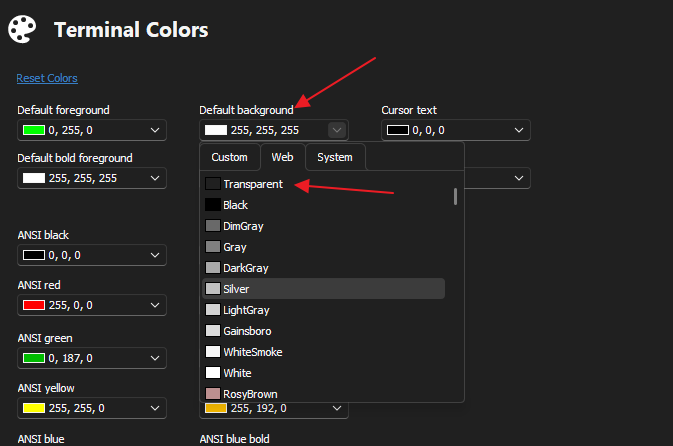
now in working scenario this is how words appear when background hilight matches default background (black):
but if I change default background color of the session, this is how the word 'failure' will appear: it has background black of this word only! this is very inconvenient:
I thought I can use 'transparent' option for the background in syntax hilight, but this insn't working and the background color appears as white, not as transparent.
2- colors I have to pick from is very limited. I want to choose orange color but there is no option for 'orange' so I had to choose 'red bold' instead. However, I have had an option for red-bold that I now override with orange. It will be great if we can choose any color from available colors without having to pre-set the colors in "Terminal -> Colors" option.
Thank you.
Am
fbb5f58f-1e6e-498a-b737-52659c036705.png
69d5e7a9-20ad-4c70-993d-26dbbf493738.png
704b4d05-00f3-4202-b801-7ee9aa4525fb.png
All Comments (11)
anyone is looking into this? :)
Hello AndalusPC,
Thank you for contacting us on that matter,
Could you check that article on how to change terminal colour and see if it helps you:
https://docs.devolutions.net/kb/remote-desktop-manager/how-to-articles/change-ssh-color-font/
Best regards,
Patrick Ouimet
Thank you Patrick. But the link is mostly irrelevant to the what I want to achieve. in brief, what I am looking for is:
- To have text highlight background match shell background so if I change shell background the highlight have same background as well.
- To have more colors. This can be done by letting user specify foreground/background in RGB without having to define set of colors then pick up fore/background colors from that set.
Hello AndalusPC,
Thank you for your message. Regarding your first request to match the background color with the highlight, I have forwarded your request to our engineering department. I will update you as soon as I hear back from them.
As for your second request, I am happy to inform you that RDM already has the option you are looking for. To access it, please go to the custom tab and select "more colors" when changing the color.
Please let me know if you have any further questions or concerns.
Best regards,
Patrick Ouimet
Thank you Patrick for your response. Great that you forwarded the response to engineering team. I hope they'll consider it for new releases shortly.
For second point, I don't find the 'custom tab' you are referring to. May you please guide me where I can find that?
Thanks..
Hello AndalusPC,
To select a custom color for your SSH entry, Select the Terminal Colors as you usually do -> select a field to change the color -> select the custom tab -> more color -> and set the color that you want.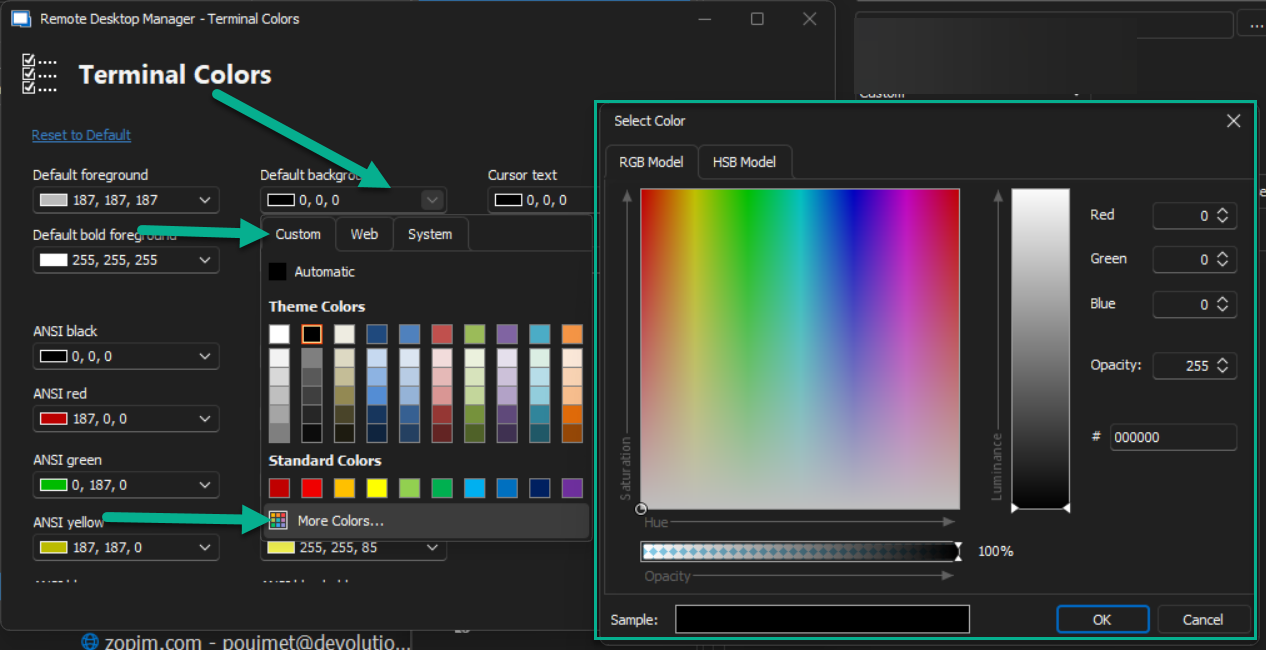
Best regards,
Patrick Ouimet
color.png
Thank you Patrick for your explanation.
Please note that I was talking about colors in 'syntax highlighting' (options -> types -> terminal -> syntax highlighting).
I can't choose from RGB directly for syntax highlighting. I can only pre-defined set of colors (from options -> types -> terminal -> colors) then choose from those sets.
I can't choose syntax highlight color from RGB, I must only choose from the pre-defined list (see screenshot below)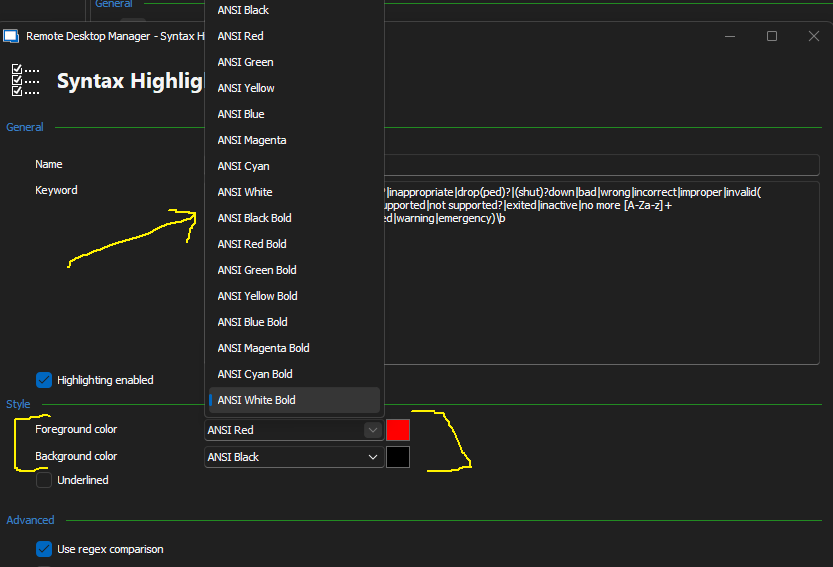
261a280e-de0c-4896-a7e6-2425bdd4fb10.png
Hello AndalusPC,
To set a custom color to your syntax highlight, go to file -> option -> terminal -> color -> change the Ansi color you wanted for your syntax highlight -> OK.
Select your syntax highlight and select the Ansi custom color that you had set before.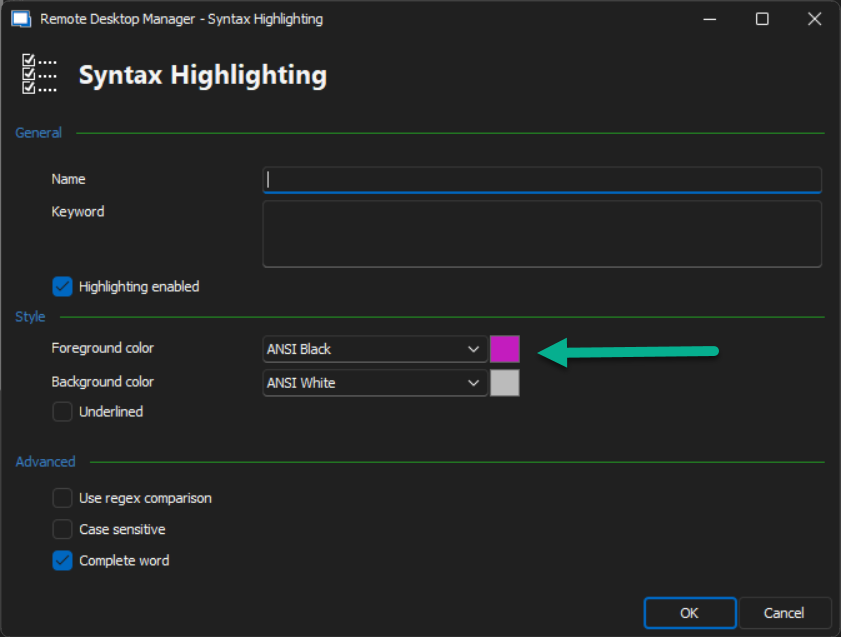
For the transparent highlight to match the background color, we are still working on this feature.
Best regards,
Patrick Ouimet
color.png
color1.png
Thank you Patrick,
what you explained is what I am currently using. To explain to you my challenge, let me give you a few examples:
- I want to use orange color for syntax hilighting (or, any color not on the list). It is currently very misleading to use another name of color with the actual color is orange.
- I want to use multiple scale of red color. like 4 or 5 different red colors (each is different RGB). I can't use that.
That's why I am looking for a way to choose RGB color directly in syntax highlighting than select from the list of pre-defined colors. In screenshot you put, rather than choosing foreground from the list, I would expect RGB box instead to allow me to choose any RGB color. That is way more convenient and allows all RGB spectrum to be available for syntax hilighting.
Hello AndalusPC,
Thank you for getting back to me.
This was a workaround until we will have access to the new feature.
The engineering department has been working on implementing the feature you requested to change the color in Remote Desktop Manager.
They understand exactly what you want to achieve with the Highlight Syntax and are actively working on it.
I will continue to keep you updated on any further developments.
Best regards,
Patrick Ouimet
Thank you very much Patrick,
I appreciate your, and whole Devolutions' family, efforts making this product helpful.
Will be looking forward to seeing this great feature in production.
Best,
Am
Hello AndalusPC,
Thank you for getting back to me.
This was a workaround until we will have access to the new feature.
The engineering department has been working on implementing the feature you requested to change the color in Remote Desktop Manager.
They understand exactly what you want to achieve with the Highlight Syntax and are actively working on it.
I will continue to keep you updated on any further developments.
Best regards,