Version management is overwritten by non-admins

Hi,
I'm the admin of a MSSQL data source and am using the "version management" feature. Recently the values there 2023.1.something were overwritten by non-admin users which - I assume they got a message at the startup because of an old version - probably clicked "adjust version settings" and were successful with that. Is that an error or is that intentional?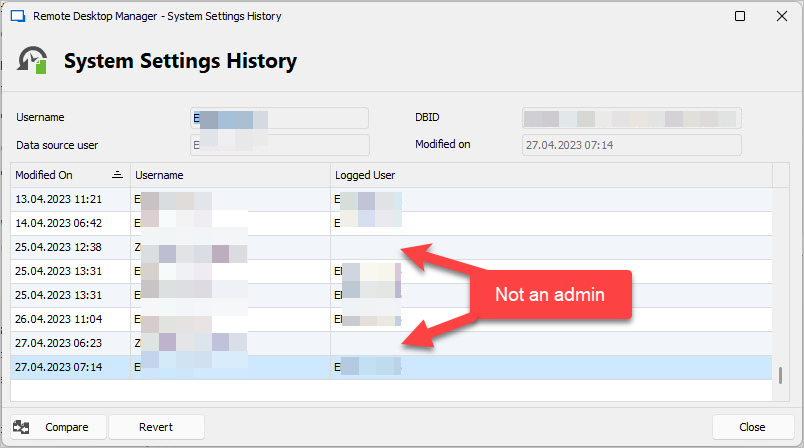
The DB has version v1.838 and should only work with clients > 2023.1.10 but it looks like old versions change that to: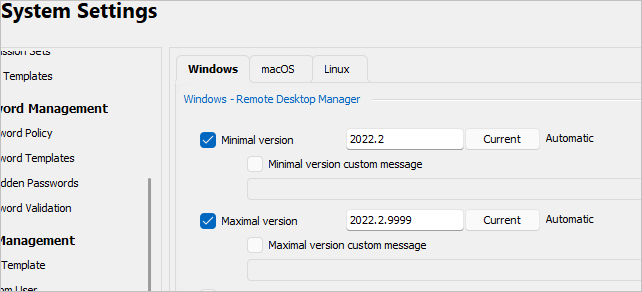
The change - from a technical perspective - is:
Of course updated users then get this: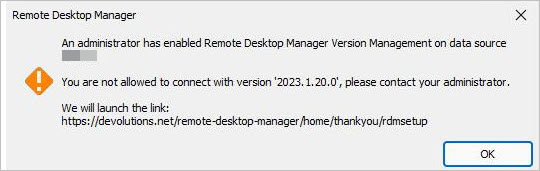
Thanks in advance for an explanation...
19b203ad-9c3e-4e6a-ae6f-d40f1352ca79.png
bf4b6013-c2b6-4303-85fb-6520404ca5b4.png
00706137-f8cd-4bcc-a8c8-6d06a17a9a05.png
655a7460-08bd-4ae1-971b-63896d98236a.png
All Comments (10)
Hi,
Very interesting, observations.
Here is what we know so far.
We had a bug (fixed in v2023.1.23) where after a DB upgrade, if the users chose either Automatic or Yes RDM would re-initialize the system settings (essentially wipe all but version management).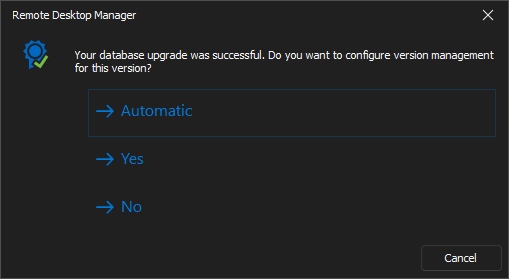
You can validate if this is the case for you. Compare the two such instances as follows. In both cases 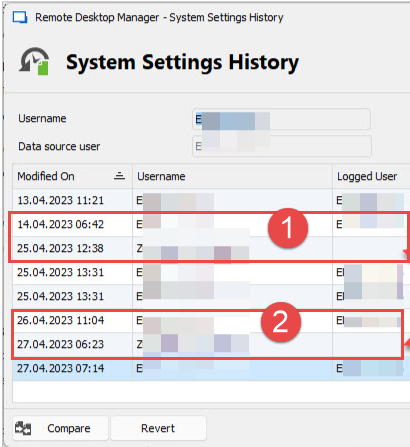
If you see settings being removed (see below) especially the DBID value, you have encountered this issue.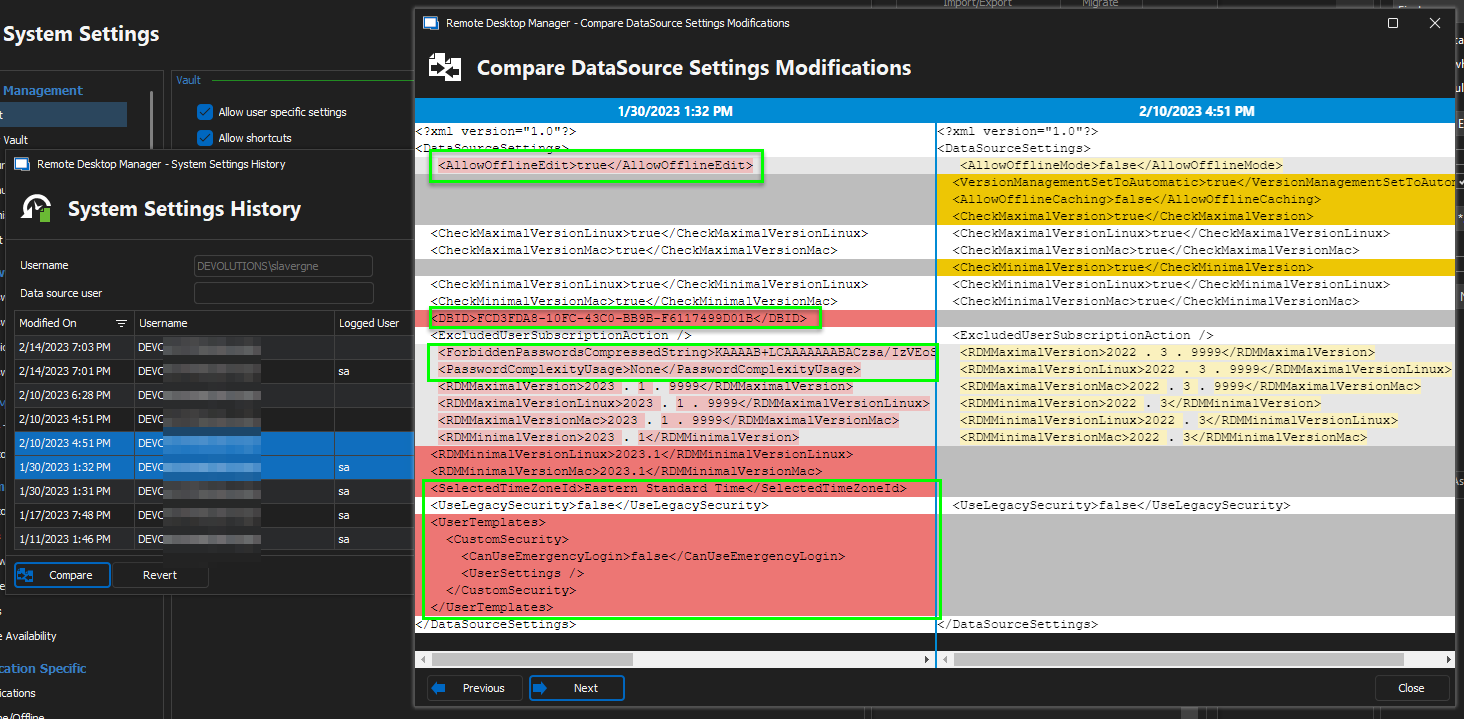
A few things stick out with what I see with your screen shots.
- Why is a non-admin changing the settings?
- What settings changed?
- Why is
Logged Userblank? - If this is due to the known bug (mentioned above) then why did both instance 1 (25.04.2023 12:38) and instance 2 (27.04.2023 06:23) initiate a DB upgrade and version management prompt?
- We only require DB updates when upgrading major.minor version. So say 2022.3 -> 2023.1 and not 2023.1.10 => 2023.1.23 for example.
- Is there something else here at play that we are missing?
- Maybe by comparing the changes made at 1 & 2 we can better determine the underlying issue. Since I'm not convinced that this is due to the bug we've already fixed.
Best regards,
Stéfane Lavergne
f80a5f89-a769-4e25-bd63-c77a9c056b1e.png
da45aced-e8ed-437c-be51-6c60427275ab.png
39632026-eea2-4f61-a909-1ffb958cb1cf.png
Hi Stéfane,
- Why is a non-admin changing the settings? Because they used an old version, got the message about a version conflict and went for the "change version automatically" option, which they shouldn't be able to do (and which is my main concern)
- What settings changed? Just the version management was set to automatic (and because an old version of RDM was used it was changed to old 2022.x versions)
- Why is Logged User blank? 🤷♂️
- If this is due to the known bug (mentioned above) then why did both instance 1 (25.04.2023 12:38) and instance 2 (27.04.2023 06:23) initiate a DB upgrade and version management prompt? I switched back the version management to 2023.x between the two changes, therefore the second occurrence
- We only require DB updates when upgrading major.minor version. So say 2022.3 -> 2023.1 and not 2023.1.10 => 2023.1.23 for example. I guess they used an pretty old version
- Is there something else here at play that we are missing? 🤷♂️
- Maybe by comparing the changes made at 1 & 2 we can better determine the underlying issue. Since I'm not convinced that this is due to the bug we've already fixed.
I get why the first and the second change occurred, they were simply using old versions. The main problem remains though: it shouldn't happen that non-admins can accidentially change such crucial settings just by clicking the wrong button.
Hi,
Here is where my head is at on this issue (thinking out loud).
In theory, only administrators get the database upgrade & version management prompts. I have yet to figure out how a non-admin even gets the window to popup yet alone change the settings. Out of curiosity what version were they using? Could it be it had a bug where non-admin got the prompts? Going back and looking at the code for that particular version might help but that's a tedious task (read, I'm too lazy or not crazy enough to even try).
So how to we go forward from here?
We've put in a few tasks to improve the entire process. Things like telling the user what values will be used for the min/max in case au "automatic" and warning if you are setting lower values than the current ones. Of course this won't help much if users keep on using old version that won't have the enhancements.
Hang on, rereading my response and your last post before I hit reply and I think I found something.
What settings changed? Just the version management was set to automatic (and because an old version of RDM was used it was changed to old 2022.x versions)
Could it be since you are configured automatic that if you run an old version automatic kicks in and reverts the values to the current (older) version? I will investigate.
Best regards,
Stéfane Lavergne
In theory, only administrators get the database upgrade & version management prompts. I have yet to figure out how a non-admin even gets the window to popup yet alone change the settings.
Hmm, there's an option "Show custom minimal/maximal version message for administrators" so I'd assume it's other way round and only non-admins get this version messages?
Out of curiosity what version were they using? Could it be it had a bug where non-admin got the prompts?
Thb, I don't know the exact version but I guess it was something like v2022.2.29.0 as the min/max was set to 2022.2/2022.2.9999
So how to we go forward from here?
We've put in a few tasks to improve the entire process. Things like telling the user what values will be used for the min/max in case au "automatic" and warning if you are setting lower values than the current ones. Of course this won't help much if users keep on using old version that won't have the enhancements.
Ok. For now we got away from explicitly checking the versions and keep only the MSSQL messages that occur if you have a non-compatible version
Could it be since you are configured automatic that if you run an old version automatic kicks in and reverts the values to the current (older) version? I will investigate.
If I got you right with this, that's the whole point of my request. We don't manage the installation of our team via a software package manager or something so we are not in control who uses which version. And still "Version management is overwritten by non-admins" 🤷♀️
I'm experiencing the same that "Non admins" are allowed to set new min/max versions because the have downloaded newer package from devolutions web site. I got suggestion from Devolutions support to set "lower" admin rights on the SQL DB user the RDM users are using.
As of now I think it's strange that the connection at star up doesn't check if you are admin and allowed to set system settings just because you downloaded a new version of the web, that is not compliant with min/max version setting. I was told by devolutions to post a "feature request", but I just got link to this web page.
Screenshot of "non admin users" upgrading aka. setting new min/max version because they upgraded local client. 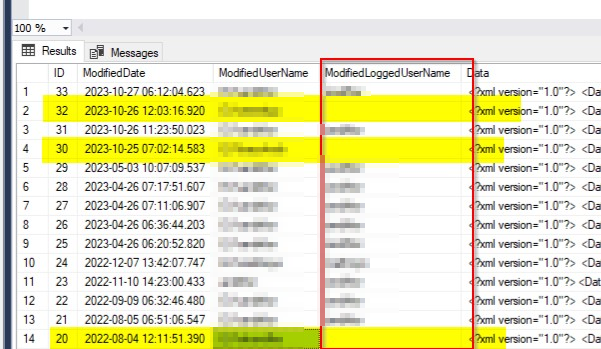
507a6089-88f8-477a-92ec-dbbd41d7b535.png
@torsteinandreassen
Thank you for the heads-up, I will have another look. This should have already been fixed. We must have missed something.
Sorry for the inconvenience.
Best regards,
Stéfane Lavergne
@all
v2023.3.22 is now available
https://devolutions.net/remote-desktop-manager/home/download/
Best regards,
Stéfane Lavergne
Wrong thread, sorry
Stéfane Lavergne
@torsteinandreassen
We've found and fixed the issue. The fix should be in a build within the next week or so.
Look for something like the following in the release notes for the fix:
- Resolved non-admin DB upgrade prompt issue
- Resolved version Min/Max issue not prompting for non-admin
(these are the dev notes, the build master goes over the dev notes and "prettifies" them prior to the release)
Best regards,
Stéfane Lavergne
Nice. thank you :)
@torsteinandreassen
We've found and fixed the issue. The fix should be in a build within the next week or so.
Look for something like the following in the release notes for the fix:
- Resolved non-admin DB upgrade prompt issue
- Resolved version Min/Max issue not prompting for non-admin
(these are the dev notes, the build master goes over the dev notes and "prettifies" them prior to the release)
Best regards,