import connections with RDP Gateway link and inherited credentials already set
import connections with RDP Gateway link and inherited credentials already set

Hi, I'm new to RDM. I have ~800 connections to create.
I have a single user account for them all.
I created a new folder
I've created a credential (key) object in the root of that folder
I set the dft creds to use that credential item.
I setup subfolders with inherit.
Now when I create new connections they always create with "custom" credentials??? How to make default 'Inherit"
How do I import to do the same?
I don't want to have to configure RD Gateway for each, I have created a RD GW object in the root.
I can reference this in the Connection panel of any new connection and it works.
How do I mass import my 800 connections with this setting already?
I've attached screenshots of a working connection i'd like to use as the basis of a copy, I figure I could export to csv then add additional rows and then reimport but the rdgw settings and credential inheritance aren't visible on a csv export.
Thanks in advance.
Michael
rdm-question.pdf
All Comments (3)
Hello
Michel,
Thanks for
trying our product.
For your
credential problem make sure your root folder uses the linked (vault). This can
be configured in propriety -> general -> credentials then use
the ellipsis button to select your credential entry.
Since you have already created an RD GW object in the
root folder you can go to is properties,
under VPN\SSH\Gateway in the type setting select “RDP Gateway.”
Then move to the setting “RDP gateway” tab use the ellipsis button to select your
RD GW object.
Now everything is set up as far as the root folder goes.
From there you will need to create an RDP template,
configure it to have its credential set to inherit, the same thing will need to
be done under the VPN\SSH\Gateway section.
To create a template, go to file -> template
-> Create template -> session then select the session type you want to
create, in this case, an rdp entry.
Now when you are going to import your session, using
these steps provided in this link, “https://help.remotedesktopmanager.com/importcsv_strategies.html”
Best regards,
Carl Marien
Apologies, i'm confused at the config of the rdgw setup. In the RDGW settings VPN/SSH/Gateway tab I select RDP Gateway.
Then when I switch to the "Settings (RDP Gateway)" tab I can't select anything. I assume an rdgw can't point to itself??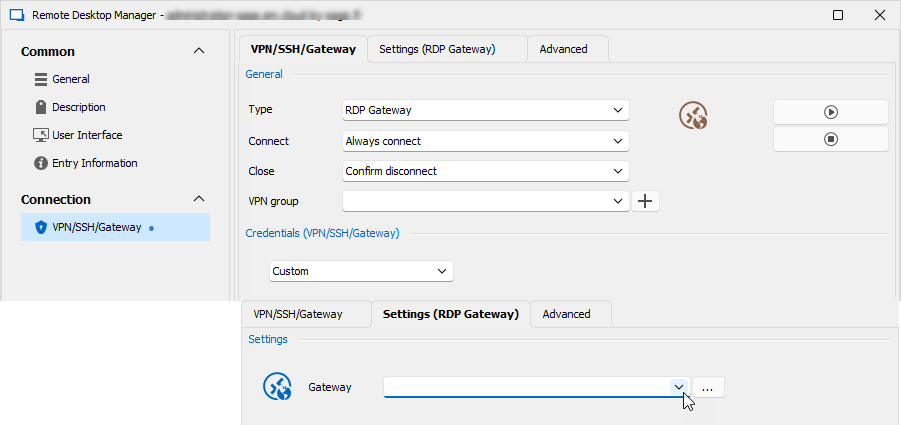
640c039e-3df0-47e3-bb93-d41fbe126189.png
Hello Michel,
If you want a rdgw to appear in the dropdown menu you will
need to create a rdgw session.
Carl Marien