Use a wrapper script for ssh connection

Hi,
I would like to run a powershell script to sign a SSH key and generate a SSH certificate before a SSH login. Is it possible via a wrapper (change de CLI called by RDM) ?
Thanks you
All Comments (7)
Hello Joffrey,
You can use the Before Open event to run a PowerShell script in the session. Please refer to https://docs.devolutions.net/kb/remote-desktop-manager/how-to-articles/execute-powershell-connection/ for more information.
Best regards,
Richard Boisvert
Thanks you Richard, but I don't find any doc about the powershell module and $RDM.connection.
I want to read User public ssh key and set a temporary ssh certificate.
Where is the documentation about $RDM.connection object ?
Hello Joffrey,
The $RDM is the entry object, you can apply anything to it that you can do in RDM. What we recommend as making the change in the UI, and the looking at the properties (Clipboard > Copy -see the first point of https://help.remotedesktopmanager.com/pstipsandtricks.html) so you can reference it in a script after.
Please note that if you use $RDM.Save, it will save this instance of the session object, the changes will not be permanent. Once the session is closed, anything that was saved to it with a $RDM.Save will be lost, but this seems to be what you are looking to accomplish.
Best regards,
Richard Boisvert
Thanks you ! It works if I don't use personnals settings. I generated a temporary file with a new ssh key for the current connection.
But, How can I retreive public key stored in "File -> My Defaults -> My Personal Private Key" or in "File -> Settings -> My Personnal Credentials".
And I need "Personnal -> Settings -> Password Management -> HashiCorp Vault" too (used when you set "use my account settings")
Hello Joffrey,
Glad to see it works!
Is there a reason the entry is not set to use the private credentials and key directly?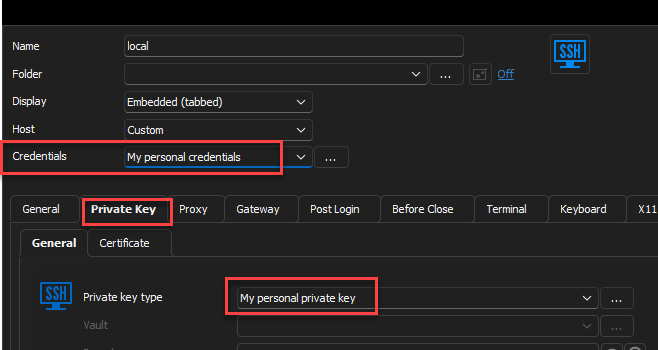
For the My Personal Credentials, you can use the following cmdlet: Get-RDMPersonalCredentials . The private key and the HashiCorp Vault are not available from PowerShell, however.
You will need to install the PowerShell module if it is not already installed: https://docs.devolutions.net/kb/remote-desktop-manager/knowledge-base/rdm-powershell-core-module/#powershell-installation . Then, if you user RDM 2023.1, you will need to use PowerShell 7 (File > Option > Types > Others) since 5.1 is not supported anymore for the module.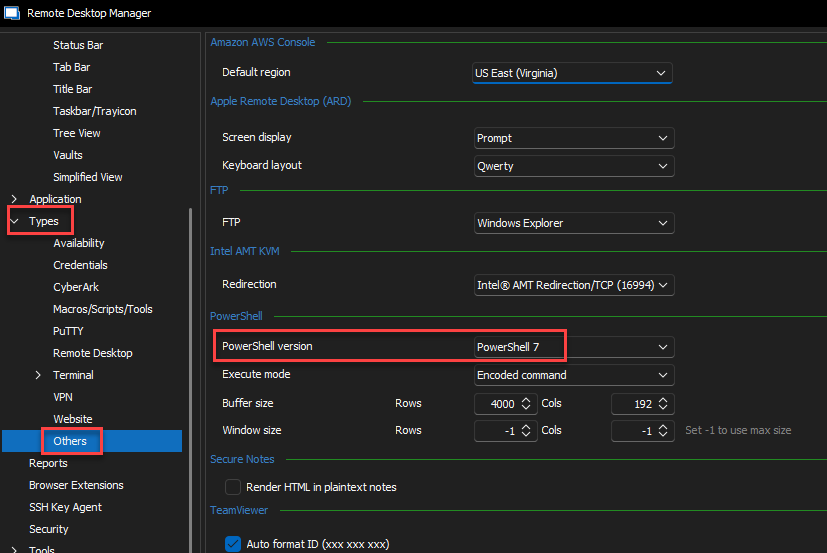
Best regards,
Richard Boisvert
470c61a0-c6a1-4c4f-804f-11a54ac730ca.png
6d510ef6-9278-4a99-8994-d012cb2ee458.png
Ok thanks you. Finally, I use a Powershell Session + SSH Windows binary. For this particular use cas, it's easier to do with a powershell session with a prompt in the powershell session to login to Vault if necessary.
Do you know if it's possible to open a sensitive message prompt in a Event + powershell script fort a SSH session ?
Hello Joffrey,
You could always do a Get-Credential (https://learn.microsoft.com/en-us/powershell/module/microsoft.powershell.security/get-credential?view=powershell-7.3) and then retireive that password as the sensitive information.
Best regards,
Richard Boisvert