Automatically run "Check if host is online" before an RDP connection
Automatically run "Check if host is online" before an RDP connection

Because of some IP overlap when connected to several clients via VPN, I need to ping a machine immediately before I open an RDP connection to it otherwise the connection will fail.
As part of a single shortcut, is there a way to run the tool "Check if host is online", and if the ping is successful, automatically initiate an RDP connection attempt? If not, it takes 4 clicks to do the process manually, which may not seem like a lot, but multiply that over a large number of devices and it's a pain.
Enabling "Is Online (Ping/Port scan)" isn't enough in this case due to the timing required for these connections to work.
I looked at running a Before Open event, but it doesn't include the "Check if host is online" tool under the Macro/Script/Tool option, and running a ping test in a command prompt is fussy (have to customize it for every connection) and not a pleasant user experience for this situation.
All Comments (1)
Hello,
Thank you for contacting us on that matter.
The only solution would be to add the following PowerShell script in the Before Open Events feature of the RDP entries.
if (Test-Connection "$HOST$" -Quiet)
{
    $RDM.Cancel = $false
}
else
{
    $RDM.Cancel = $true
}
You can use the Batch Edit feature to modify all existing RDP entries at once.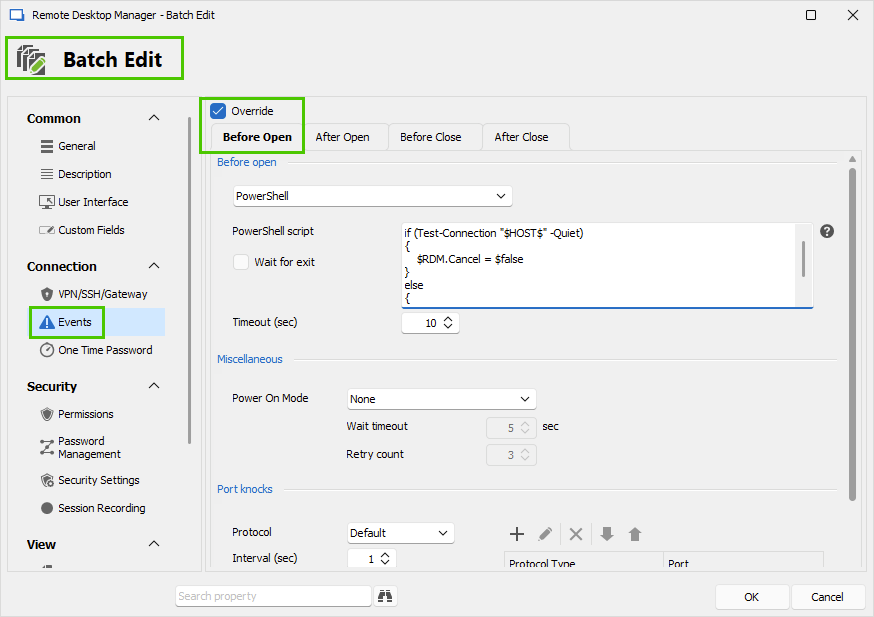
And for the new RDP entries, you can create them using a Template that already contains the script.
Let us know if you have further questions about this.
Best regards,
Érica Poirier
c9d9978b-2d7d-4c71-aa45-7693b0f53d97.png