Preferred version
0 vote

Can we please have a setting in this screen for "preferred version"
As an example, I'd like to set 2023.1.20.0 as the "preferred version" so that it prompts users and says "Your administrator has requested that you upgrade your version. Click here to download or press cancel to continue with the current version"
That way I can give users 2 weeks to upgrade themselves and then if they haven't, I can force them by changing the minimal version at that time.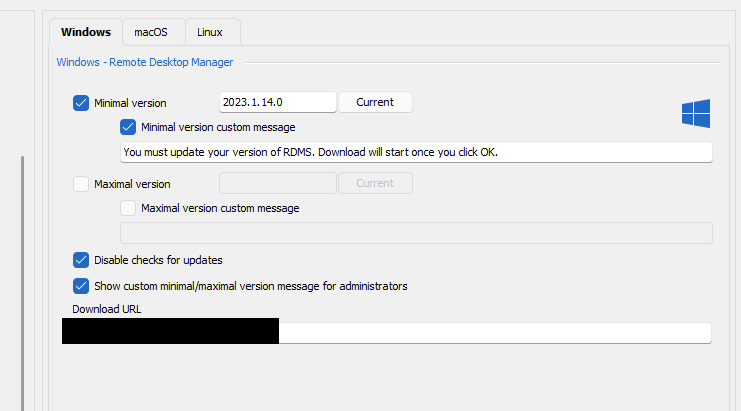
4ec0d2e6-53ad-4a92-8725-789fca58d489.png
All Comments (5)
Hello,
I think that's an interesting idea. We could do the following:
- Add a checkbox for "recommended version", with a button for "current", similar to the minimal and maximal versions
- Add a way to customize the message
- Use the existing "download URL" for the download button
Would this work for you?
Regards,
Hubert Mireault
Yep, that would be perfect, as long as upgrading is optional rather than mandatory.
Perfect, I will open a ticket and we will let you know once we have an update on this feature.
Regards,
Hubert Mireault
Hi Hubert
I see this has been implemented, but no way to enter a custom message. It's also not putting a prompt up when the user loads RDM?
Hello,
The custom message from the minimal and maximal version setting should be shown when a user connects to the datasource and are out of the range. This recommended version setting is used to help a user get on a specific version if they are out of the allowed range. If they are within the minimal/maximal range, they will not be prompted for this recommended version.
Let me know if this current implementation works for you, otherwise, let us know what is missing and we will see what we can do to improve the behavior for your scenario.
Regards,
Hubert Mireault