Issue accessing an Azure Virtual Desktop (AVD)

Hi,
I am trying to use RDM to access a workspace-based Azure Virtual Desktop (AVD) by importing the .rdp file from %LocalAppData%/rdclientwpf as per other forum entries I found. I am using RDM 2023.1.20.0
After I import the RDP when I double click to connect, I get this error message:
"We've blocked the connection because the connection information was tampered with."
See attached screenshot.
Any idea how I can use RDM 2023.1.20 to access workspace-based Azure Virtual Desktops?
Thank you!
PalmPilot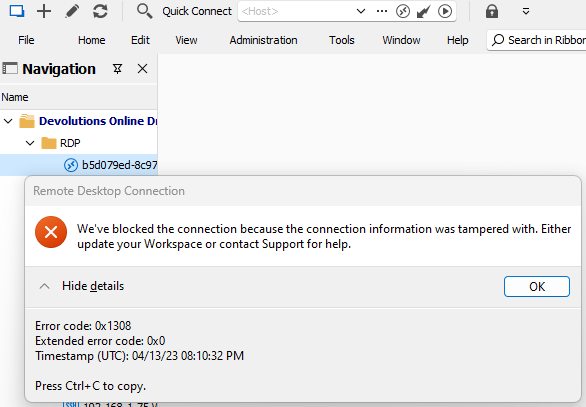
62c001ff-33d1-4387-b92b-3cf90a851f29.png
All Comments (8)
Hello
Can you confirm if you have RDP API hooking enabled? It's a prerequisite for this functionality.
What configuration do you have in Options > Types > Remote Desktop > API Hooking?
Please let me know if something isn't clear, or you have further questions
Kind regards,
Richard Markievicz
Hi Richard,
Thank you for the quick reply. Under Options > Types > Remote Desktop > API Hooking I have it set to Enabled.
BTW when I try to import the RDP it gives me two options (import RDP content or link to RDP file) when I pick import it creates the entry (and later gives me the error that I showed above), when I pick link, it does not create the entry at all (does nothing).
Thank you,
PalmPilot
Hello again
Thanks for confirmation. When you import the .rdp file, which option do you take? 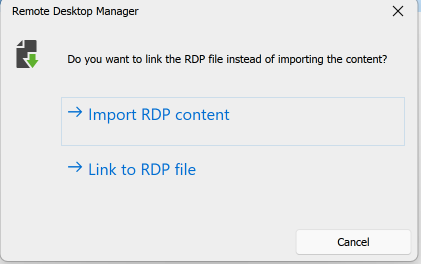
It's import to link to the existing RDP file (option 2) rather than importing the content.
Let me know if that helps, or if something isn't clear.
Thanks and kind regards,
Richard Markievicz
Screenshot 2023-04-13 at 16.17.11.png
When I import and choose "Link to DRP file" it does nothing. It just closes the dialog and does not add any entry to my Navigation folder.
Hello
I reproduced your issue locally and I'm looking into that currently. I'll post back here once I have some more information.
I apologize for the inconvenience.
Thanks and kind regards,
Richard Markievicz
Hello again
I've done some digging on this issue; first - my apologies, I was incorrect in my earlier post. The proper way to link the MSRDC .rdp file is to choose the "Import RDP Content" option.
(As a side note - as you saw, there is a bug in the current release where choosing "Import... Link to RDP File" does nothing; I've already entered a fix for that).
Assuming you've imported your .rdp file, the next step is to "Edit" the connection and under the "Advanced" tab, set the "RDP Version" to "MSRDC".
Finally, thanks for confirming that you have API Hooking enabled - please be advised also that it's possible for this to be disabled via group policy. If you make the change above, and still get the same error, can you confirm with your system administrator that you don't have a GPO disabling this feature? The policy name is "EnableRDPHooking".
Please let me know if something isn't clear, or if you have further questions.
Thanks and kind regards,
Richard Markievicz
Hi Richard,
Thank you so much for the updates and fixes. Now with RDP Version set to MSRDC I am able to connect. I have an issue with authentication (it keeps insisting my username/password are incorrect when I know they are) but I will try to figure out that part by myself and update later.
Do you happen to know where I can import the RDP files from on MacOS? basically the equivalent location of %LocalAppData%/rdclientwpf on MacOS version of Microsoft Remote Desktop? I would like to try to import that into RDP on my mac if possible.
Thank you!
Hello again
Good news, thank you for the update.
In terms of authentication, it should work the same as using the MS RDC client normally. I got tripped over in the past when I tried to use my Azure domain credentials on the machine but it was expecting the credentials from a local user on the machine. If you can't get this right, please post back and we'll see if we can offer any more advice.
On macOS the equivalent directory is likely somewhere in ~/Library/Application Support. However, that being said - this feature won't work on RDM Mac. On Windows, we're able to hook into the internals of the MS RDC client and alter its behaviour (that's the "API Hooking" option). The key to making Azure Virtual Desktop work is by disabling some checks inside the MS RDC client (RDM generates it's own .rdp file to launch the connection and that file is obviously not blessed by Microsoft). You can read more about the technology on our blog; but right now the same approach is simply not feasible on macOS. We'll keep working on ways to unblock this feature on other platforms.
I apologize for the inconvenience. If you have further questions or comments, please don't hesitate to post back.
Kind regards,
Richard Markievicz