Uninstall and/or MFA problem

We use RDM against a SQL server.
I have it working i Windows with no problems.
Wanted to set it up again in OS X since there was problems with an earlier version (read 2-3 years ago)
When I start RDM in my MAC I'm prompted to enter my MFA key for our SQL database source, which is correct.
The problem is that I don't have that entry in my authenticator anymore.
So I followed the uninstall instructions here: https://helpmac.remotedesktopmanager.com/installation_uninstall.html
Downloaded the newest version 2023.1.7.1 Team Edition and installed, draged the file to applications folder.
I import the setting for out SQL database source from the rrd file, all tests against the sever and database works fine.
But as soon as I choose it as my data source I'm prompted to enter my MFA key
So the uninstall didn't remove everything that was needed what else should I remove to get a clean new install
or how can I reset/setup a new MFA key?
All Comments (3)
Hello,
Thank you for contacting us on that matter.
As the MFA is now configured at the user level and not the data source level, you can go in Administration - Users, select your account and then remove the MFA with the Remove MFA button.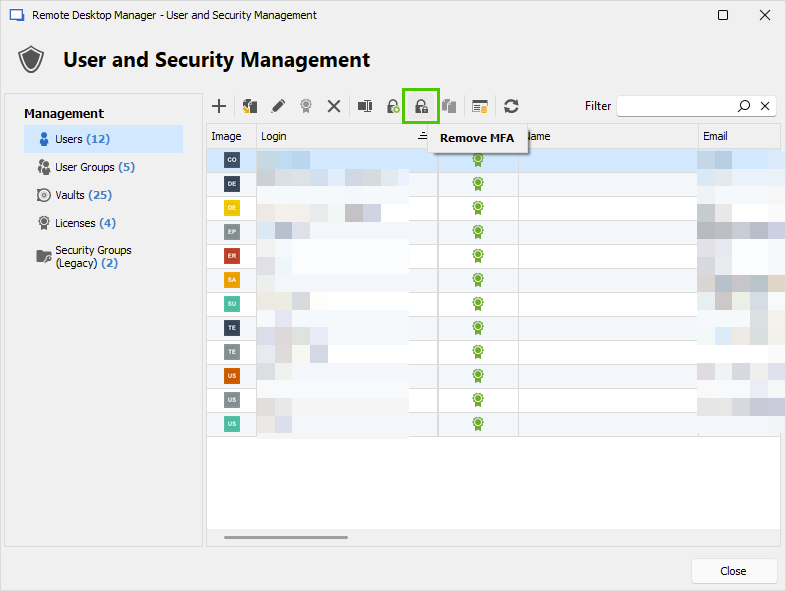
Let us know if that helps.
Best regards,
Érica Poirier
6601f402-2714-4829-b96b-c6d18d22bb53.png
It worked like a charm
Wasn't aware that the MFA now was stored at the server and not in the client
Reset and new setup, works in both Windows and MAC with the same authenticator entry
Thank you for help.
Hello,
Thank you for your feedback and glad that it helped.
Best regards,
Érica Poirier