Edge embedded, but allow popups?

We use Dell Servers with iDrac. This works fine with embedded Edge, but when we want to access the Virtual Console, the popup for this windows is blocked and embedded it is not working. In the past with older iDrac versions this was working, but not with the latest ones.
This error message is shown shorty: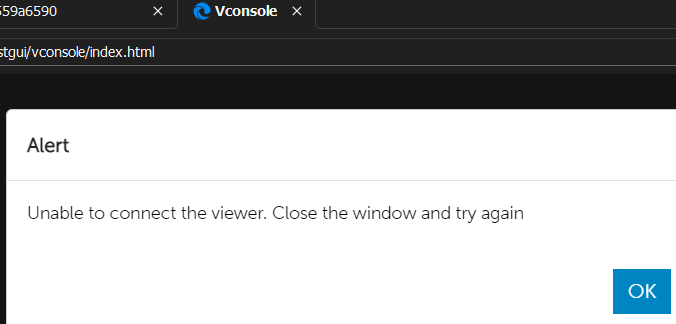
And on the main iDrac page this is shown: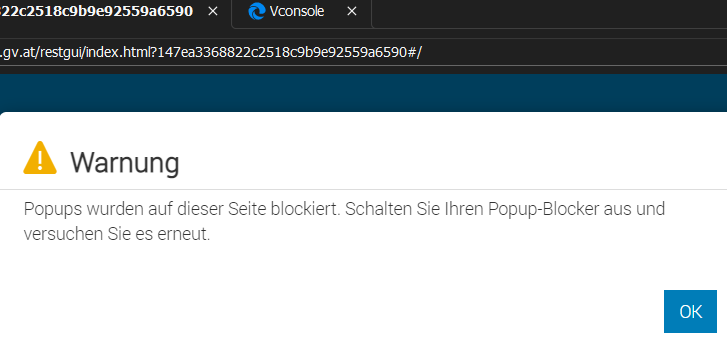
Do we have any chance to use embedded Edge, but allow popups in its own window?
Brgds Andreas
ae1a2323-c92d-4699-9064-ed7c8aabba6b.png
a418dd4f-b3e0-4ef8-9199-560b32ec65d9.png
All Comments (16)
Hello,
Just to confirm, do you have the same behavior when you launch your session with Chrome? Also, what is your RDM version?
Best Regards,
Etienne Lord
Hello,
no, with Chrome it is working! I did not tested it as Edge is our standard browser and I nearly never use Chrome...
RDM is latest - 2023.1.20
Brgds Andreas
Hello,
Thank you for the details, I will have a look with the engineering department.
Best Regards,
Etienne Lord
Hello,
Have you tried the idrac entry type?
Regards
David Hervieux
Hello,
I tried it long time ago, but it was not working. Now I tried it again and it is working for iDrac 9! So you can basically forget about the Edge thing...
The only problem I have now is that we use domain credentials to login stored on Secret Server. We need the user in the format user@domain which is selectable, but not filled in that format.
Setting: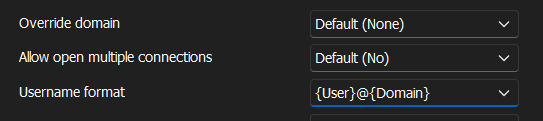
Filled:
Edit: Just to not confuse you - with my Edge entry the settings are the same and in Secret Server the "Domain" is available as an attribute which is fetched by RDM.
Edit 2: I tried to set now a "Custom Domain" as a workaround, but when I select this - where do I enter the domain?!? There is no field where I could enter my domain.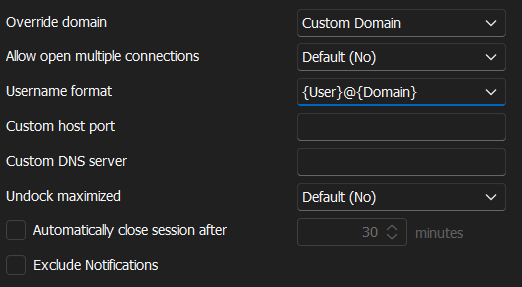
Brgds Andreas
6adc971b-5599-4502-8b14-446d0436125e.png
65bb2572-01bb-4fa4-b5bb-daf0a76e6994.png
4e36cf20-f325-4dad-abc9-5f0c0d6a8c32.png
Hello,
The custom domain refers to the Domain property in the Asset section. But it still won't work for iDrac entries at the moment.
We've found the cause of the underlying issue and made an internal fix. It will be included in version 2023.1.23.0.
Regards
Jonathan Del Signore
Hello,
Thanks a lot for your help! It is amazing how fast you are with fixes!
I hope you mean the fix for not fetching the domain field from Secret Server - right?
When is this version planned to be released?
Brgds Andreas
Yes this also applies to Secret Server credentials. Our Secret Server setup is down at the moment so I can't confirm, so please report back to us if you still encounter issues.
We're planning a new build later today, so if everything goes well it'll be available tomorrow or friday.
Regards
Jonathan Del Signore
Sure - I´ll post here as soon as I was able to test it.
Brgds Andreas
Hello,
I can confirm that with 2023.1.23 the iDrac entry is working with user@domain!
Thanks a lot for your help!
Brgds Andreas
I created now a PowerShell script that converts an export of my iDrac connections from type WebBrowser to IDrac. If anyone is interested, I can post it here...
iDrac works great with iDrac v9, but with iDrac v8 it does not fill the password. The user is filled after checking "Use legacy control IDs", but the password field stays empty. Do we have any Chance to get this fixed? We still have a few servers with v8...
In the old .rdm file the input fields that worked with WebBrowser connection type were:
<UserNameControlId>user</UserNameControlId>
<PasswordControlId>password</PasswordControlId>
Why do I know that the password is not filled? Because of this:
Brgds Andreas
1b37b3fa-b99a-4077-a1e3-9543eb166e51.png
Hello Andreas,
Thank you for your reply! I will contact our engineering department and see what can be done.
Best regards,
James Lafleur
Hello,
Our engineering department has informed me that they will add an option to allow our users to enter custom control IDs and in doing so, help with the issue that you are facing with iDrac8.
We will let you know as soon as we will have an update to provide,
Best regards,
James Lafleur
Hello James,
thanks a lot for your help!
Brgds Andreas
Hello James,
would it be possible to add another thing? With a web browser connection we can use the "key" icon to submit the credentials again if a timeout occured and we were logged out. With the iDrac entry type this is not available and i must do a "Reconnect" which also refreshes the web page. It is working, but the refresh is not neccessary...
Brgds Andreas
Hello,
We have added this information to our currently opened ticket so we can do this as well.
Regards,
Hubert Mireault