Create Keyboard Shortcut for "Windows Key on Remote Computer"
Create Keyboard Shortcut for "Windows Key on Remote Computer"
0 vote

Hello,
Wondering if it would be possible to create a keyboard shortcut for the "Windows Key on Remote Computer" button/feature? I know we can adjust the default keyboard hook to either remote/local/full screen only, but since I often use RDP in windowed mode, I have mine set to full screen only because i like to be able to use keyboard shortcuts on my local machine most of the time.
But, I would use the mode where it "hooks" the keyboard when the RDM window received focus (i.e. set it to "on the remote computer") if there was a keyboard shortcut to break that hook - it looks like the "Windows Key on Remote Computer" feature will do this but you have to manually click it up in the Actions ribbon (I could not find it on the keyboard shortcut list). And then preferrably it would re-grab the hook if we clicked within the RDP session again (or perhaps the same keyboard shortcut would re-hook if the RDM window had the focus...).
So if there was some way to make a shortcut for that (similar to how Ctrl-Alt shortcut breaks the hook for VMware Remote Console windows), that would be so awesome.
Amazing product by the way! I've used it free for a while and now we just bought the licensed version so I'm just stating to explore the more advanced features... and I know there's so much I haven't even scratched the surface of.
Thanks in advance for your consideration of this request!
David Willis
All Comments (17)
Hello,
Thank you for your request. I think it should be possible to add something like this. I will open a feature request ticket and we will post back here when we have an update.
Regards,
Hubert Mireault
Great, thank you!
David Willis
Hello,
I was looking for this shortcut too. Has this already been realised?
Hello,
It's not currently implemented but I will ask our development team for an update on the matter. We had issues implementing this originally and I think it fell through.
Regards,
Hubert Mireault
Ok. Thank You for the update.
I'm curious.
Hello, just wondering if there was any update or ETA on getting this implemented?
David Willis
Hello,
We've done a preliminary investigation on what it would take to implement this, but we don't have an estimate yet. I will try and raise the priority on this.
Regards,
Hubert Mireault
Hello again - just checking in to see if there was any progress?
Also on a slightly related topic, can I ask what the difference is between the red magnet in the bottom right, and the "windows key on remote computer" setting? I tried searching but have found very little on this (especially the red magnet button - aside from a couple suggestions of when to use it, but no description of what it does).
Best regards!
David Willis
Hello,
Our developer has performed the analysis but hasn't had time to implement the necessary changes yet as we've had other priorities and bigger roadmap items to get to. I'll see if it's possible to schedule soon.
As for the magnet icon, this is used for the shortcuts within RDM, when they are configured in "Default" mode. What I mean by that is the shortcuts configured in File > Settings > User Interface > Keyboard that are unique to RDM: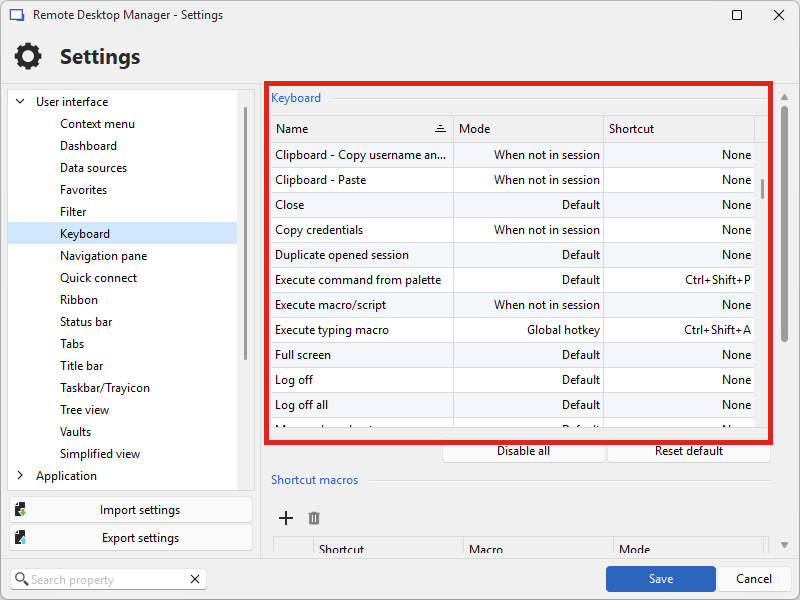
The "windows key on remote computer" setting is a configuration within RDP called "keyboard hook mode", that specifies whether the RDP control will catch the input Windows keyboard shortcuts and execute them within the RDP session, or on your local machine. I think the name might be a little confusing: it's not only the "windows key" that is caught, but shortcuts that the Windows OS supports.
Let me know if that clarifies the purpose of both settings.
Regards,
Hubert Mireault
06e237fb-276b-4666-9312-75ba78ca4d48.png
Hello
Just to add on to what my colleague already wrote: we did perform an analysis here, while it superficially seems quite straightforward the devil is in the details and it's something tricky to implement cleanly and in a robust way. I'll ask my colleague who specializes in API hooking if there might be a way to achieve this directly inside the ActiveX control, which could be easier than implementing it directly in RDM.
However, in the meantime; I'd like to highlight a little known feature of MS RDP: when the keyboard hook is set to trap Windows shortcuts locally, there are alternative key combinations for firing the Windows shortcuts on the remote machine anyway. For example; if the keyboard hook is local, then [Alt]+[Tab] will cycle through programs on the client machine. However, it's possible to use [Alt]+[PageUp] to perform the same action on the remote machine. Similarly, [Windows] will open the start menu on the local machine, but [Alt]+[Home] will open the start menu on the remote machine. There's a bit of overhead with knowing the alternative shortcuts, but since there are only 6 or 7 it's not too bad.
The complete set of alternatives is listed here.
Please, let me know if you have some questions or something isn't clear.
Kind regards,
Richard Markievicz
Hi,
I am currently working on implementing this inside MsRdpEx, after which RDM will be updated to use it. Here's what it looks like so far:
KeyboardHookMode:i:0
KeyboardHookToggleShortcutEnabled:i:1
KeyboardHookToggleShortcutKey:s:space
KeyboardHookMode is the regular option which lets you choose between local, remote and remote only in fullscreen mode. I have made a shortcut key (Ctrl+Alt+Space by default) to toggle between local and remote. I'm making the last key ("space") configurable, and I am not trying to prevent events from being sent to the server - if you use Ctrl+Alt+Space, then Ctrl+Alt+Space is sent to the server, but the client will catch it and toggle the keyboard hook mode value.
A simple toggle looks like the best option, as I would rather not make it more complex with switching between value 0,1,2. I simplified it to local (0) and remote (1) when using the toggle. It will work with the RDP ActiveX embedded in RDM, but also with mstsc in external mode.
Does this look good on paper to you? If so, I'll make the finishing touches, and this is what we'll integrate in RDM.
Best regards,
Marc-André Moreau
Hello all,
Thank you so much for all the responses. Let me respond to each one here:
First to Hubert's post - thank you for explaining these buttons. I think I understand "windows key on remote computer", but just to make sure I understand on the magnet. It sounds like you're saying if the magnet is enabled, then any shortcuts set to "default" mode in the RDM shortcut list will be in effect? And if the magnet is disabled, those same default shortcuts will not be in effect? Is that a correct understanding?
Secondly to Richard's post - thanks for the tip on the hidden RDP shortcuts, indeed I did not know those existed! (well, except for Ctrl+Alt+End which I've used for a long time but I didn't know there were others as well). It looks like they do have an Alt+Tab alternative which is cool since that is one of my most commonly-used key combos that I'd want to be able to sometimes execute in the remote session. Unfortunately though, beyond that there aren't a ton of other shortcuts available - for example Ctrl+Tab/Ctrl+Shift+Tab (to cycle between tabs in the same app, e.g. in a browser or an app like Visual Studio or SSMS) is another one I'd use very commonly and it doesn't appear they have a solution for that. Still though, this is very helpful to know, so thank you! Too bad MS didn't extend that feature further and/or make it configurable, that would've been awesome...
Last but not least, Marc-Andre - that's awesome!! Thanks so much for working on this! That sounds great so far - my only questions at this time would be whether the Ctrl+Alt+Space (or whatever configured shortcut was used) would be the only way to toggle the hook on/off or would it also enable the hook just from clicking in the RDP session? (assuming a docked, tabbed session)
Also , how would it work if the hook was on, and then lets say the user clicks outside RDM somewhere into another window. If they later switch back to RDM (either via mouse, or Alt+Tab) is the hook still active?
Thank you all for your support on this - you all are amazing!!
Best regards!
David Willis
First to Hubert's post - thank you for explaining these buttons. I think I understand "windows key on remote computer", but just to make sure I understand on the magnet. It sounds like you're saying if the magnet is enabled, then any shortcuts set to "default" mode in the RDM shortcut list will be in effect? And if the magnet is disabled, those same default shortcuts will not be in effect? Is that a correct understanding?
That's exactly right. Meanwhile, the other modes are a little more self-explanatory:
- Global mode: the shortcut will trigger even when the focus is outside of RDM
- When not in session: the shortcut will trigger when the focus is inside RDM, but not within an active session
- None: the shortcut is unset and will not trigger
Just one thing to note but as previously mentioned, even if the magnet is on, certain entries like RDP, due to the way they work, will capture the shortcuts when focus is inside them. It's much more difficult handling that; at least for RDP, we have a lot of expertise at Devolutions which helps us improve the behavior.
I'll let Marc-André answer for your other questions as this is moreso in his wheelhouse.
Thank you for the kind words as well!
Regards,
Hubert Mireault
Hello again David
I'll follow up here with the current progress and try to answer your remaining questions.
Marc has finished the code that allows us to toggle the keyboard hook mode in RDP sessions via a keyboard shortcut. This is tricky, because obviously if an RDP session has focus it will "swallow" keyboard shortcuts before RDM has a chance to "see" and act on them. Marc's changes trap [Ctrl]+[Alt]+[Space] and use that to toggle the keyboard hook mode, but the shortcut itself is still sent to the remote session. This is unavoidable but we hope that this particular shortcut doesn't have many conflicts - it's close to what VMWare does, as you mentioned in your original post. In the future we could make this customizable but that represents further trickery, because this functionality is basically separate from RDM's own shortcut handling. We'll consider that for a future improvement if the default shortcut proves troublesome for some users.
Now, having the ability to toggle the keyboard hook in this fashion is only half of the battle, because it still remains to integrate that functionality inside RDM; which will likely fall on my shoulders.
At a bare minimum, we will add a setting to the RDP session and to the application settings (allowing a "Default" configuration for all sessions) like "Toggle Windows keyboard hook with shortcut".
I'll see if it's feasible to add a further setting to rebook the keyboard when you give an RDP session focus; I believe that's what you talked about in your earlier posts.
My remaining concern is actually showing the current hook status to the user. I'd like it if we had a way to show visually where Windows shortcuts were going for that a particular session, and a visual feedback when you toggle the setting by shortcut (and possibly by focussing the session). Perhaps this could be an additional icon in the tab header, somewhere else in RDM or possible a notification bubble. I'm still thinking this through.
I'll hope to have this implemented for the 2025.1 release in a few weeks, or very shortly afterwards.
Please, let me know if you have any additional questions or comments
Kind regards,
Richard Markievicz
Hello
I have an update on this topic. I've integrated a change that adds an application setting "Use shortcut" alongside the "Keyboard Hook" application setting in Settings > Entry Types > Sessions > Remote Desktop (RDP). If set to enabled, the keyboard shortcut [Ctrl]+[Alt]+[Space] will toggle between "On the local computer" and "On the remote computer" keyboard hook modes in embedded and external RDP sessions (as long as they are configured to use Microsoft RDP, as opposed to FreeRDP / IronRDP / msrdc).
I'm not sure if the change will be in the first release of 2025.1 (it's in advanced beta / release candidate stage right now). If it's not in the first release, it will be in the next minor update after the initial 2025.1.
Please, let me know if you have some questions or something isn't clear
Kind regards,
Richard Markievicz
Hello again,
Thank you so much for all the work on this! I'm super excited to try it out!
Reading through the last couple posts again, there was just one thing that came to mind (which is actually something I just discovered myself fairly recently while trying to setup some shortcuts for Windows Terminal on a machine I RDP into)... it seems that any Ctrl+Alt shortcuts may get eaten by an RDP session (as I think was mentioned in one of the posts above). I think this is a native "feature" (or bug) in RDP (maybe due to some of the default shortcuts that Richard had mentioned in a previous post). But the strange thing is I found that even Ctrl+Alt combos that aren't a default RDP shortcut (and thus should be open to be assigned to some other purpose) wouldn't work through an RDP session - it seems they just go into a black hole (at least when I was trying to set them up in Windows Terminal).
However, running a VMware Remote Console within an RDP session, if I click inside it to let it grab the keyboard hook, Ctrl+Alt does work to successfully release it.
I haven't dug really deep on this, but I did a little investigating (using AutoHotKey's "key history" feature on a machine I was RDP'd into to see which keys were passed through) and what I found was that the Ctrl+Alt keystrokes seem to go through, but the third key (whatever you press afterwards) does not. Like if I press Ctrl+Alt+Space for example, AHK would only show the Ctrl+Alt keystrokes and not the space. So that might be why it works for releasing the hook from the VMware Remote Console (since that is just a two-key combo, Ctrl+Alt) but why I was unable to map three-key combos beginning with Ctrl+Alt in Windows Terminal.
The reason this came to mind was because a quite common use case for us is for people to use RDM within an RDP session. The reason for this is for people such as IT who may have a desktop onsite which is their "workhorse" (much more horsepower than their laptop, plus has all their apps and stuff configured the way they like, etc.) so often times when they work from home or anywhere remote, instead of doing everything directly from their laptop, they will just RDP into their desktop onsite and then do everything from there (including run RDM, to then RDP into servers they administer or whatever). This also is sometimes done if there are certain things in our network that aren't reachable via VPN directly, for example.
So I'm thinking (perhaps incorrectly) that this may be an issue with this solution for people that use RDM within an RDP session. If it does happen to be an issue, is there any other key combo we could use as the first two keys other than Ctrl+Alt?
Thanks again for the consideration of, and work on this feature - it's very much appreciated!
Best regards
David Willis
Hi David
Thanks for your thoughts on this. Indeed, RDP is probably trapping Ctrl and Alt to see what key you strike next, and if it needs to trap it as a shortcut locally or dispatch the whole sequence to the remote machine. We've had some difficulty with this on our side with nested RDP shortcuts and the "Action" button to dispatch Ctrl + Alt + End.
I hadn't thought about this, but actually I don't believe it's a problem. We should be seeing the shortcut on our side before the RDP control does anything with it (although, we can't prevent the RDP control from dispatching the sequence to the server).
Regardless - this feature is now available in RDM 2025.1 so I encourage you to update if you haven't already and give it a try. You'll need to enable it in the application settings as I mentioned above. Please let us know your feedback, and don't hesitate with questions or comments.
Kind regards,
Richard Markievicz