Ipad App not connecting to server via RDP

Hi!
I use RDM in my PC and my Mac computer and I use it to connect to my Azure Windows VM machine. They work perfectly.
I just installed the ipad app and configured the RDP connection IDENTICAL to the ones I have in my PC and MAC, but all I get is "Unable to connect to host', no further information provided.
I triple checked that the host, ports, user and password are identical to what I have in my PC and Mac.
I even selected in the RDP Type "Azure Cloud Services" but that didn't help. I reset it to 'Default' and still no luck.
I also tried optimize for XRDP ON and OFF and didn't make any difference.
I made sure it is not my firewall either since I have the same IP as in my PC and Mac computers.
What am I missing?
All Comments (19)
BTW, I am using the server IP for the host name.
Hi,
What is your application version? It can be found in the about section of the application's navigation drawer.
Best Regards,
Nicolas Dufour
2023.1.3
I tried again with different configurations. with Optimize On or OOF, with RDP type Azure or Default. But I still get the same error message.
When I started the App I noticed there was an update for fixing some bug for RDP connections, unfortunately doesn't seem to fix this issue.
I would be happy to do an online meeting and show you with my phone both configurations from my computer and my ipad, they are identical.
But ipad doesn't connect.
Hi,
Are you able to connect using the Microsoft RDP application on your iPad?
Best Regards,
Frédérick Simard
Yes. and I AM able to connect using your RDM from my laptop, my PC and I have the same configuration on the ipad, but there it won't connect.
I am not sure if you are referring to an RDP from Microsoft for ipad. I haven't checked if that exists I am comfortable with your software so I rather use it, but Ill check to see if there is a Microsoft RDP for ipad.
I looked for a Microsoft Remote Desktop app but found none.
The application is called : "Microsoft Remote Desktop". I was able to find it on the App Store.
Also, on RDM Windows, is it possible for you to go into the advanced tab of the RDP session and tell us what RDP Version is set there ?
If the RDP Version is not set to "RDP (FreeRDP Latest)", could you try to change it to that and let us know if it works ?
Best Regards,
Frédérick Simard
They must have removed it because there is nothing in the App Store.
I don't have access to my PC until later this afternoon, but my mac RDM version is 2023.1.7.1 and works perfectly fine.
And my PC works fine, the one not connecting is the iPad so I am leaving my PC and Mac alone.
On iOS and iPadOS, we only have support for FreeRDP. This means that when you try to connect to to RDP on iPad, it will try to use FreeRDP as the version. This test will allow us to know if the problem is specific to the iPad version, or if it is caused by FreeRDP.
Best Regards,
Frédérick Simard
Can I do the test from my macbook pro computer or only the PC?
In the Mac I only see three options for RDP type: Normal (This is how I connect), Azure Services and Hyper-V) I have not tried those but I don't see any 'Free RDP" option.
Only on the PC if possible !
No problem. I can try that this afternoon once I am by my PC. I will reply then.
Thank you ! In Windows, the option to change the RDP version is in in the advanced tab.
Best Regards,
Frédérick Simard
There is no Free RDP in the PC as an option, I have:
- Configured
- RDP File link
- Embedded RDP file
Please include a screenshot of what I should be looking at so that I can try it.
Hi,
Sure, here's a screenshot on where to find that setting. Go into Commun > General, and then choose the Advanced tab. Here you will find a dropdown menu with the label called "RDP Version".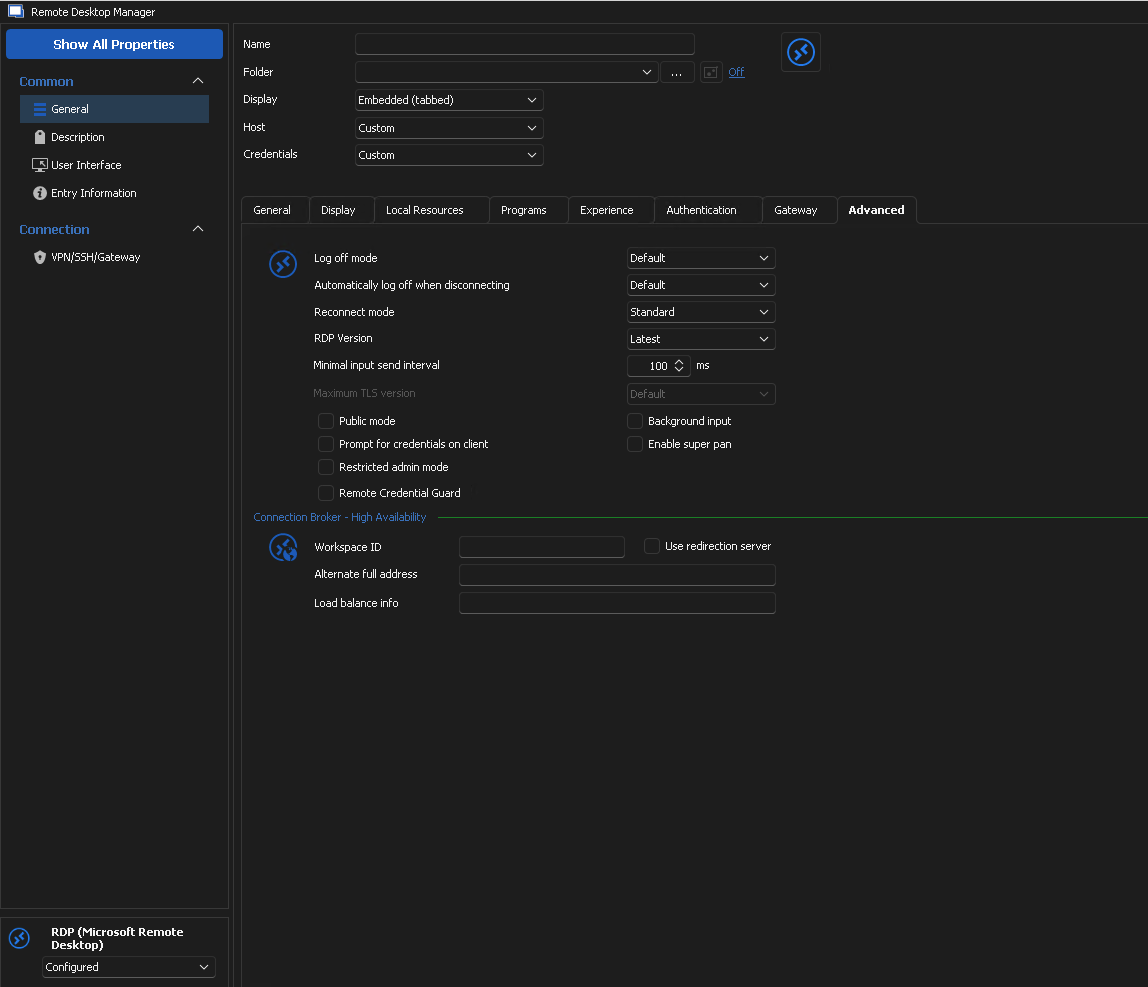
Best Regards,
Frédérick Simard
5163f7a5-d6d3-4379-bf5c-513f04f68bf1.png
OK I picked FreeRDP latest and I was able to connect. I also tried Latest and worked fine too.
I went back to the ipad and the app kind of restarted itself, and out of curiosity i tried again and now I am able to login :$ weird but it works so .. I am happy camper.
Glad to hear it !
Let us know if there's anything else we can help you with.
Best Regards,
Frédérick Simard