RDP Sessions are not auto-sizing correctly

I'm wondering if this is a misconfigured setting or a bug. When I connect to any rdp session, it doesn't auto-size the VM to fit the window correctly. RDM does adjust the VM resolution when the window is resized but it is always the same, 10 or so pixels to large resulting in a scroll bar. How do I fix this?
7f16b97c-a978-4926-b2fc-a86fd3a6d35c.png
All Comments (3)
Hello,
Thank you for contacting us on that matter!
Would it be possible for you to go under the "Display" tab of your RDP entry and change the "Screen sizing mode" to "Smart sizing" and see if it does the trick?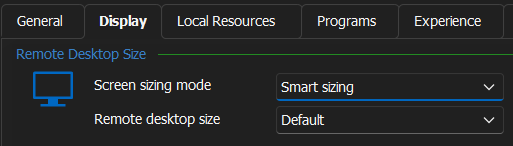
If this does not work for you, could you please tell me which version of RDM and what type of Data Source you are currently using?
Best regards,
James Lafleur
46e817a5-49c7-429f-af71-bf45bcba7886.png
I had them on smart reconnect, switching to Smart Sizing appears to have fixed it. Whoops. I'm using Google Drive Datastore for reference.
Hello,
Thank you for your swift reply! I am glad to see that changing this setting worked for you.
Do not hesitate to contact us again if you require further assistance.
Best regards,
James Lafleur