VERY small folder icons have become

VERY small folder icons have become
Why did we reduce the number of icons in version
2023.3.18.0, or rather the main icon, put it inside the folder icon
when it is the folder that is used in the tree for groups
it is also impossible to work with this (this is despite the fact that I have a 4K monitor with a 175 scale)
I had to roll back to 2023.3.17.0, where everything corresponds to the icons in the folders
Please return everything as it was, or give the opportunity in the settings to disable
such an unsuccessful solution for 4K monitors
error02.png
error01.png
All Comments (7)
Hello,
We will add a setting for that but the next minor update will disable for now.
Regards
David Hervieux
And why did they come up with such a solution at all ? who needed it, to draw a VERY small icon into the already small folder icon
can you tell me in which release to expect this change ? and where exactly in the interface to enable this option to restore the normal appearance of folder icons?
Hello,
This is available in RDM 2023.1.20.0 and it's the previous folder images.
Regards
David Hervieux
Good day David, for many releases the problem of this post has been fixed. But again, starting with the release of 2023.2.18.0, the problem of small icons inscribed inside the folder icon has returned again... Again, alas, nothing is visible if a non-standard icon is selected on the folder (it fits inside again and it is not visible again ((( is it possible to provide any option in the interface settings (let's say a check box that will be responsible for this behavior, for example ("enter / not write a non-standard icon in the folder" name option)
On a 4k monitor, it is generally impossible to see what is inside the folder icon
PS: Your dedicated tester
error.png
Hello,
This is now an option in File->Options
You can search for Use legacy folder images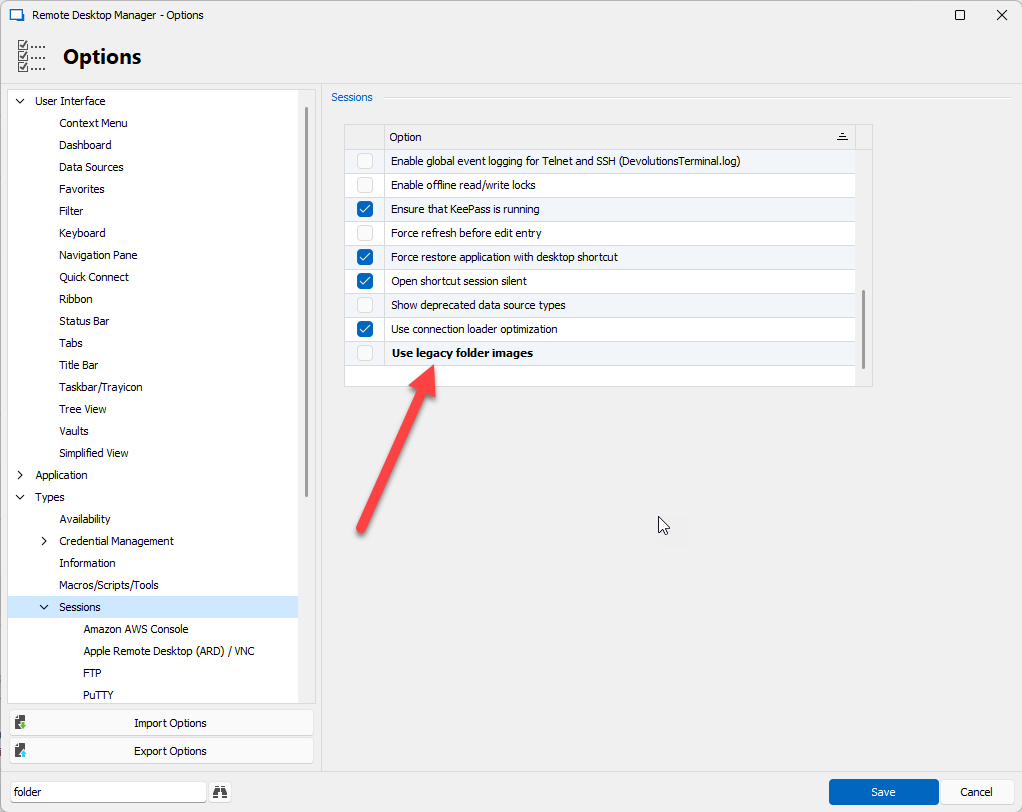
Regards
David Hervieux
4d20e621-c85a-4a28-9f0e-4c976be90934.png
Thank you very much. And why did you decide to enter the icon in the folder picture by default? (and not vice versa, so that whoever needs it would include the entry through the option)... After all, even on Full HD monitors, when the icon is placed in a folder, everything is very small, and even more so on 4k... What is the scenario that exactly the icon entry should be by default?